
Topaz DeNoise AI 3.7.2 – Next-Level Noise Reduction with Artificial Intelligence
Photography often suffers from one of the most common problems — image noise, especially in low-light conditions.
Topaz DeNoise AI 3.7.2 from Topaz Labs revolutionizes the way photographers remove noise while keeping every detail intact.
This latest version combines advanced machine learning models with intelligent algorithms to restore image clarity and preserve the natural look of your photos.
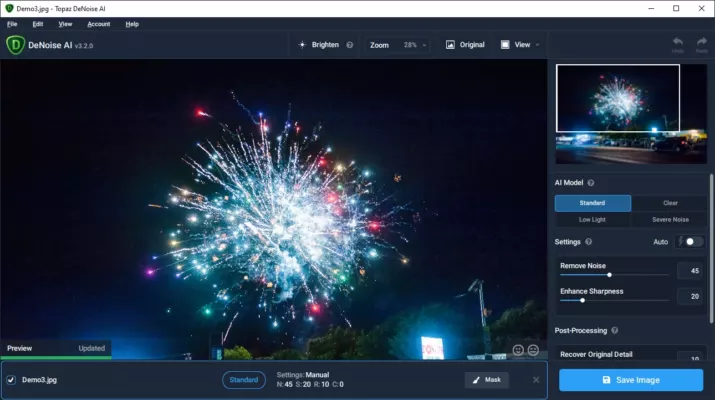
Whether you’re a professional photographer or a creative hobbyist, DeNoise AI transforms grainy, soft, or pixelated photos into sharp, vibrant masterpieces.
🎯 What Makes DeNoise AI Special?
Unlike traditional noise reduction tools that blur or soften images, DeNoise AI uses deep learning trained on millions of images to distinguish between noise and true image detail.
It doesn’t just smooth the picture — it reconstructs lost details intelligently. This ensures textures like hair, fur, and fabric look natural, not artificial or over-processed.
⚙️ Key Features of Topaz DeNoise AI 3.7.2
🧠 AI-Powered Noise Reduction
The AI model analyzes each pixel to separate actual image content from digital noise. The result?
Crystal-clear photos without halos or artifacts — even in ISO 6400+ shots.
🪄 Detail Recovery & Sharpness Enhancement
DeNoise AI not only removes unwanted grain but also enhances micro-details, giving photos a realistic depth and improved contrast.
🖼️ Batch Processing
Photographers can now process hundreds of images at once. Batch mode ensures consistent results across large photo collections while saving valuable editing time.
📸 RAW & JPEG Compatibility
Supports RAW, TIFF, JPEG, and PNG formats with full metadata retention.
You can use it as a standalone app or as a plugin for Adobe Photoshop, Lightroom, or Capture One.
🧩 Seamless Integration
When used as a plugin, DeNoise AI integrates smoothly into your editing workflow. You can apply noise reduction before or after color grading, depending on your preference.
🆕 What’s New in Version 3.7.2
The latest Topaz DeNoise AI 3.7.2 introduces:
Improved AI model accuracy for low-light photos
Faster preview rendering and batch export
Better color tone preservation for RAW files
Enhanced GPU acceleration for NVIDIA and AMD cards
UI improvements for smoother navigation
This version delivers both speed and precision, making it one of the best updates from Topaz Labs yet.
💡 When to Use DeNoise AI
Low-light or night photography with high ISO
Wildlife and sports shots taken at fast shutter speeds
Old or scanned photos needing clarity restoration
Drone and landscape photography where detail is critical
Whether editing portraits, landscapes, or product shots, DeNoise AI ensures your images remain clean, detailed, and professional-looking.
🛠️ System Requirements
OS: Windows 10/11 (64-bit) or macOS 10.15+
RAM: 8GB (16GB recommended)
GPU: NVIDIA GTX 1050 or higher / AMD equivalent
Disk Space: 3GB free minimum
🌟 Why Photographers Love Topaz DeNoise AI
🧠 AI-based precision unlike any traditional tool
🎨 Natural textures preserved — no waxy effect
⚙️ Easy to use for both professionals and beginners
🚀 Faster processing powered by your GPU
🖼️ Consistent results for all image types
🔚 Final Thoughts
Topaz DeNoise AI 3.7.2 is more than a noise reduction tool — it’s a complete AI-driven enhancement solution for photographers who demand the highest quality.
By combining intelligent noise removal with natural texture preservation, it helps you produce images that look stunningly clean and lifelike.
If you value clarity, detail, and realism in every shot, DeNoise AI 3.7.2 is an essential addition to your creative toolkit.
🔗 Official Website:https://www.topazlabs.com/denoise-ai
✔ Tested: This software was tested on Windows 10 & Windows 11 and works smoothly without issues.
Frequently Asked Questions
- Is this software free?
Yes, it can be downloaded and used for free. - Does it support Windows 11?
Yes, it works perfectly on Windows 10 and 11. - Is it safe to use?
Yes, the software was scanned and tested before publishing.
Last updated: January 2026