
🎥 AVCLabs Video Enhancer AI 2.9 Overview
AVCLabs Video Enhancer AI 2.9 is an advanced AI-powered video enhancement tool that transforms low-quality videos into stunning, high-resolution visuals. Using deep learning technology, it can upscale videos to 4K or even 8K, remove noise, sharpen details, and restore old or damaged footage.
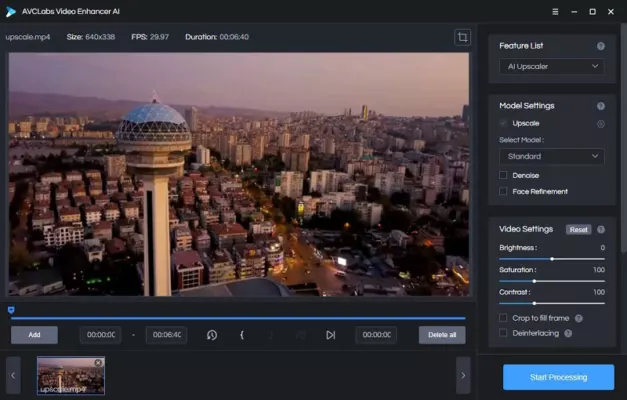
The software is designed for professionals, content creators, and anyone who wants to breathe new life into videos. With its intuitive interface and powerful AI engine, AVCLabs makes complex enhancement tasks simple and automatic.
⚙️ Key Features
🔹 AI Video Upscaling
Powered by deep neural networks, the software intelligently increases video resolution while preserving texture and sharpness. You can convert SD or HD videos to 4K quality effortlessly.
🔹 Noise Reduction
Say goodbye to grainy or blurry footage. The built-in AI denoiser removes unwanted noise and artifacts without losing important details, making every frame clean and crisp.
🔹 Color & Detail Enhancement
AVCLabs automatically adjusts lighting, contrast, and saturation to achieve natural, vivid results. The AI detects and refines fine elements such as edges, skin tones, and objects.
🔹 Face Refinement
Using facial recognition technology, AVCLabs enhances faces separately to make them appear more detailed and realistic. Perfect for interviews, portraits, and films.
🔹 Batch Processing
You can process multiple videos at once, saving valuable time when working on large-scale projects or video libraries.
🚀 What’s New in Version 2.9
Improved AI engine for faster and more precise enhancement.
Better GPU acceleration for NVIDIA and AMD users.
Updated algorithms for color correction and sharpness.
Stability improvements for long rendering sessions.
New export presets for MP4, MKV, and MOV formats.
💼 Who Can Benefit from AVCLabs Video Enhancer AI
🎬 Content Creators & YouTubers
Perfect for upgrading old content or improving the visual quality of new projects. Bring cinematic detail to your videos without reshooting.
🕰️ Archivists & Restoration Experts
Ideal for restoring VHS recordings, family videos, and vintage films. The AI recovers lost details and improves clarity without manual editing.
🧑💻 Businesses & Educators
Enhance training materials, marketing videos, and product demos to professional quality, ensuring a strong visual impact.
🧩 System Requirements
OS: Windows 10/11 or macOS 10.14+
CPU: Intel Core i5 or higher
RAM: 8 GB minimum (16 GB recommended)
GPU: NVIDIA GTX 1050 Ti or newer for optimal AI performance
🌐 Official Website
For the latest version, updates, and detailed guides, visit the official developer’s website:
🔗 https://www.avclabs.com
✔ Tested: This software was tested on Windows 10 & Windows 11 and works smoothly without issues.
Frequently Asked Questions
- Is this software free?
Yes, it can be downloaded and used for free. - Does it support Windows 11?
Yes, it works perfectly on Windows 10 and 11. - Is it safe to use?
Yes, the software was scanned and tested before publishing.
Last updated: January 2026