What Is Enigma Virtual Box?
Enigma Virtual Box is a lightweight virtualization utility for Windows. It allows developers and advanced users to package an application along with all its files, registry entries, DLLs, and dependencies into a single executable. The virtualized application runs as-is without extracting files to disk, providing portability, ease of deployment, and registry isolation.
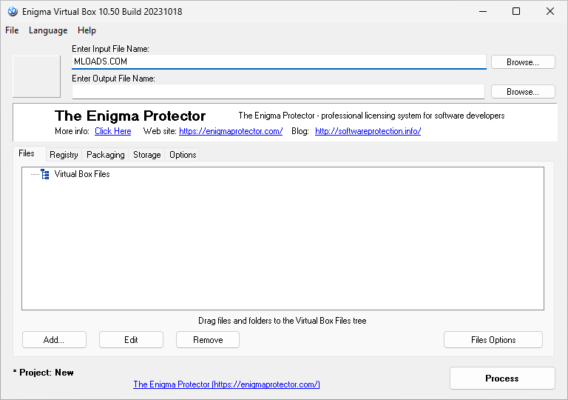
This tool supports both 32‑bit and 64‑bit binaries and runs on Windows XP through Windows 11 and server editions, making it highly versatile for legacy and modern environments.
🆕 What’s New in Version 11.30 (Build 20250429)
🛠️ Key Fixes and Improvements
Enigma Virtual Box 11.30 resolves several long-standing issues:
Unicode folder support improved — packed files now work correctly even in folders with non-Latin characters.
Console version stability — the command‑line tool handles Unicode paths without crashes.
Folder options bug fixed — features that rely on writing child files or folders now behave reliably.
Deadlock prevention — fixed concurrency issues in multithreaded applications that previously caused deadlocks.
Legacy Windows XP compatibility restored — packed apps now run more reliably on older systems.
These enhancements improve both the stability and cross-version compatibility of the software.
⚙️ Core Features Overview
Single EXE Packaging
Bundle all necessary application files, libraries, media, and registry data into a standalone executable—no installer or external files needed.
Memory‑Only Virtualization
Files are virtualized in memory without extracting to disk, so temporary files or registry entries are never written to user systems.
File Compression Options
Allows optional compression of virtual files to reduce overall package size, with options for cleanup after execution.
Comprehensive Format Support
Supports executable files (.exe), dynamic link libraries (.dll, .ocx), registry entries, and other data types like media or configuration files.
ActiveX/COM Virtualization
Handles virtualized ActiveX/COM components without registering them system-wide, preserving target system integrity.
👍 Advantages & Limitations
| ✅ Advantages | ⚠️ Limitations |
|---|---|
| Portable single-file executables | Not designed for general user-level apps |
| No temporary extraction or registry pollution | Requires familiarity with app structure |
| Supports Unicode paths and legacy Windows versions | Packaging requires manual project configuration |
| Memory-only execution avoids disk writes | Not a full sandbox; limited security scope |
✔ Tested: This software was tested on Windows 10 & Windows 11 and works smoothly without issues.
Frequently Asked Questions
- Is this software free?
Yes, it can be downloaded and used for free. - Does it support Windows 11?
Yes, it works perfectly on Windows 10 and 11. - Is it safe to use?
Yes, the software was scanned and tested before publishing.
Last updated: January 2026