🖨️ Print.Test.Page.OK 3.39 – Fast & Reliable Printer Testing Utility
Print.Test.Page.OK 3.39 is a lightweight yet powerful utility designed to help Windows users quickly test and calibrate their printers. Developed by SoftwareOK, this small application allows you to verify print quality, color alignment, and nozzle functionality with just a few clicks — no complex setup required.
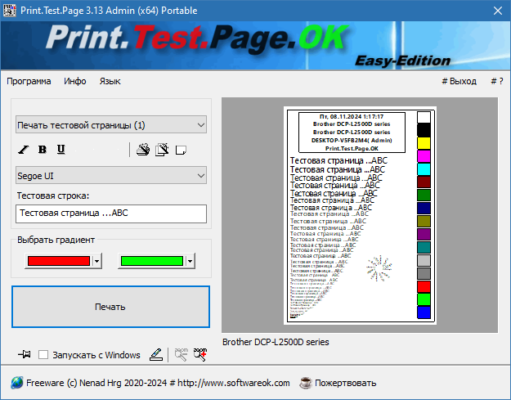
Whether you own an inkjet, laser, or multifunction printer, Print.Test.Page.OK ensures that every print job maintains high quality and accurate color output.
⚙️ What is Print.Test.Page.OK?
Print.Test.Page.OK is a free portable tool created for users who need to check if their printer is working properly. Instead of printing random documents or photos, you can use pre-designed test pages to evaluate:
🧩 Color accuracy and contrast
🖋️ Nozzle and alignment performance
📄 Ink saturation and grayscale balance
🔲 Printer head precision
It’s ideal for technicians, office workers, and home users who want to maintain print quality or troubleshoot printing issues efficiently.
🎯 Key Features of Version 3.39
🧾 1. Quick Printer Tests
Perform instant test prints without installing heavy software suites. You can select different test pages — color grids, grayscale gradients, and text layouts — to evaluate your printer’s output quality.
🎨 2. Color and Nozzle Check
The app helps you detect nozzle clogs or color misalignment by printing pattern-based test pages that highlight missing colors or streaks.
⚙️ 3. Adjustable Settings
You can choose page orientation, paper size (A4, Letter, Legal), and color mode before printing. The flexibility makes it compatible with almost all printer types.
💾 4. Portable and Lightweight
At less than 1 MB in size, Print.Test.Page.OK requires no installation — just download, run, and start printing. This makes it perfect for USB drives or maintenance toolkits.
🧠 5. Multi-Printer Support
If you have multiple printers connected, you can select which device to test from a dropdown list. It works seamlessly with USB, Wi-Fi, and network printers.
🔄 What’s New in Version 3.39
The latest update from SoftwareOK includes:
Enhanced compatibility with Windows 11 (22H2/23H2).
Optimized printer communication speed.
Improved color test patterns for better diagnostic accuracy.
Minor UI improvements and bug fixes.
These refinements make Print.Test.Page.OK 3.39 even more reliable and precise for modern printing environments.
🖥️ System Requirements
OS: Windows 7 / 8 / 10 / 11 (32-bit & 64-bit)
CPU: Intel or AMD Dual-Core processor
RAM: 512 MB minimum
Storage: Less than 1 MB (portable executable)
Printer: Any compatible USB or network printer
🧩 Ideal Use Cases
Print.Test.Page.OK is particularly useful for:
🏢 Office Maintenance: Ensure printers are aligned before bulk printing.
🏠 Home Users: Verify color performance after replacing ink cartridges.
🧰 Technicians: Diagnose printer hardware issues quickly.
🎓 Educational Use: Demonstrate print calibration in IT labs.
Whether you’re testing new cartridges or troubleshooting faded colors, this utility makes printer maintenance quick and effective.
💡 How to Use Print.Test.Page.OK
Download the portable file from the official SoftwareOK website.
Run the program (no installation required).
Choose your printer from the dropdown list.
Select a test page type (color, grayscale, or text).
Click Print Test Page to begin.
In seconds, you’ll have a complete diagnostic printout to evaluate your printer’s performance.
🧾 Final Thoughts
Print.Test.Page.OK 3.39 is a must-have tool for anyone who uses a printer regularly. Its simplicity, speed, and portability make it ideal for both casual and professional use. Instead of wasting paper and ink printing random files, you can now perform structured, accurate tests to maintain your printer in top condition.
It’s small, efficient, and completely free — a perfect example of practical software engineering by SoftwareOK.
🌍 Official Website
For the latest version and technical details, visit the official developer’s site:
🔗 https://www.softwareok.com
✔ Tested: This software was tested on Windows 10 & Windows 11 and works smoothly without issues.
Frequently Asked Questions
- Is this software free?
Yes, it can be downloaded and used for free. - Does it support Windows 11?
Yes, it works perfectly on Windows 10 and 11. - Is it safe to use?
Yes, the software was scanned and tested before publishing.
Last updated: January 2026