
Microsoft Office is one of the most widely used productivity suites in the world, powering everything from business reports to academic projects. However, managing its installation, updates, and activation can often be challenging, especially for IT professionals or users handling multiple devices. This is where Office Tool Plus 10.25.54 comes into play. It is a powerful utility designed to simplify the entire process of installing, customizing, and managing Microsoft Office products.
What is Office Tool Plus?
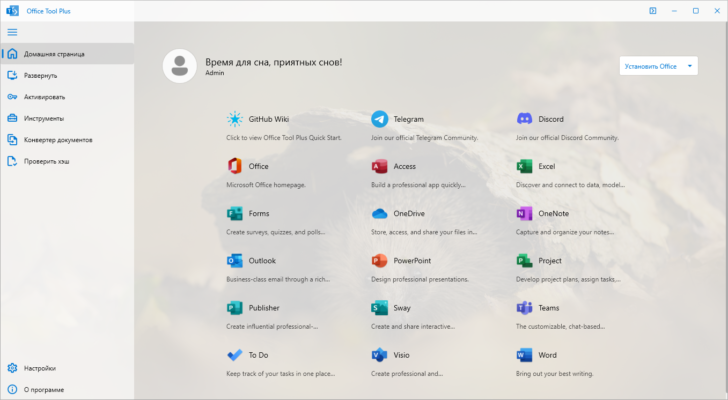
Office Tool Plus is a free and advanced utility that acts as a front-end for Microsoft Office Deployment Tool (ODT). With its clean interface and powerful features, it allows users to download, install, configure, and activate Office editions such as Office 2016, 2019, 2021, and Microsoft 365. Unlike the traditional installation method, Office Tool Plus gives you more control, ensuring that you only install the apps and languages you need.
Key Features of Office Tool Plus 10.25.54
1. Custom Office Deployment
With Office Tool Plus, you can fully customize your Office setup. This means selecting specific Office applications like Word, Excel, PowerPoint, or Outlook while excluding others you don’t need. Additionally, you can choose different languages, architecture types (32-bit or 64-bit), and update channels.
2. Activation and License Management
Another major advantage is built-in support for Office activation. The tool simplifies the process of entering product keys or managing KMS activation. It also provides detailed information about your Office license status, making it easier to track and maintain.
3. Update Control
Office Tool Plus 10.25.54 allows you to manage Office updates efficiently. You can choose whether to stay on the stable release channel or switch to insider channels for early access to new features. It even lets you pause or resume updates depending on your workflow.
4. User-Friendly Interface
The interface is designed to be intuitive and modern, making it suitable for both beginners and advanced users. Despite offering advanced customization, it keeps the process simple and easy to follow.
5. Integration with Office Deployment Tool
Since Office Tool Plus is built on top of Microsoft’s official Office Deployment Tool, it ensures reliability and compatibility with all Office versions.
Why Upgrade to Office Tool Plus 10.25.54?
The latest release, version 10.25.54, includes performance improvements, bug fixes, and enhanced compatibility with Microsoft’s latest Office builds. It ensures a smoother installation process, faster deployment times, and more reliable activation features.
Benefits for IT Professionals and Regular Users
For IT administrators managing multiple PCs, Office Tool Plus is a time-saving solution. Instead of manually installing Office on each computer, you can create a custom deployment package and deploy it across several devices. For regular users, it provides flexibility to install Office exactly the way you want, without unnecessary apps or updates slowing down your system.
Conclusion
Office Tool Plus 10.25.54 is an indispensable tool for anyone who works with Microsoft Office regularly. Whether you need to install a lightweight version of Office, manage updates, or handle activation seamlessly, this utility provides all the features in one place. With its user-friendly design and advanced customization options, it stands out as the best solution for managing Microsoft Office.
If you are looking for a reliable way to deploy, configure, and maintain Microsoft Office on your PC, downloading Office Tool Plus 10.25.54 is highly recommended.
✔ Tested: This software was tested on Windows 10 & Windows 11 and works smoothly without issues.
Frequently Asked Questions
- Is this software free?
Yes, it can be downloaded and used for free. - Does it support Windows 11?
Yes, it works perfectly on Windows 10 and 11. - Is it safe to use?
Yes, the software was scanned and tested before publishing.
Last updated: January 2026