
DipTrace 5.1.0.3 is a comprehensive electronic design automation (EDA) software used to create schematics, design printed circuit boards (PCBs), and visualize electronic layouts in 3D. Known for its balance of power and usability, DipTrace helps engineers, hobbyists, and educators bring electronic ideas to life efficiently and accurately.
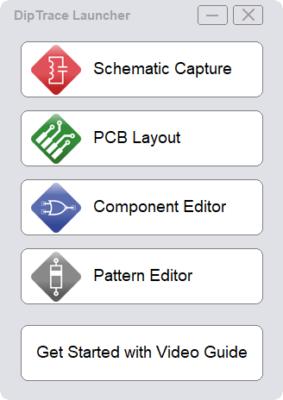
Intuitive Interface and Workflow
DipTrace offers an intuitive interface that minimizes the learning curve for new users while providing advanced features for professionals. Its modular design consists of four main environments: Schematic Capture, PCB Layout, Component Editor, and Pattern Editor — all connected in a seamless workflow. Changes made in one module automatically synchronize across others, reducing design errors and saving time.
Key Features
Advanced Schematic Capture
Create detailed electrical schematics with an extensive component library. DipTrace automatically checks for design errors and supports hierarchical schematics for large projects.
Powerful PCB Layout Tools
DipTrace 5.1.0.3 includes intelligent auto-routing and manual routing options, supporting up to 32 signal layers and mixed technologies (through-hole and surface-mount). The routing engine optimizes trace paths for signal integrity and manufacturability.
3D PCB Preview and Export
Visualize your board in 3D before production. The 3D viewer provides realistic models of components, giving engineers the ability to inspect clearances, orientation, and aesthetics. Export to STEP format for integration into mechanical CAD software.
Design Rule Check (DRC)
The built-in DRC automatically detects clearance violations, short circuits, and unconnected pins. It ensures the design meets both manufacturing and electrical standards before fabrication.
Component and Pattern Editors
Customize your parts library using the component and pattern editors. Users can import models, assign footprints, and manage complex component parameters with ease.
What’s New in DipTrace 5.1.0.3
- Improved auto-router algorithms for faster and cleaner layouts.
- Enhanced 3D rendering performance and model accuracy.
- Updated library management with cloud-based synchronization.
- Expanded file format support including Altium and KiCad imports.
- More robust BOM (Bill of Materials) export options.
How to Use DipTrace Effectively
Step 1: Create a New Schematic
Start by placing components from the library and connecting them using nets or buses. Use hierarchical blocks for organized multi-sheet projects.
Step 2: Convert to PCB Layout
Once the schematic is complete, switch to PCB Layout mode. The software automatically places components based on schematic connections.
Step 3: Route and Inspect
Use auto-route or manual routing for precision. After routing, run DRC to verify there are no electrical or spacing violations.
Step 4: 3D Visualization and Export
Preview the board in 3D, adjust orientation, and export the design for manufacturing or integration with mechanical models.
Applications
- Professional PCB manufacturing — for commercial electronic products.
- Prototyping — ideal for makers and small design teams.
- Educational use — great for teaching electronic design principles.
- Engineering research — supports advanced simulation and hardware development.
Conclusion
DipTrace 5.1.0.3 is a versatile and powerful PCB design suite that combines professional-grade tools with a user-friendly workflow. Its advanced schematic capture, intelligent routing, and 3D visualization capabilities make it a go-to solution for engineers and designers seeking both precision and efficiency. Whether for commercial products or personal projects, DipTrace delivers everything needed to move from concept to production seamlessly.
✔ Tested: This software was tested on Windows 10 & Windows 11 and works smoothly without issues.
Frequently Asked Questions
- Is this software free?
Yes, it can be downloaded and used for free. - Does it support Windows 11?
Yes, it works perfectly on Windows 10 and 11. - Is it safe to use?
Yes, the software was scanned and tested before publishing.
Last updated: January 2026