
💾 Disk Sorter Pro 17.4.16 – Smart Disk Analyzer and File Management Tool
Disk Sorter Pro 17.4.16 is a professional disk analysis and file classification tool that helps users manage, organize, and optimize their storage efficiently. Whether you are a system administrator or a home user, this program allows you to analyze disk space usage, find duplicate or large files, and categorize your data based on file type, size, or modification date.
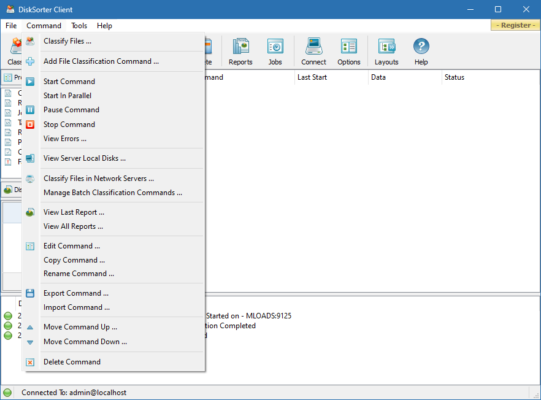
With its intuitive interface and powerful engine, Disk Sorter Pro is an ideal solution for anyone looking to understand how storage is being used across drives, servers, or even network shares.
⚙️ Key Features of Disk Sorter Pro 17.4.16
📁 Advanced Disk Analysis – Scan entire drives or folders to detect how space is distributed across files and directories.
📊 File Classification Engine – Automatically classify files by type, size, date, or extension.
⚡ Fast Scanning Performance – Optimized algorithms for quick and accurate results even with large datasets.
📂 Custom Categorization – Create your own classification rules for specific file types or locations.
🔍 Duplicate File Detection – Identify and remove duplicates to free up valuable space.
📈 Detailed Reports & Charts – Visualize data usage through graphs, charts, and summaries.
🌐 Network Drive Support – Analyze and manage data on shared drives or NAS devices.
🔒 Command Line Control – Automate analysis tasks with built-in command line tools for professional use.
💡 Why Choose Disk Sorter Pro?
Disk Sorter Pro stands out for its balance of speed, accuracy, and flexibility. Unlike simple file explorers, it gives you deep insights into your storage usage. IT administrators can easily track file growth across servers, while regular users can identify what’s taking up unnecessary space.
Some common use cases include:
Managing company storage across multiple devices.
Identifying old or unused files for deletion.
Monitoring shared network folders.
Preparing for system backups or migrations.
It’s a complete disk management tool that keeps your system efficient and organized.
🧠 How to Use Disk Sorter Pro 17.4.16
Launch the program and choose a drive or folder to analyze.
Click “Classify” to start scanning your data.
View categorized results by type, size, or modification date.
Export reports or take action directly (move, copy, delete, or archive).
The clean dashboard makes it easy to navigate even for beginners, while advanced options cater to professional users who need automation and detailed analytics.
🖥️ System Requirements
Operating System: Windows 7, 8, 10, 11 (32-bit or 64-bit)
RAM: 2 GB minimum (4 GB recommended)
Disk Space: 200 MB for installation
Internet: Optional for online updates
✔ Tested: This software was tested on Windows 10 & Windows 11 and works smoothly without issues.
Frequently Asked Questions
- Is this software free?
Yes, it can be downloaded and used for free. - Does it support Windows 11?
Yes, it works perfectly on Windows 10 and 11. - Is it safe to use?
Yes, the software was scanned and tested before publishing.
Last updated: January 2026