📸 Adobe Photoshop Express 3.22.32.0: Professional Photo Editing—Simplified
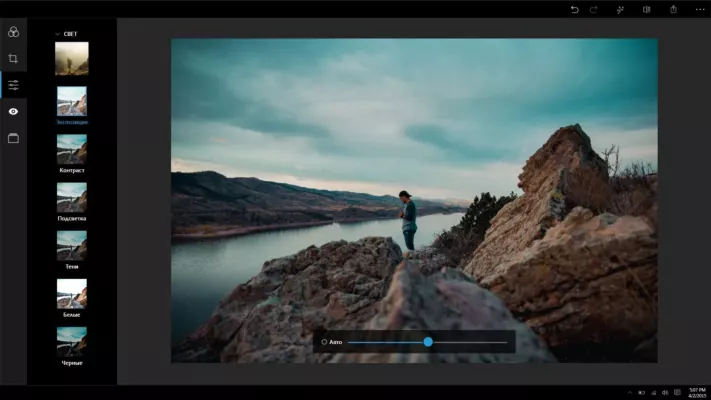
Looking for a fast, free, and reliable photo editor for your Windows PC? Adobe Photoshop Express 3.22.32.0 brings the power of Adobe’s imaging expertise to your desktop—without the complexity of full Photoshop. Perfect for students, social media creators, bloggers, and casual users, this lightweight app delivers one-click enhancements, creative filters, and essential editing tools in a clean, intuitive interface.
Unlike the mobile-only versions, this desktop edition (available via Microsoft Store) is optimized for Windows 10 and 11, offering larger canvas support, keyboard shortcuts, and seamless integration with your photo library.
🌟 What’s New in Version 3.22.32.0?
Adobe regularly updates Photoshop Express to improve performance and user experience. Version 3.22.32.0 includes:
- 🚀 Faster startup and rendering on low-end PCs
- 🎨 Refined AI-powered auto-enhance for better exposure and color balance
- 🖼️ Improved support for HEIC and WebP formats
- 🐞 Bug fixes for crop tool stability and export crashes
- 🌓 Better dark mode integration with Windows system themes
✨ Key Features You’ll Love
🌈 One-Tap Enhance
Fix lighting, color, and clarity instantly with Adobe’s smart AI algorithm.
✂️ Crop, Rotate & Straighten
Precisely frame your shots with grid overlays and angle correction.
🎭 Creative Filters & Looks
Apply professional-grade presets like “Dramatic,” “B&W Studio,” or “Vintage Glow.”
🖌️ Spot Healing & Redeye Removal
Touch up portraits with intelligent blemish removal—no brush needed.
📏 Resize & Export Options
Optimize images for Instagram, email, or print with custom dimensions and quality settings.
☁️ Optional Cloud Sync
Save edits to Adobe Creative Cloud (requires free Adobe ID).
💡 No subscription required for core editing features—100% free to use.
💻 Why Choose the Desktop Version?
While Photoshop Express is popular on iOS and Android, the Windows desktop app (v3.22.32.0) offers unique advantages:
- Larger workspace for detailed editing
- Full keyboard & mouse support
- Faster batch-like editing (one image at a time, but with precision)
- No mobile ads or in-app purchase pressure
It’s the perfect middle ground between basic Paint and complex Photoshop.
📥 How to Install
- Open the Microsoft Store on your Windows 10 or 11 PC
- Search for “Adobe Photoshop Express”
- Click Install (free, ~100 MB)
- Launch and start editing—no account needed for basic use
🔗 Direct Link: https://apps.microsoft.com/detail/9n8w8t58r2gj
✅ Fully safe, official Adobe app—no third-party downloads required.
🆓 Free Forever (With Optional Upgrades)
The core app is completely free, including:
- All essential editing tools
- Dozens of filters and frames
- Basic healing and retouching
Premium “Looks” (advanced filters) are available via in-app purchase—but not required for daily use.
💬 Final Thoughts
Adobe Photoshop Express 3.22.32.0 proves you don’t need a $20/month subscription to edit photos like a pro. With smart AI, trusted Adobe quality, and a clutter-free design, it’s one of the best free photo editors for Windows users who value speed and simplicity.
📸 Edit beautifully. Share confidently. All in seconds.
✔ Tested: This software was tested on Windows 10 & Windows 11 and works smoothly without issues.
Frequently Asked Questions
- Is this software free?
Yes, it can be downloaded and used for free. - Does it support Windows 11?
Yes, it works perfectly on Windows 10 and 11. - Is it safe to use?
Yes, the software was scanned and tested before publishing.
Last updated: January 2026