In the world of digital photography, graphic design, and content creation, image quality is everything. Whether you’re working with old family photos, low-resolution scans, or pixelated digital art, poor image quality can ruin the impact of your visuals and buy.
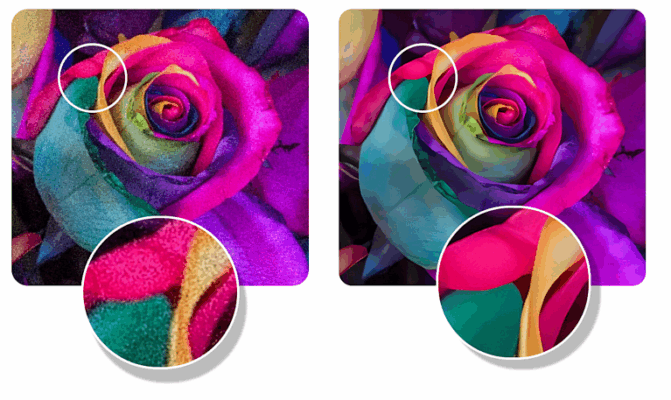
That’s where Mediachance AI Photo and Art Enhancer 1.7.00 comes in — a powerful, AI-driven tool designed to upscale, sharpen, colorize, and restore images with stunning results. Developed by Mediachance, a company known for innovative image processing software, this application uses deep learning algorithms to intelligently reconstruct details, reduce noise, and bring life back to damaged or low-quality images.
Unlike basic upscaling tools that simply stretch pixels, AI Photo and Art Enhancer 1.7.00 understands the content of the image — whether it’s a face, text, illustration, or photograph — and enhances it accordingly.
Let’s explore how this smart software is transforming the way photographers, artists, and archivists work with digital visuals.
📌 What Is Mediachance AI Photo and Art Enhancer 1.7.00?
Mediachance AI Photo and Art Enhancer 1.7.00 is a desktop application for Windows that leverages artificial intelligence and neural networks to improve the quality of digital images. It’s specifically optimized for:
- Restoring old, blurry, or compressed photos
- Upscaling pixel art and digital illustrations
- Enhancing low-resolution screenshots or web images
- Recovering details from heavily compressed JPEGs
The software automatically detects the type of image (photo, drawing, text, or mixed content) and applies the most suitable enhancement model — ensuring optimal results without manual tweaking.
It’s ideal for:
- Photographers restoring vintage prints
- Game developers upscaling retro sprites
- Designers improving web graphics
- Families digitizing old photo albums
All with minimal effort and maximum visual impact.
🛠️ Key Features of Mediachance AI Photo and Art Enhancer 1.7.00
1. 🔍 Smart AI Detection
Automatically identifies image type:
- Photographs
- Drawings & Digital Art
- Text & Line Art
- Mixed Content
Applies the best enhancement model for each.
2. 📈 Image Upscaling (Up to 4x)
Enlarge low-resolution images by 2x or 4x without pixelation. AI reconstructs missing details for sharp, natural-looking results.
Perfect for printing small images or using them in high-DPI designs.
3. ✨ Detail Enhancement
Sharpens edges, enhances textures, and brings out fine details in faces, hair, fabric, and backgrounds — even in heavily blurred images.
4. 🎨 Color Restoration & Enhancement
Revives faded colors and improves contrast and saturation in old or poorly lit photos.
Optional colorization for black-and-white images.
5. 🧼 Noise & Compression Artifact Removal
Reduces JPEG compression artifacts, banding, and digital noise — especially effective on images saved at low quality.
6. 🖼️ Face-Aware Enhancement
Special AI model optimized for human faces — enhances eyes, skin texture, and facial features naturally, without over-sharpening.
7. 🎭 Digital Art & Pixel Art Upscaling
Preserves clean lines and sharp edges when upscaling cartoons, comics, or retro game sprites — no blurring or smudging.
8. 📦 Batch Processing
Enhance multiple images at once — ideal for restoring photo albums or processing large art collections.
9. ⚙️ Customizable Settings
Fine-tune enhancement strength, sharpness, color vibrancy, and output size for full creative control.
10. 🖥️ Offline Operation
All AI processing happens locally on your PC — no uploading, no privacy risks . Your images stay 100% private.
👥 Who Should Use This Tool?
- Photographers: Restore and enlarge old or low-res shots.
- Digital Artists: Upscale illustrations for print or web.
- Game Developers: Enhance retro sprites and textures.
- Graphic Designers: Improve low-quality client assets.
- Families & Historians: Preserve and share vintage photos.
- Content Creators: Boost image quality for social media or YouTube.
🖥️ System Requirements
- Operating System: Windows 10 / 11 (64-bit)
- RAM: 8 GB minimum (16 GB recommended)
- Graphics Card: NVIDIA or AMD GPU with at least 4GB VRAM (CUDA or OpenCL support)
- Hard Disk Space: 2 GB free space
- .NET Framework: 4.8 or later
✅ GPU acceleration ensures fast processing — CPU-only mode available (slower).
📈 Why Choose Mediachance AI Photo and Art Enhancer 1.7.00?
- ✅ AI-Powered for Realistic Results
- ✅ Smart Detection for Different Image Types
- ✅ Superior Upscaling Without Pixelation
- ✅ Preserves Artistic Style in Drawings
- ✅ Fully Offline & Private
- ✅ Lightweight Compared to AI Alternatives
✅ Final Thoughts
Mediachance AI Photo and Art Enhancer 1.7.00 isn’t just another image resizer — it’s an intelligent restoration engine that breathes new life into low-quality visuals. With its advanced AI models, batch support, and focus on artistic integrity, it stands out from generic upscalers.
If you work with old photos, digital art, or need to improve image quality for professional use, this tool delivers exceptional results with minimal effort .
For anyone who values clarity, detail, and authenticity in their images, Mediachance AI Photo and Art Enhancer 1.7.00 is definitely worth trying .
✔ Tested: This software was tested on Windows 10 & Windows 11 and works smoothly without issues.
Frequently Asked Questions
- Is this software free?
Yes, it can be downloaded and used for free. - Does it support Windows 11?
Yes, it works perfectly on Windows 10 and 11. - Is it safe to use?
Yes, the software was scanned and tested before publishing.
Last updated: January 2026