
💻 Overview of Bootstrap Studio 7.1.2
Bootstrap Studio 7.1.2 is a professional desktop application for creating beautiful, responsive websites using the power of the Bootstrap framework. It’s designed for both beginners and experienced developers who want to speed up their design workflow without sacrificing control over the code.
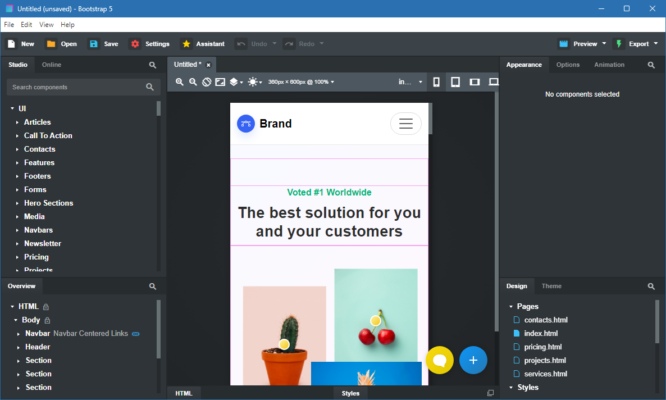
With its drag-and-drop interface, Bootstrap Studio lets you build web pages visually while maintaining clean, production-ready HTML and CSS. The software comes with a vast library of prebuilt components such as headers, footers, galleries, forms, and navigation bars, allowing you to create fully functional websites in minutes.
⚙️ Key Features of Bootstrap Studio 7.1.2
🎨 Intuitive Drag-and-Drop Builder
The user-friendly interface allows you to drag and drop components to quickly assemble web layouts. You can visually adjust design elements while the app generates the underlying HTML automatically.
🧩 Smart Components Library
Bootstrap Studio includes hundreds of predesigned components built on Bootstrap 5. These components are fully responsive and can be customized to match your project’s branding and design language.
💡 Live Preview and Real-Time Editing
You can instantly preview your website in multiple devices and screen sizes. The live sync feature updates changes across all open pages, helping you design consistently.
⚡ Custom Code Support
Developers can insert their own HTML, CSS, JavaScript, or SASS directly into the project. This gives you the flexibility to enhance your designs with custom logic or animations.
🚀 What’s New in Version 7.1.2
The latest version brings several enhancements that make Bootstrap Studio faster and more efficient for modern web development.
Key updates include:
Support for the latest Bootstrap 5.3 framework.
Improved asset management with auto-cleaning of unused files.
Enhanced export options for cleaner project structure.
New UI themes and better dark mode support.
Performance optimizations for large projects.
These improvements make it easier than ever to create responsive websites that load quickly and look great across all devices.
🧠 Why Choose Bootstrap Studio
Unlike online builders, Bootstrap Studio runs locally on your computer, giving you complete control over your projects and privacy. It’s perfect for freelancers, agencies, and developers who want to:
Build websites without relying on external hosting.
Quickly prototype interfaces before coding them fully.
Export clean, readable code that integrates easily into any backend.
Ensure that every design follows the principles of responsive web design.
In addition, the software supports integration with Google Fonts, Unsplash images, and icon libraries, saving you time when creating professional-quality designs.
🧰 System Requirements
Operating System: Windows 10 / 11, macOS 10.15+, or Linux
Processor: Dual-core CPU, 2 GHz or higher
RAM: 4 GB minimum
Storage: 500 MB of free disk space
Internet: Required for component updates and activation
🏁 Conclusion
Bootstrap Studio 7.1.2 is more than just a web design tool—it’s a complete development environment for creating responsive and elegant websites. Its mix of visual design, flexibility, and code control makes it ideal for both professionals and beginners.
Whether you’re crafting a personal portfolio, an e-commerce site, or a client project, Bootstrap Studio helps you design with speed, precision, and creativity — all within a single application.
✔ Tested: This software was tested on Windows 10 & Windows 11 and works smoothly without issues.
Frequently Asked Questions
- Is this software free?
Yes, it can be downloaded and used for free. - Does it support Windows 11?
Yes, it works perfectly on Windows 10 and 11. - Is it safe to use?
Yes, the software was scanned and tested before publishing.
Last updated: January 2026