
For web developers working with dynamic technologies like PHP, HTML, CSS, JavaScript, and SQL , having a powerful yet lightweight Integrated Development Environment (IDE) can significantly boost productivity. While full-scale IDEs like PhpStorm or Visual Studio Code are popular, they can be heavy or complex for focused tasks and buy.
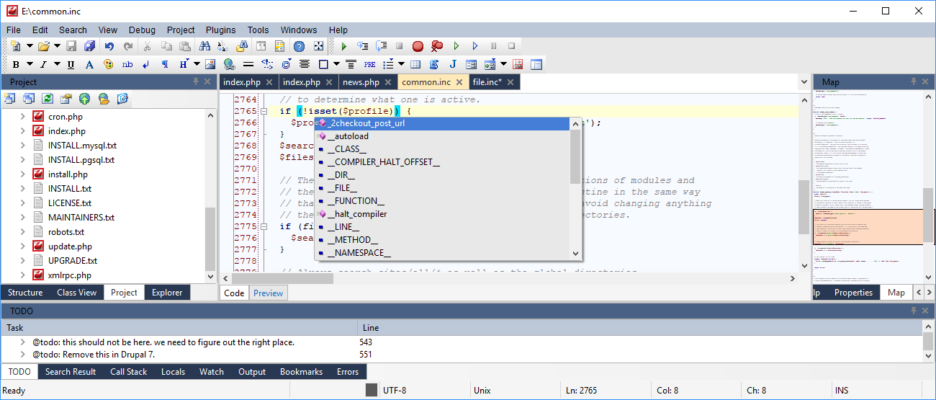
Enter CodeLobster IDE Professional 2.6.0 — a streamlined, intelligent, and affordable code editor designed specifically for PHP-based web development . Whether you’re building custom WordPress themes, developing Laravel applications, or managing Joomla extensions, CodeLobster delivers essential tools in a fast, user-friendly package.
Developed by CodeLobster Software, this professional version enhances the free edition with advanced debugging, framework-specific support, FTP/SFTP integration, and intelligent autocomplete — making it a top choice for developers who need precision without bloat.
Let’s explore what makes CodeLobster IDE Professional 2.6.0 a standout tool in 2025.
📌 What Is CodeLobster IDE Professional 2.6.0?
CodeLobster IDE Professional 2.6.0 is a Windows-based IDE tailored for web development , especially projects involving PHP and popular CMS platforms . It combines syntax highlighting, code intelligence, debugging, and framework integration into one responsive interface.
Unlike general-purpose editors, CodeLobster understands the structure of modern web frameworks and provides context-aware suggestions, reducing errors and speeding up coding.
It’s ideal for:
- Full-stack PHP developers
- WordPress theme/plugin creators
- Laravel and CodeIgniter developers
- Front-end coders working with dynamic sites
And it runs efficiently even on mid-range laptops.
🛠️ Key Features of CodeLobster IDE Professional 2.6.0
1. 💡 Intelligent Code Completion (Autocomplete)
Offers smart suggestions for:
- PHP functions and classes
- HTML tags and attributes
- CSS properties and values
- JavaScript methods
- SQL queries
Context-aware and framework-integrated.
2. 🐞 Built-in PHP Debugger
Debug PHP code directly using Xdebug integration. Set breakpoints, inspect variables, and trace execution flow — all within the IDE.
No need to switch to browser tools or external debuggers.
3. 🧩 Framework & CMS Support
Includes dedicated toolkits for:
- WordPress – Auto-complete for hooks, functions, and template tags
- Joomla – Syntax help for components and modules
- Drupal – Support for hooks and theme functions
- Laravel – Blade template syntax highlighting
- CodeIgniter, Symfony, Yii
Saves time when working with complex CMS logic.
4. 🌐 FTP/SFTP Integration
Edit files directly on remote servers without downloading them first. Automatically sync changes and maintain version control.
Perfect for live site editing and staging environments.
5. 🎨 Syntax Highlighting & Code Folding
Color-coded syntax for all major web languages. Collapse sections of code (functions, loops) for better readability.
Supports over 20 programming and markup languages.
6. 🔍 HTML/CSS/JS Inspector (Like Browser Dev Tools)
Preview your web pages and inspect HTML elements to see which CSS rules apply — great for front-end debugging.
7. 🧰 Code Navigation & Structure
Quickly jump to functions, classes, or includes. View project structure with a file explorer and function outline.
8. 🔄 Code Snippets & Templates
Create and reuse custom code fragments (snippets) for common tasks like loops, conditionals, or SQL queries.
Boosts coding speed and consistency.
9. 🖥️ Lightweight & Fast
Small installation size (~100 MB), quick startup, and low memory usage — ideal for older machines or virtual environments.
10. 🧼 Clean, Customizable Interface
Dark and light themes, resizable panels, and keyboard shortcut customization for a personalized workflow.
👥 Who Should Use CodeLobster IDE Professional 2.6.0?
- PHP Developers: Build and debug dynamic websites efficiently.
- WordPress Developers: Create themes/plugins with CMS-aware autocomplete.
- Web Agencies: Maintain multiple client sites via FTP.
- Freelancers: Work on CMS projects without heavy IDEs.
- Students & Learners: Learn PHP and web dev with guided coding support.
🖥️ System Requirements
- Operating System: Windows 11, 10, 8.1, 8, 7 (64-bit recommended)
- RAM: 2 GB minimum (4 GB recommended)
- Hard Disk Space: 150 MB free space
- PHP: Installed (for debugging)
- Xdebug: Required for debugging (free to install)
✅ No internet required after setup.
📈 Why Choose CodeLobster IDE Professional 2.6.0?
- ✅ Tailored for PHP & CMS Development
- ✅ Smart Autocomplete for WordPress, Laravel, etc.
- ✅ Integrated Debugger & FTP Support
- ✅ Lightweight vs. Heavy Alternatives
- ✅ Affordable One-Time License
- ✅ No Ads or Watermarks
✅ Final Thoughts
CodeLobster IDE Professional 2.6.0 isn’t trying to replace Visual Studio Code or PhpStorm — instead, it fills a niche: a fast, focused, and intelligent editor for PHP and CMS-based web development .
With its deep integration into platforms like WordPress and Laravel, powerful debugging tools, and lightweight design, it’s an excellent choice for developers who want speed, accuracy, and simplicity in their daily workflow.
If you’re building or maintaining PHP-driven websites and want an IDE that understands your framework , speeds up coding , and doesn’t slow down your system , CodeLobster IDE Professional 2.6.0 is definitely worth trying .
✔ Tested: This software was tested on Windows 10 & Windows 11 and works smoothly without issues.
Frequently Asked Questions
- Is this software free?
Yes, it can be downloaded and used for free. - Does it support Windows 11?
Yes, it works perfectly on Windows 10 and 11. - Is it safe to use?
Yes, the software was scanned and tested before publishing.
Last updated: January 2026