
Managing files efficiently is one of the most essential tasks for Windows users, whether for personal organization, business, or IT administration. While Windows Explorer provides the basics, power users often require advanced features, better navigation, and greater flexibility. EF Commander 25.20 is one of the most robust alternatives, offering a feature-rich dual-pane interface, built-in FTP support, and powerful file management tools and buy.
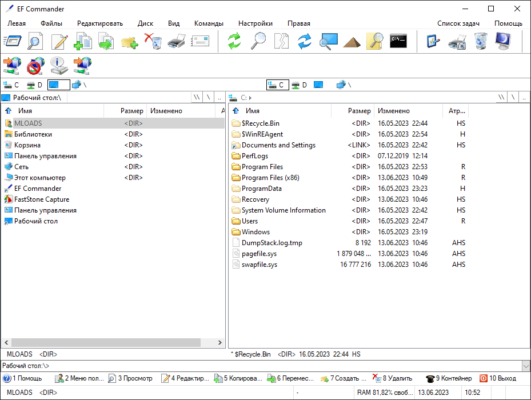
What is EF Commander?
EF Commander is a professional-grade file manager for Windows that goes far beyond the standard capabilities of File Explorer. Originally released in the 1990s, it has been continuously updated to meet the evolving needs of advanced users. The latest version, EF Commander 25.20, brings enhanced performance, improved compatibility, and more customization options.
Key Features of EF Commander 25.20
1. Dual-Pane File Management
Navigate and manage files effortlessly using the dual-pane layout, which makes moving and copying files between directories faster and more intuitive.
2. Built-in FTP and SFTP Client
Directly connect to remote servers with FTP, FTPS, and SFTP support, allowing secure file transfers without third-party software.
3. File Compression and Extraction
EF Commander supports popular archive formats like ZIP, RAR, 7z, TAR, GZIP, and more, enabling users to compress or extract files seamlessly.
4. Multi-Rename Tool
Rename multiple files in bulk with advanced options like numbering, search and replace, or metadata-based renaming.
5. Tabbed Interface and Customization
Open multiple tabs within each pane for advanced multitasking, and personalize the interface with themes, colors, and shortcuts.
6. Integrated Media and Hex Viewer
Preview text, images, and media files without leaving the application. For developers and IT admins, a hex editor is included for binary file inspection.
What’s New in Version 25.20?
Optimized performance for large directories.
Updated FTP engine for better stability and speed.
Enhanced compatibility with Windows 11.
Improved archive management with faster extraction times.
UI refinements for smoother navigation.
Benefits of Using EF Commander
For Power Users
Advanced tools like bulk renaming, dual-pane navigation, and tabbed browsing save time and streamline workflows.
For IT Professionals
With built-in FTP/SFTP and advanced file viewers, EF Commander provides everything needed for remote file management and troubleshooting.
For Everyday Users
Even casual users benefit from faster navigation, integrated compression tools, and a customizable interface.
How to Use EF Commander 25.20
Step 1: Installation
Download EF Commander 25.20 from the official website and complete the setup process.
Step 2: Familiarize with the Interface
Explore the dual-pane layout, menu options, and toolbar for quick file access.
Step 3: Customize Your Workspace
Set up tabs, color themes, and keyboard shortcuts to fit your workflow.
Step 4: Manage Files Efficiently
Use built-in tools like multi-rename, archive handling, and FTP transfers to manage local and remote files.
Conclusion
EF Commander 25.20 is not just a replacement for Windows Explorer; it is a comprehensive file management solution tailored for power users, IT administrators, and anyone who needs more control over their files. With its dual-pane design, FTP/SFTP support, compression tools, and extensive customization, it stands as one of the most versatile file managers available for Windows.
Whether you are organizing personal files, managing servers, or handling complex projects, EF Commander offers the reliability and efficiency you need.
✔ Tested: This software was tested on Windows 10 & Windows 11 and works smoothly without issues.
Frequently Asked Questions
- Is this software free?
Yes, it can be downloaded and used for free. - Does it support Windows 11?
Yes, it works perfectly on Windows 10 and 11. - Is it safe to use?
Yes, the software was scanned and tested before publishing.
Last updated: January 2026