
What is EF File Catalog?
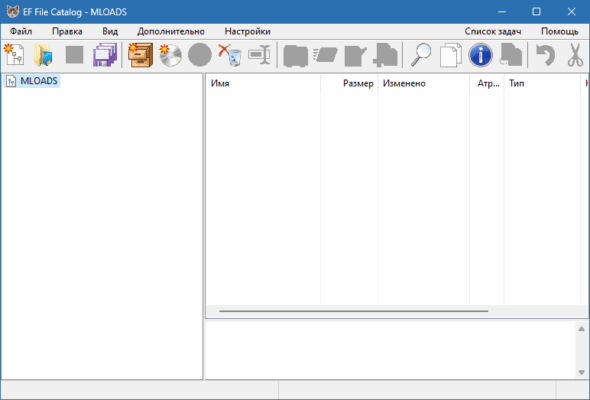
EF File Catalog 25.07 is a powerful file management and cataloging tool designed to help users efficiently organize, index, and access their files stored on various drives and devices. Whether you have large collections of documents, multimedia files, or backups across external drives, CDs, DVDs, or USBs, EF File Catalog provides a structured way to keep track of everything and buy.
Key Features
1. Comprehensive File Indexing
EF File Catalog automatically scans and indexes files and folders from various storage devices, creating a detailed catalog that you can browse anytime—even if the original media is not connected.
2. Advanced Search Capabilities
With its powerful search engine, you can quickly find any file using keywords, file types, sizes, or even timestamps. This is extremely useful when managing large volumes of data.
3. Metadata and File Info Display
EF File Catalog shows extended file information such as file attributes, versions, and descriptions. It even supports comments and custom metadata for easier classification.
4. Multilingual Support
The software supports multiple languages, making it accessible to a global user base.
5. Portable Media Support
Catalog files stored on CDs, DVDs, USB drives, and external hard disks—perfect for users with vast media libraries or archived content.
Use Cases
IT Professionals who manage thousands of files across multiple systems.
Photographers and Designers who store projects on external drives.
Archivists and Researchers needing a structured catalog of documents.
Regular users who want a smarter way to browse backups or collections.
EF File Catalog vs. Traditional File Explorers
Unlike standard Windows File Explorer, EF File Catalog maintains access to your files’ metadata and paths without needing the media to be connected. This is especially beneficial when managing files from different time periods or drives.
Pros and Cons
✅ Pros:
Fast and efficient indexing
Lightweight and user-friendly
Advanced search and filtering
Supports removable and network drives
❌ Cons:
Outdated user interface
Lacks cloud integration
Learning curve for first-time users
How to Use EF File Catalog
Install the software on your Windows system.
Add a new catalog and select the drives or folders to scan.
The tool will create a searchable index that you can browse or export.
Use filters, tags, or comments to better organize your catalog.
System Requirements
Windows 11, 10, 8, 7
10 MB of disk space
512 MB RAM
Conclusion
EF File Catalog 25.07 is an ideal tool for users who want to take control of their file organization. Whether you’re managing archives or keeping track of massive multimedia collections, this software provides a smart and structured way to access your files at any time.
✔ Tested: This software was tested on Windows 10 & Windows 11 and works smoothly without issues.
Frequently Asked Questions
- Is this software free?
Yes, it can be downloaded and used for free. - Does it support Windows 11?
Yes, it works perfectly on Windows 10 and 11. - Is it safe to use?
Yes, the software was scanned and tested before publishing.
Last updated: January 2026