Screen recording has become an essential tool for professionals, educators, gamers, and casual users. Whether you’re creating tutorials, recording gameplay, or saving video calls, you need software that’s reliable and easy to use. Debut Video Capture Software Pro 10.25, developed by NCH Software, is one of the most versatile recording tools available for Windows. It allows users to capture screens, webcams, and external devices in high quality with minimal effort and buy.
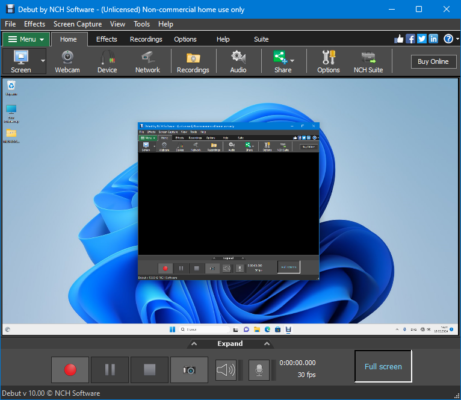
What is Debut Video Capture Software Pro?
Debut Video Capture Software Pro is a professional screen recording tool that lets users capture video from multiple sources. With support for webcams, screen recording, and even external devices like VHS recorders or IP cameras, it’s more than just a typical recorder.
The Pro edition 10.25 includes advanced features like video overlay, scheduled recordings, multiple output formats, and customizable resolution, making it ideal for both beginners and advanced users.
🔑 Key Features of Debut Video Capture Software Pro 10.25
1. Multiple Recording Sources
Capture your entire screen, a selected window, or a custom region.
Record from webcams or external devices like cameras and TV tuners.
2. High-Quality Output
Save recordings in popular formats such as AVI, MP4, MOV, and WMV.
Adjust resolution, frame rate, and quality to fit your needs.
3. Video Overlay
Add webcam footage over screen recordings – perfect for tutorials, reaction videos, or presentations.
4. Scheduled Recording
Automate your recording tasks by setting up schedules for screen or camera capture.
5. Easy Editing Tools
Add captions, adjust color settings (brightness, contrast, gamma), and apply filters directly.
6. Audio Recording
Record audio from your computer’s system sound, microphone, or both at the same time.
7. Snapshot Tool
Take still images from your screen or video feed with one click.
8. User-Friendly Interface
Simple layout makes it accessible even to beginners.
⚡ Benefits of Using Debut Video Capture Pro
Versatility: Works as a screen recorder, webcam recorder, and external device capture tool.
Professional Quality: High-resolution output suitable for YouTube, tutorials, and business presentations.
Customization: Flexible recording options let you adjust video settings to your needs.
Productivity Boost: Scheduled recording helps automate tasks.
All-in-One Tool: Eliminates the need for separate recording software.
🛠️ What’s New in Version 10.25?
Improved compatibility with the latest Windows updates.
Optimized performance for smoother recording on high-resolution screens.
Enhanced stability when capturing from multiple devices.
Bug fixes and UI refinements.
📥 How to Use Debut Video Capture Software Pro 10.25
Install the Software – Download and set up Debut Video Capture Pro on your Windows device.
Choose a Recording Source – Select whether you want to capture screen, webcam, or external input.
Adjust Settings – Choose resolution, format, and frame rate.
Start Recording – Click the record button to begin.
Edit & Save – Add captions or overlays, then export your recording in your preferred format.
Conclusion
Debut Video Capture Software Pro 10.25 is a powerful, flexible, and user-friendly tool for anyone who needs to record screens, webcams, or external devices. With features like scheduled recordings, video overlay, and editing tools, it goes beyond basic screen recording to provide a professional solution.
Whether you’re a teacher preparing online lessons, a gamer streaming your gameplay, or a business professional making tutorials, Debut Video Capture Pro 10.25 is a reliable software that delivers high-quality results.
✔ Tested: This software was tested on Windows 10 & Windows 11 and works smoothly without issues.
Frequently Asked Questions
- Is this software free?
Yes, it can be downloaded and used for free. - Does it support Windows 11?
Yes, it works perfectly on Windows 10 and 11. - Is it safe to use?
Yes, the software was scanned and tested before publishing.
Last updated: January 2026