
Pot 3.0.7 Overview
Pot 3.0.7 is an intelligent translation software designed for Windows and macOS that allows users to translate text instantly from any source. Whether you’re translating text from documents, web pages, or screenshots, Pot provides fast and accurate translations powered by AI. It’s the perfect tool for writers, students, and professionals who work across different languages daily.
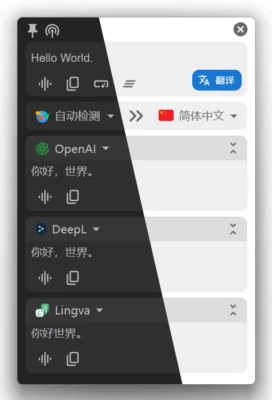
Key Features of Pot 3.0.7
1. AI-Powered Translation Engine
Pot 3.0.7 uses advanced AI algorithms to detect and translate text with high accuracy. It supports popular translation engines like Google Translate, DeepL, and Microsoft Translator, allowing users to choose their preferred engine for optimal results.
2. Screen and OCR Translation
One of Pot’s standout features is screenshot translation (OCR). You can capture any part of your screen, and Pot automatically detects and translates the text — perfect for translating text from images, PDFs, or apps that don’t allow text copying.
3. Floating Window for Quick Access
Pot introduces a floating translation window that stays on top of other applications, making it easy to view translations while working, reading, or gaming. This feature improves productivity and saves time when switching between languages.
4. Customizable Hotkeys
Users can set custom keyboard shortcuts to trigger translations, screenshots, or copy results instantly. This makes Pot 3.0.7 a convenient companion for power users who value efficiency.
5. Supports Multiple Languages
Pot supports over 100 languages, making it suitable for global users. Whether you need to translate English, Arabic, Chinese, or French, Pot delivers clear and natural translations.
What’s New in Version 3.0.7
Improved Accuracy and Performance
The latest update enhances translation accuracy and speeds up OCR processing. Pot now uses optimized AI models that deliver smoother and more context-aware translations.
New Modern Interface
Pot 3.0.7 introduces a cleaner and more responsive UI, making it easier to navigate and control. The design is minimal and user-friendly, matching the needs of both casual and professional users.
Better Integration with Cloud Services
This version improves integration with cloud-based translation APIs, providing faster and more stable results even on lower-end devices.
Why Choose Pot 3.0.7?
Pot 3.0.7 stands out among translation tools because of its combination of power, simplicity, and AI technology. It doesn’t just translate words—it understands context, tone, and structure. Whether you’re translating an academic paper, a website, or social media text, Pot ensures accurate and natural output.
Conclusion
If you’re looking for a fast, reliable, and intelligent translation tool, Pot 3.0.7 is one of the best options available today. Its real-time screen translation, customizable hotkeys, and AI integration make it ideal for users who want seamless multilingual communication.
✔ Tested: This software was tested on Windows 10 & Windows 11 and works smoothly without issues.
Frequently Asked Questions
- Is this software free?
Yes, it can be downloaded and used for free. - Does it support Windows 11?
Yes, it works perfectly on Windows 10 and 11. - Is it safe to use?
Yes, the software was scanned and tested before publishing.
Last updated: January 2026