
Overview of ZoomIt 9.10
ZoomIt 9.10 is a small but powerful utility developed by Microsoft Sysinternals that allows users to zoom into their screen and annotate it during live presentations, tutorials, or demonstrations.
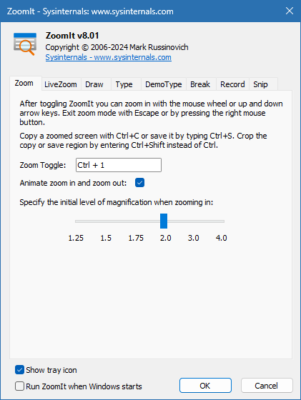
It’s a favorite among professionals, educators, and IT experts who frequently present or explain on-screen processes.
This latest version improves compatibility with Windows 10 and Windows 11, delivering smoother zooming performance and better drawing precision.
Key Features
1. Real-Time Screen Zoom
ZoomIt lets you instantly zoom in on any part of your screen to emphasize important details. You can activate the zoom feature using a customizable hotkey (default: Ctrl + 1). Once zoomed in, the mouse pointer moves smoothly, and you can navigate easily around the screen.
2. On-Screen Annotation
After zooming in, you can use the annotation mode (Ctrl + 2) to draw, highlight, or mark areas of interest directly on the screen. This feature is perfect for trainers, developers, and presenters explaining software interfaces or workflows.
3. Live Timer and Break Mode
ZoomIt includes a timer mode that’s ideal for presentations or breaks. You can set countdowns during sessions or workshops to help manage time effectively.
4. Customizable Shortcuts
Every feature — zooming, drawing, and timer — can be triggered via custom keyboard shortcuts. Users can configure these shortcuts based on their workflow preferences for faster access.
How It Works
Step 1: Launch ZoomIt
After downloading and running ZoomIt, it sits quietly in the system tray, ready for use at any time.
Step 2: Activate Zoom
Press Ctrl + 1 (default) to enter zoom mode. You can scroll the mouse wheel to adjust the zoom level or move your mouse to pan across the screen.
Step 3: Annotate or Highlight
While zoomed in, press Ctrl + 2 to enter drawing mode. Use the mouse to draw, underline, or highlight areas on your screen. Press Esc to clear the annotations and exit.
What’s New in Version 9.10
Enhanced performance for Windows 11 and multi-monitor setups
Improved mouse tracking and zoom stability
Updated timer mode with clearer display
Fixed minor bugs and memory usage optimizations
Performance and Compatibility
ZoomIt 9.10 is extremely lightweight — it consumes minimal system resources and requires no installation.
You can run it directly as a portable executable, making it perfect for USB drives or presentation environments.
The tool supports Windows 7, 8, 10, and 11, both 32-bit and 64-bit systems. It integrates perfectly with all modern Windows desktop environments and touch-enabled displays.
Pros and Cons
Pros
Lightweight and portable
Smooth zoom and annotation tools
Fully customizable hotkeys
Works perfectly on multiple monitors
Cons
Lacks advanced drawing options (shapes, text)
No built-in screenshot saving feature
Conclusion
ZoomIt 9.10 is a must-have utility for anyone who conducts live demonstrations, software tutorials, or presentations.
It combines screen zooming, drawing, and timing tools in one simple, fast, and portable application.
Whether you’re teaching, training, or showcasing a product, ZoomIt helps keep your audience focused on the details that matter most — all without lag or distraction.
If you want to make your next presentation sharper and more interactive, ZoomIt 9.10 is the perfect choice for Windows users.
✔ Tested: This software was tested on Windows 10 & Windows 11 and works smoothly without issues.
Frequently Asked Questions
- Is this software free?
Yes, it can be downloaded and used for free. - Does it support Windows 11?
Yes, it works perfectly on Windows 10 and 11. - Is it safe to use?
Yes, the software was scanned and tested before publishing.
Last updated: January 2026