In today’s connected world, the ability to remotely access and control another computer is essential for IT support, remote work, troubleshooting, and home automation. While many remote desktop tools require complex setups, subscriptions, or cloud accounts, FreeControl v1.7.3 offers a refreshing alternative: a lightweight, free, and open-source solution that works instantly — with no installation or configuration needed.
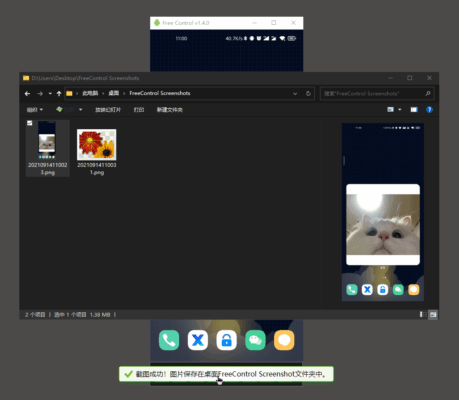
Whether you’re helping a family member fix their PC, managing servers, or accessing your office computer from home, FreeControl v1.7.3 delivers reliable performance with minimal effort.
Let’s explore what makes this tool a standout choice for simple, secure, and efficient remote control.
📌 What Is FreeControl v1.7.3?
FreeControl v1.7.3 is an open-source remote desktop application designed for Windows , allowing users to remotely view and control another computer over a local network (LAN) or the internet. It’s built with simplicity in mind — the entire app runs as a single executable file, requires no installation, and starts within seconds.
Developed for ease of use and privacy, FreeControl uses direct peer-to-peer connections when possible and supports encryption to keep your sessions secure.
It’s ideal for users who want a no-nonsense, portable, and completely free remote access tool without ads, bloat, or data collection.
🛠️ Key Features of FreeControl v1.7.3
1. 🖥️ Instant Remote Access
Launch the app on both computers, connect via IP address, and gain full control — all within seconds. No account creation or cloud registration required.
2. 🚫 No Installation Needed
Runs as a portable .exe file — perfect for USB drives or temporary use on shared machines.
3. 🔐 Secure Connection with Password Protection
Set a password to protect your remote session. All screen data is encrypted during transmission to prevent unauthorized access.
4. 🌐 Works Over LAN & Internet
Use it on the same network (ideal for offices or homes), or configure port forwarding/firewall rules to access systems remotely over the internet.
5. ✅ Cross-Platform Viewer (via Web or App)
While the host must be Windows, some versions allow viewing through web browsers or experimental clients on other platforms.
6. 🖱️ Full Mouse & Keyboard Control
Remotely operate the target PC as if you were sitting in front of it — including clipboard sharing and window resizing.
7. 📦 Lightweight & Fast
Less than 10 MB in size, FreeControl uses minimal CPU and RAM, making it suitable even for older computers.
8. 🧩 Minimal Firewall Configuration
Uses standard TCP/UDP ports and provides clear instructions for setting up external access securely.
9. 📷 Screen Viewing & Monitoring
You can choose to only view the screen (view-only mode), which is useful for monitoring or training purposes.
10. 💻 Ideal for IT Support & Education
Perfect for tech support teams, teachers, or family helpers who need quick access to troubleshoot issues.
👥 Who Should Use FreeControl v1.7.3?
- IT Technicians: For quick remote diagnostics and repairs.
- Home Users: Help relatives with computer problems from afar.
- Educators & Trainers: Demonstrate software usage or monitor student PCs.
- Developers & Admins: Access test machines or servers without physical presence.
- Privacy-Conscious Users: Avoid cloud-based tools that store logs or track activity.
🖥️ System Requirements
- Operating System: Windows 7, 8, 10, 11 (32-bit or 64-bit)
- RAM: 512 MB minimum
- Hard Disk Space: < 10 MB
- Network: Stable LAN or internet connection
- Firewall Access: Required for remote (WAN) connections
⚠️ Note: For internet access, basic knowledge of port forwarding or UPnP may be required.
📈 Why Choose FreeControl v1.7.3?
- ✅ 100% Free & Open Source – No hidden costs or telemetry
- ✅ No Installation or Setup – Run directly from any folder or USB
- ✅ Fast & Lightweight – Starts instantly, low resource usage
- ✅ Secure & Private – Data stays between devices; no third-party servers
- ✅ Simple Interface – Easy for beginners, powerful enough for pros
✅ Final Thoughts
FreeControl v1.7.3 is not meant to replace enterprise-grade solutions like TeamViewer or AnyDesk — instead, it fills a critical gap for users who need a simple, trustworthy, and offline-capable remote control tool .
With its portability, speed, and focus on privacy, FreeControl v1.7.3 is one of the best lightweight remote desktop tools available — especially for local networks, emergency access, or environments where security and simplicity are top priorities.
If you’re looking for a no-frills, free, and effective way to control another Windows PC , FreeControl v1.7.3 is definitely worth trying .
✔ Tested: This software was tested on Windows 10 & Windows 11 and works smoothly without issues.
Frequently Asked Questions
- Is this software free?
Yes, it can be downloaded and used for free. - Does it support Windows 11?
Yes, it works perfectly on Windows 10 and 11. - Is it safe to use?
Yes, the software was scanned and tested before publishing.
Last updated: January 2026