Creating a polished, reliable installer is an essential step for every software release. CreateInstall 8.11.2 is a versatile Windows installer authoring tool designed to help developers, independent software vendors (ISVs), and system integrators package applications into compact, customizable setup programs. With a focus on flexibility, scripting, and compression efficiency, CreateInstall streamlines deployment while delivering a professional end-user experience.
What is CreateInstall 8.11.2?
CreateInstall is a Windows setup creation utility that produces single-file or multi-file installers with advanced options for user interaction, file operations, registry changes, and component selection. The 8.11.2 release brings improved stability, enhanced compression choices, and refined scripting abilities to meet modern distribution requirements. It’s an ideal alternative for developers who prefer control over the installer logic without the complexity of large enterprise suites.
Key Features of CreateInstall 8.11.2
Flexible Project Types
CreateInstall supports multiple installer formats including single EXE, split packages, and self-extracting archives. This lets you choose the best distribution method for web downloads, CDs, or enterprise deployment.
Powerful Scripting Engine
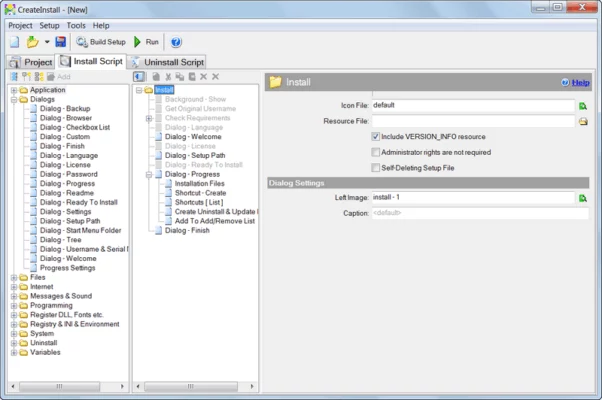
Built-in scripting allows conditional installation flows, custom dialogs, and sophisticated pre/post-install actions. Developers can use scripts to check system requirements, install prerequisites, or configure services automatically.
Customizable User Interface
Design your own installer UI using built-in templates or custom dialogs. CreateInstall supports multilingual interfaces, license agreements, EULAs, and branded graphics so your setup matches your product identity.
Compression & Performance
Version 8.11.2 improves compression algorithms and file handling to reduce package size and speed up installation. This helps lower bandwidth costs and shortens installation times for users.
Registry & File Management
Easily add or remove registry keys, set file permissions, and register components such as DLLs or COM objects. The tool ensures correct rollback behavior if an installation is interrupted.
Silent & Unattended Installs
CreateInstall supports command-line parameters and silent mode for automated deployments, making it suitable for corporate rollouts and automated testing environments.
Benefits for Developers and Teams
- Faster Releases: Use reusable projects and templates to speed up packaging for each release cycle.
- Greater Control: Scripting and component-based installations let you tailor .NET installs, services, prerequisites, and optional modules.
- User Experience: Polished, localized installers reduce support requests and improve first-run experience for customers.
- Enterprise Friendly: Silent installs, exit codes, and logging support corporate deployment tools like SCCM and PDQ.
Typical Use Cases
- Independent Developers: Create compact setup files for direct downloads and distribution portals.
- ISVs & Software Houses: Bundle complex applications with prerequisites and custom configuration in one installer.
- IT Departments: Deploy applications silently across workstations with unattended installation options.
- OEMs & Resellers: Brand installers with customized UI and licensing dialogs for end customers.
How to Get Started
- Create a New Project: Choose single EXE or split package depending on distribution needs.
- Add Files & Components: Organize application files, prerequisites, and shortcuts.
- Configure Registry & Services: Define registry keys, environment variables, or Windows services.
- Design UI & Dialogs: Customize installation steps, language packs, and license screens.
- Set Scripting & Conditions: Add pre/post actions and conditional installation logic.
- Build & Test: Compile the installer and test on target environments, including silent mode and rollback scenarios.
Conclusion
CreateInstall 8.11.2 offers a balanced mix of power and simplicity for anyone who needs to build reliable Windows installers. With effective compression, deep scripting, customizable UI, and enterprise-ready deployment options, it’s a strong choice for developers who want full control over packaging without the overhead of heavyweight solutions. Whether you’re releasing a small utility or a complex enterprise application, CreateInstall helps you deliver a professional installation experience to your users.
✔ Tested: This software was tested on Windows 10 & Windows 11 and works smoothly without issues.
Frequently Asked Questions
- Is this software free?
Yes, it can be downloaded and used for free. - Does it support Windows 11?
Yes, it works perfectly on Windows 10 and 11. - Is it safe to use?
Yes, the software was scanned and tested before publishing.
Last updated: January 2026