
Modern productivity tools are essential for managing tasks, projects, and personal organization. Appflowy 0.9.4 is an open-source alternative to Notion, designed for users who want powerful note-taking, task management, and collaboration features without sacrificing privacy or control.
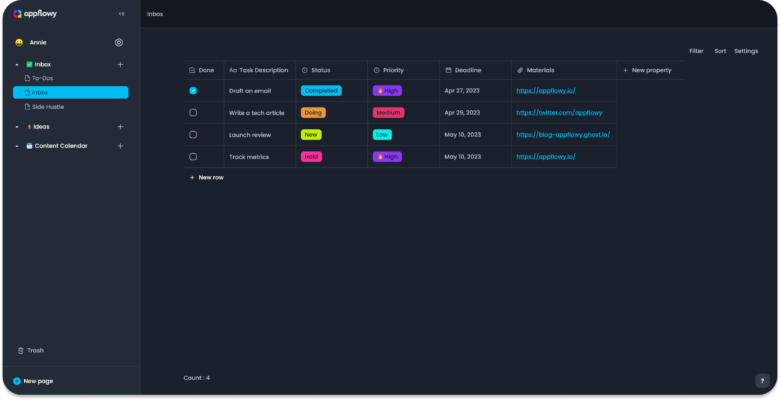
What is Appflowy 0.9.4?
Appflowy is a free, open-source productivity application that combines note-taking, task management, and database functionality in one platform. Built with user privacy and extensibility in mind, it offers similar capabilities to Notion but allows users full ownership of their data.
Unlike proprietary tools, Appflowy is community-driven, customizable, and highly flexible, making it a popular choice for developers, students, and professionals.
Key Features of Appflowy 0.9.4
- Note-Taking – Create, organize, and format notes with rich text editing.
- Task & Project Management – Build to-do lists, Kanban boards, and project workflows.
- Open-Source & Private – Full control of your data with no vendor lock-in.
- Customizable Workspaces – Adapt layouts and features to your workflow.
- Cross-Platform – Available for Windows, macOS, Linux, and mobile platforms.
- Collaboration Tools – Share projects and collaborate with teams in real time.
Why Use Appflowy 0.9.4?
For many users, cloud-based productivity apps raise concerns about data privacy and long-term reliability. Appflowy addresses these issues by giving users complete control over their data while offering the same functionality as mainstream tools.
Developers appreciate its modular structure, allowing them to extend features through plugins and integrations. Students and professionals benefit from its simple yet powerful organizational tools that support both personal and team productivity.
How to Use Appflowy 0.9.4
- Download & Install – Get the version compatible with your operating system.
- Create Workspaces – Organize projects, personal notes, or team boards.
- Add Content – Use blocks to add text, tasks, databases, and media.
- Collaborate – Share workspaces with colleagues or classmates.
- Customize & Extend – Install community plugins for advanced workflows.
Benefits of Appflowy 0.9.4
- Free and open-source, with no hidden costs.
- Enhanced privacy and data ownership compared to proprietary platforms.
- Scalable for both individual users and teams.
- Constantly evolving with community-driven updates and improvements.
Conclusion
Appflowy 0.9.4 is more than just a note-taking app; it is a full productivity suite that empowers users to take control of their workflow and data. Whether you are a student managing assignments, a professional handling projects, or a team collaborating on tasks, Appflowy provides the tools you need with transparency and flexibility.
If you are looking for a powerful Notion alternative that respects your privacy, Appflowy 0.9.4 is an excellent choice.
✔ Tested: This software was tested on Windows 10 & Windows 11 and works smoothly without issues.
Frequently Asked Questions
- Is this software free?
Yes, it can be downloaded and used for free. - Does it support Windows 11?
Yes, it works perfectly on Windows 10 and 11. - Is it safe to use?
Yes, the software was scanned and tested before publishing.
Last updated: January 2026