In today’s digital world, managing images efficiently is essential — whether you’re preparing photos for social media, optimizing graphics for websites, or converting camera RAW files into shareable formats. Manually editing each image is time-consuming and impractical when dealing with large collections and buy.
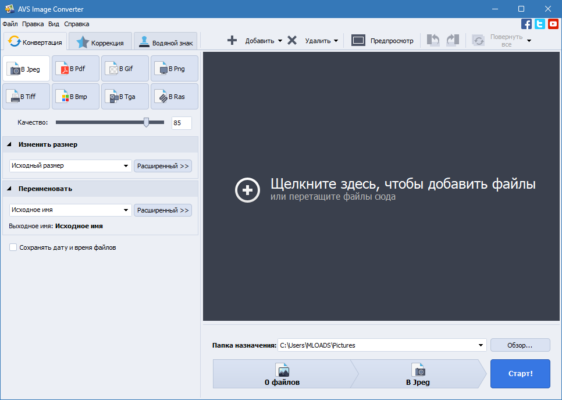
That’s where AVS Image Converter 7.0.2.21 comes in — a fast, reliable, and feature-rich desktop application designed to help users convert, resize, rotate, rename, and optimize multiple images at once without needing advanced photo editing skills.
Developed by Online Media Technologies Ltd., the same team behind the popular AVS4YOU suite, AVS Image Converter 7.0.2.21 combines professional functionality with an intuitive interface, making it ideal for photographers, marketers, bloggers, students, and home users alike.
Let’s explore what makes this software one of the best choices for efficient image conversion and batch processing.
📌 What Is AVS Image Converter 7.0.2.21?
AVS Image Converter 7.0.2.21 is a Windows-based tool that allows you to convert images between more than 50 file formats , apply transformations, and automate repetitive tasks in bulk. It supports all major image types:
- JPG, JPEG 2000
- PNG, BMP, TIFF
- GIF (including animated GIFs)
- ICO, PSD (preview), PDF
- Camera RAW files : CR2, NEF, ARW, ORF, DNG, and more
Unlike basic converters, AVS Image Converter also lets you adjust quality, add watermarks, change metadata, and use predefined presets for common workflows like web publishing, email attachments, or printing.
It’s perfect for turning high-res camera shots into lightweight web images or standardizing a folder full of mixed formats into one consistent type.
🛠️ Key Features of AVS Image Converter 7.0.2.21
1. 🔄 Convert Between 50+ Formats
Switch seamlessly between popular and niche image formats while preserving color depth and transparency (e.g., alpha channels in PNG).
Ideal for designers, developers, and archivists.
2. 📦 Batch Processing
Convert hundreds of images in one go — select entire folders and apply the same settings across all files. Saves hours compared to manual editing.
3. 🖼️ Resize & Scale Images
Adjust dimensions by pixels, percentage, or predefined sizes (e.g., 1920×1080, Facebook cover, Instagram post). Maintain aspect ratio to avoid distortion.
4. 🌀 Rotate & Flip
Correct orientation issues automatically (via EXIF data) or manually rotate/flip images as needed.
5. 🎨 Quality & Compression Control
Fine-tune output quality for JPG/PNG/GIF — balance visual clarity with file size reduction.
Useful for optimizing website performance.
6. 💧 Add Watermarks
Insert text or image watermarks (logos, copyright notices) to protect your work or brand your content.
Position them anywhere on the image.
7. 🏷️ Rename Files in Bulk
Apply custom naming patterns like Photo_001.jpg, Vacation_Day1, or IMG_YYYY-MM-DD.
Great for organizing unstructured photo libraries.
8. 📂 Preserve Folder Structure
When converting from nested directories, maintain the original folder hierarchy in the output.
Perfect for large-scale archival projects.
9. 🖥️ Preview Before Converting
See real-time previews of changes before applying them — ensures accuracy and avoids mistakes.
10. 🧹 Edit Metadata (EXIF/IPTC)
View and modify image metadata such as camera model, date taken, author, and copyright information.
Important for photographers and publishers.
👥 Who Should Use AVS Image Converter 7.0.2.21?
- Photographers: Convert RAW files to JPG/PNG for sharing.
- Bloggers & Webmasters: Optimize images for faster loading.
- Graphic Designers: Standardize assets across projects.
- Social Media Managers: Resize visuals for different platforms.
- Students & Teachers: Prepare presentations and reports.
- Home Users: Organize family photos and reduce file sizes.
🖥️ System Requirements
- Operating System: Windows 11, 10, 8.1, 8, 7 (64-bit recommended)
- RAM: 2 GB minimum (4 GB suggested)
- Hard Disk Space: 200 MB free space
- Graphics Card: DirectX 9-compatible
- Administrator Rights: Required for installation
✅ Portable version available for USB drives.
📈 Why Choose AVS Image Converter 7.0.2.21?
- ✅ Supports Over 50 Image Formats
- ✅ True Batch Processing Saves Time
- ✅ RAW File Compatibility
- ✅ No Need for Photoshop or GIMP
- ✅ User-Friendly Interface – Beginner Friendly
- ✅ Affordable Alternative to Premium Tools
✅ Final Thoughts
AVS Image Converter 7.0.2.21 is more than just a format converter — it’s a complete image preparation toolkit that simplifies everyday photo tasks. With its powerful batch capabilities, rich format support, and intuitive design, it helps both casual users and professionals streamline their workflows.
If you regularly deal with multiple images and want to convert, resize, and organize them quickly and safely , AVS Image Converter 7.0.2.21 is definitely worth trying .
For anyone seeking a reliable, no-hassle solution for mass image conversion , this tool delivers speed, flexibility, and excellent results.
✔ Tested: This software was tested on Windows 10 & Windows 11 and works smoothly without issues.
Frequently Asked Questions
- Is this software free?
Yes, it can be downloaded and used for free. - Does it support Windows 11?
Yes, it works perfectly on Windows 10 and 11. - Is it safe to use?
Yes, the software was scanned and tested before publishing.
Last updated: January 2026