Professor Teaches PowerPoint 2021 6.1 is a complete interactive training software that helps users master Microsoft PowerPoint 2021 quickly and effectively. Whether you’re a student, teacher, or professional, this program provides step-by-step lessons that teach you how to create visually engaging and professional presentations with ease.
A Complete Interactive Learning Experience
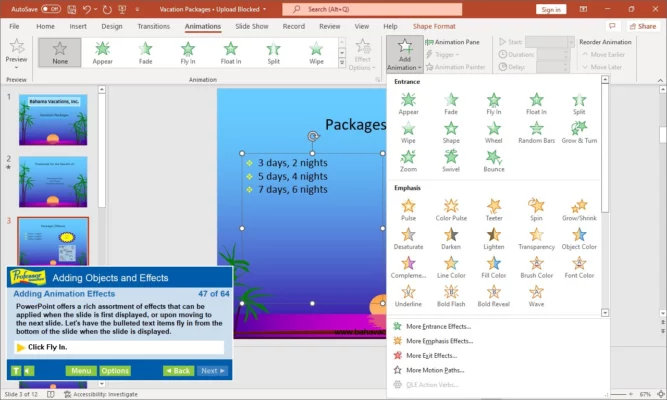
This version of Professor Teaches offers realistic simulations that closely mirror the actual PowerPoint interface. You can learn by doing — exploring every feature hands-on without the risk of making mistakes. Each lesson covers a specific topic, from creating new slides to adding animations, transitions, and multimedia elements.
Easy-to-Follow Lessons for All Skill Levels
Professor Teaches PowerPoint 2021 6.1 is designed for learners of every level. Beginners will appreciate the clear explanations and guided exercises, while advanced users can sharpen their presentation and design skills. The program includes hundreds of practice scenarios, giving you real experience building slideshows step by step.
Learn Slide Design and Visual Layouts
Design is at the heart of any PowerPoint presentation. This course teaches you how to use templates, themes, and slide masters to maintain consistency across slides. You’ll also learn how to insert images, shapes, and charts to make your slides visually attractive and easy to understand.
Master Animations and Transitions
Animations and transitions bring presentations to life. The software guides you through adding entrance, emphasis, and exit effects, as well as customizing slide transitions. You’ll also discover how to manage timing, order, and motion paths to create smooth, professional animations that enhance your storytelling.
Work with Multimedia and Collaboration Tools
Modern presentations often include videos, sounds, and online content. Professor Teaches PowerPoint 2021 6.1 shows you how to embed multimedia, record narration, and use PowerPoint’s collaboration features to work with others in real time. You’ll also learn how to export your presentation as a video or PDF.
Self-Paced and Interactive Learning
The program’s self-paced structure allows you to learn at your own speed. Each lesson includes voice narration, practical exercises, and short quizzes to reinforce understanding. You can start from the basics or jump directly into advanced topics depending on your comfort level.
Updated for Microsoft PowerPoint 2021
This version has been fully updated to match the latest Microsoft PowerPoint 2021 interface and tools. It includes lessons on new features such as improved design suggestions, enhanced transitions, and better integration with Microsoft 365 cloud storage.
Why Choose Professor Teaches PowerPoint 2021 6.1
Unlike static tutorials, Professor Teaches offers a true interactive experience. You don’t just watch — you practice. The simulated PowerPoint environment builds confidence and ensures you’re ready to create stunning, polished presentations on your own.
Conclusion
Professor Teaches PowerPoint 2021 6.1 is the perfect training companion for anyone looking to master presentation design and delivery. With practical exercises, realistic simulations, and step-by-step lessons, it helps you build professional skills that last. Create slides, apply effects, and deliver impactful presentations — all while learning at your own pace.
✔ Tested: This software was tested on Windows 10 & Windows 11 and works smoothly without issues.
Frequently Asked Questions
- Is this software free?
Yes, it can be downloaded and used for free. - Does it support Windows 11?
Yes, it works perfectly on Windows 10 and 11. - Is it safe to use?
Yes, the software was scanned and tested before publishing.
Last updated: January 2026