
For users who find Windows Explorer too slow or limited, Xplorer2 Ultimate 6.2.0.3 delivers a powerful, customizable, and lightning-fast alternative. Designed for IT professionals, system administrators, and power users, this dual-pane file manager combines the familiarity of classic Windows navigation with advanced features that dramatically boost productivity and control over your files and buy.
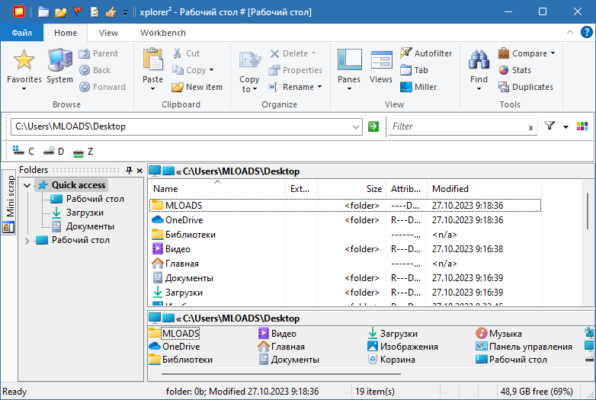
Why Xplorer2 Ultimate Stands Out
Unlike basic file explorers, Xplorer2 operates with multi-threaded architecture, enabling seamless browsing of large folders, network drives, and ZIP archives without freezing or lag. Version 6.2.0.3 refines stability, enhances Unicode support, and improves compatibility with modern Windows 10/11 systems—while retaining its lightweight footprint.
Key Features of Xplorer2 Ultimate 6.2
1. Dual-Pane (or Multi-Pane) Interface
Work with two or more folder panes side by side—perfect for copying, comparing, or syncing files without opening multiple windows. You can even split panes vertically or horizontally for maximum screen efficiency.
2. Advanced Search & Filtering
Go beyond basic filename searches. Xplorer2 supports Boolean queries, regex patterns, file content search, and metadata filtering (by date, size, type, or attributes). Find duplicates, large files, or specific document types in seconds—even across network locations.
3. Powerful Batch Renaming
Rename hundreds of files at once using customizable rules:
- Add prefixes/suffixes
- Replace text with wildcards
- Change case (upper, lower, title)
- Reorder filenames by date or number
This is invaluable for photographers, developers, and data organizers.
4. Integrated Archive Support
Browse and edit files inside ZIP, RAR, 7z, and ISO archives as if they were regular folders—no need for separate extraction. You can even create or update archives directly from the interface.
5. Tabbed Browsing & Custom Toolbars
Open multiple locations in tabs, just like a web browser. Customize toolbars with your most-used commands (e.g., copy to, sync, secure delete) for one-click access.
6. Robust File Operations
- Pause/resume file transfers
- Verify copies with checksums
- Secure delete files beyond recovery
- Synchronize folders with visual comparison
Ideal for Power Users & Professionals
Xplorer2 Ultimate isn’t for casual users—but for those who manage large datasets, servers, media libraries, or development projects, it’s indispensable. Its scripting support (via command-line and macros) allows automation of repetitive tasks, while its low memory usage ensures smooth performance even on older hardware.
Licensing & Privacy
Unlike cloud-based tools, Xplorer2 works 100% offline—your file operations never leave your machine. It’s available as a one-time purchase (no subscription), with free minor updates included. The “Ultimate” edition unlocks all features, including network search, folder comparison, and advanced scripting.
Minor Considerations
- Steep learning curve for beginners (though a “Lite” mode is available)
- Windows only (no macOS or Linux version)
- Interface feels classic—not modern—but highly functional
Final Thoughts
Xplorer2 Ultimate 6.2.0.3 proves that sometimes, the best tools are the ones that prioritize functionality over flash. With its dual-pane efficiency, batch capabilities, and rock-solid reliability, it remains one of the most respected file managers for Windows power users in 2024.
If you’re tired of waiting for Windows Explorer to load or need more control over your files, Xplorer2 Ultimate is a worthy upgrade that pays for itself in saved time and reduced frustration.
✔ Tested: This software was tested on Windows 10 & Windows 11 and works smoothly without issues.
Frequently Asked Questions
- Is this software free?
Yes, it can be downloaded and used for free. - Does it support Windows 11?
Yes, it works perfectly on Windows 10 and 11. - Is it safe to use?
Yes, the software was scanned and tested before publishing.
Last updated: January 2026