Medical imaging plays a vital role in healthcare, and the Digital Imaging and Communications in Medicine (DICOM) format is the universal standard for handling medical images. However, in many cases, medical professionals need more than just a viewer—they need a powerful editor to adjust, anonymize, and manage these files. Sante DICOM Editor 10.2.6 is a comprehensive software solution that provides advanced DICOM editing tools for radiologists, researchers, and healthcare institutions and buy.
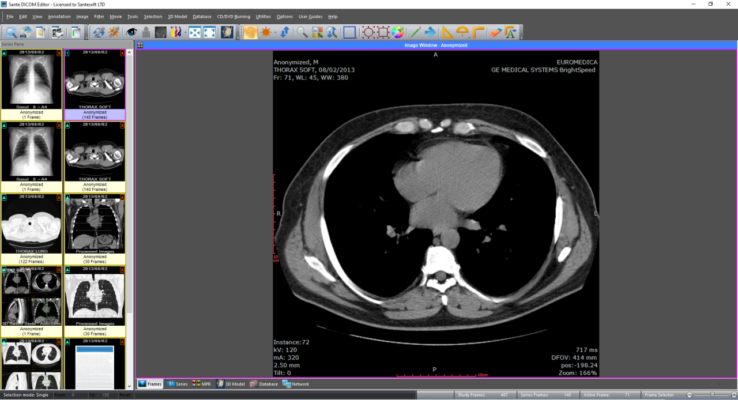
This article explores the features, improvements, and benefits of the latest version, making it a must-have for medical professionals working with DICOM data.
Why Choose Sante DICOM Editor?
While most DICOM viewers only allow visualization, Sante DICOM Editor goes further by providing editing, modification, and conversion capabilities. It helps doctors, IT administrators, and researchers manage sensitive patient data while maintaining compliance with healthcare regulations such as HIPAA.
It is especially useful for hospitals, diagnostic centers, and research institutions that require complete control over their medical imaging workflows.
Key Features of Sante DICOM Editor 10.2.6
1. Advanced DICOM Editing
Modify patient details, study information, and image metadata.
Add or remove annotations and adjust headers.
2. DICOM Anonymization
Remove sensitive patient data while keeping clinical information intact.
Essential for sharing images for research, education, or case studies.
3. Image Conversion and Export
Convert DICOM files into JPEG, PNG, BMP, or TIFF for presentations and documentation.
Batch conversion supported for large-scale projects.
4. PACS Integration
Seamlessly integrates with Picture Archiving and Communication Systems for efficient hospital workflows.
5. Image Manipulation Tools
Brightness, contrast, zoom, and rotation adjustments.
Tools to enhance readability of CT, MRI, and ultrasound images.
6. User-Friendly Interface
Simple layout that makes it easy for both beginners and advanced users.
What’s New in Version 10.2.6?
The latest release introduces enhancements for stability and performance:
Improved metadata editing tools for greater accuracy.
Enhanced anonymization engine to meet stricter privacy standards.
Bug fixes for smoother operation in hospital networks.
Better export quality for non-DICOM formats.
System Requirements
OS: Windows 7, 8, 10, or 11 (64-bit recommended)
RAM: Minimum 4 GB (8 GB recommended)
CPU: Intel/AMD dual-core or better
Storage: 200 MB free space
GPU: Optional for advanced image rendering
Benefits for Healthcare Professionals
For Radiologists
Edit and adjust imaging data for accurate reporting.
Share anonymized cases for teaching and consultation.
For Hospitals and Clinics
Maintain compliance with data privacy regulations.
Integrate seamlessly into existing PACS systems.
For Researchers and Educators
Anonymize patient information for academic studies.
Export images in standard formats for training materials.
Conclusion
Sante DICOM Editor 10.2.6 is not just a simple imaging tool—it is a complete solution for editing, anonymizing, and managing DICOM files in medical environments. With advanced editing features, PACS compatibility, and powerful anonymization tools, it ensures both flexibility and compliance for healthcare professionals.
Upgrading to this version provides improved accuracy, privacy, and workflow efficiency, making it an essential tool for doctors, hospitals, and researchers who work with medical imaging data on a daily basis.
✔ Tested: This software was tested on Windows 10 & Windows 11 and works smoothly without issues.
Frequently Asked Questions
- Is this software free?
Yes, it can be downloaded and used for free. - Does it support Windows 11?
Yes, it works perfectly on Windows 10 and 11. - Is it safe to use?
Yes, the software was scanned and tested before publishing.
Last updated: January 2026