Tipard DVD Cloner 6.2.86 is a professional DVD copying and backup tool designed for users who want a simple yet powerful way to duplicate their DVDs. Whether you’re backing up movie discs, creating ISO images, or compressing large DVDs to fit smaller discs, this software delivers excellent quality and flexibility. It’s ideal for anyone who values preserving their DVD collections safely and efficiently.
Key Features
High-Quality DVD Copying
Tipard DVD Cloner uses advanced encoding technology to ensure 1:1 DVD duplication without quality loss. It can copy entire discs including menus, subtitles, and audio tracks, or just the main movie to save space.
Three Copy Modes
Users can choose between:
- Full Copy – duplicates the entire DVD including menus and extras.
- Main Movie – copies only the feature film, skipping bonus material.
- Custom Mode – allows manual selection of titles, audio, and subtitles.
This flexibility helps balance storage needs and personal preferences.
Compression Without Compromise
The built-in compression feature lets you copy a dual-layer DVD (DVD-9) onto a single-layer disc (DVD-5) while maintaining high picture and sound quality.
ISO and Folder Support
You can clone your DVD to another disc, save it as an ISO image, or store it as a DVD folder on your hard drive. This is perfect for digital backups or later re-burning.
What’s New in Version 6.2.86
- Improved DVD-to-DVD burning stability.
- Faster conversion and copying performance.
- Enhanced video quality during compression.
- Updated compatibility for the latest Windows and macOS systems.
- Minor UI refinements for smoother navigation.
How to Use Tipard DVD Cloner 6.2.86
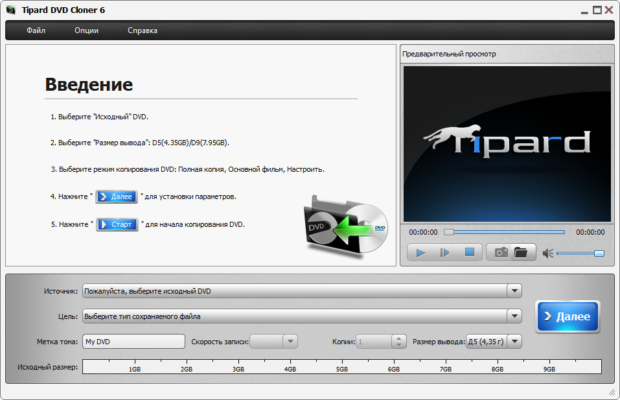
Step 1: Load Source DVD
Insert the disc you want to clone into your DVD drive, then launch Tipard DVD Cloner.
Step 2: Choose Target and Mode
Select your output type — another DVD, ISO image, or DVD folder — and pick a copy mode (Full, Main Movie, or Custom).
Step 3: Adjust Settings
Customize subtitles, audio tracks, and target disc size if you want compression. Preview your selection before proceeding.
Step 4: Start Cloning
Click “Start” and let the software handle the process. It ensures fast copying speeds while preserving data integrity.
Additional Features
- Supports both DVD-9 and DVD-5 formats.
- Compatible with most blank discs and burners.
- Allows easy disc-to-disc cloning or file-based backups.
- Multilingual interface for global users.
Why Choose Tipard DVD Cloner
Tipard DVD Cloner 6.2.86 stands out for its reliability and balance between simplicity and professional functionality. It’s lightweight, fast, and produces high-quality backups suitable for long-term storage or media sharing. Whether you need to archive family videos, duplicate collections, or safeguard rare content, this software provides everything needed for dependable DVD duplication.
Conclusion
Tipard DVD Cloner 6.2.86 offers an easy and efficient way to copy, compress, and back up DVDs without losing quality. With flexible modes, fast performance, and modern compatibility, it’s one of the most accessible and reliable DVD cloning tools available today — perfect for both beginners and advanced users.
✔ Tested: This software was tested on Windows 10 & Windows 11 and works smoothly without issues.
Frequently Asked Questions
- Is this software free?
Yes, it can be downloaded and used for free. - Does it support Windows 11?
Yes, it works perfectly on Windows 10 and 11. - Is it safe to use?
Yes, the software was scanned and tested before publishing.
Last updated: January 2026