Overview of Adolix Split and Merge PDF
Adolix Split and Merge PDF is a user-friendly utility designed for managing PDF files with precision. It allows users to split large PDF files into smaller parts or merge multiple PDFs into a single, organized document. Whether you are a student, professional, or business user, this tool simplifies document handling and boosts productivity and buy.
Key Features
Split PDF Files
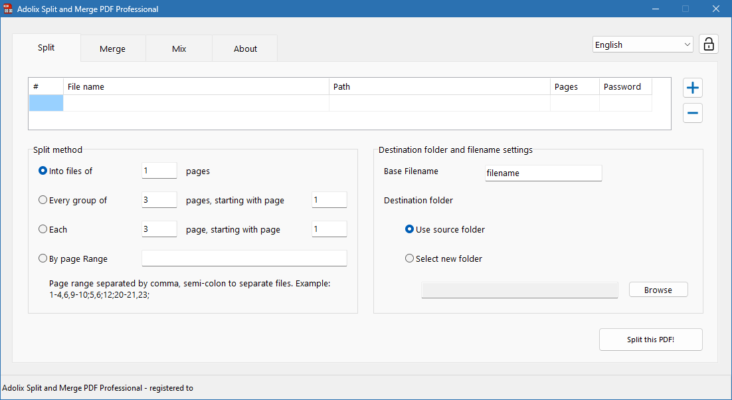
Adolix makes it effortless to split large PDF documents into manageable pieces. You can choose to split by page ranges, every X pages, or by bookmarks. This is especially useful when you need to extract specific content or reduce the file size for sharing.
Merge PDF Files
Merging multiple PDF files is just as simple. The drag-and-drop interface lets you arrange documents in the desired order before combining them into one cohesive file. This is ideal for combining reports, invoices, forms, or chapters into a single document.
Secure and Lightweight
Unlike many heavy PDF editors, Adolix Split and Merge PDF is lightweight and fast. It does not require Adobe Acrobat and runs smoothly on all modern Windows versions. Your files remain safe on your device with no upload to external servers.
How to Use Adolix Split and Merge PDF
Using the software is intuitive:
Download and Install the tool on your Windows PC.
Choose Split or Merge mode from the main interface.
Add Your Files using the built-in file browser or drag-and-drop.
Set Parameters for splitting (e.g., by page range or bookmarks) or arrange files to merge.
Click Start, and your new PDF files will be created within seconds.
This simplicity is what makes Adolix a favorite among casual and professional users alike.
System Requirements
OS: Windows 10 / 8 / 7 / Vista / XP
Processor: Pentium or higher
RAM: Minimum 512 MB
Disk Space: 50 MB free space
Why Choose Adolix Split and Merge PDF?
Unlike bloated PDF suites, Adolix offers just the tools you need without unnecessary features. It is fast, reliable, and perfect for quick tasks like separating or combining PDFs. It also supports password-protected files (with the correct password) and works offline, ensuring your document privacy.
Use Cases
For Students
Split chapters from large PDFs or combine notes from multiple documents into one file.
For Office Use
Merge client contracts, invoices, and forms into a single PDF for easier management and printing.
For Home Users
Split large eBooks or combine scanned pages into a tidy format for personal records.
Final Verdict
Adolix Split and Merge PDF is a must-have utility for anyone who frequently works with PDF documents. It’s simple, fast, and effective – no steep learning curve or complicated options. Whether you’re splitting a 100-page file into chapters or combining several PDFs into one, this tool will save you time and effort.
Download Now and streamline your PDF tasks with Adolix Split and Merge PDF – your go-to solution for fast and easy PDF management.
✔ Tested: This software was tested on Windows 10 & Windows 11 and works smoothly without issues.
Frequently Asked Questions
- Is this software free?
Yes, it can be downloaded and used for free. - Does it support Windows 11?
Yes, it works perfectly on Windows 10 and 11. - Is it safe to use?
Yes, the software was scanned and tested before publishing.
Last updated: January 2026