
Withdata Data File Converter 5.3.4 is a powerful, easy-to-use software tool designed for seamless data conversion across multiple file formats. Whether you’re a data analyst, IT professional, or just someone needing to manipulate and convert datasets, this utility can help you save time and effort. It supports a wide variety of formats, including CSV, Excel (XLS/XLSX), TXT, JSON, XML, and more, making it ideal for both technical and non-technical users and buy.
Key Features of Withdata Data File Converter
1. Support for Multiple Formats
Withdata Data File Converter enables you to convert files between various formats such as:
CSV to Excel or vice versa
Text to XML or JSON
Excel to SQL or CSV
And many more combinations
This broad format compatibility ensures you can integrate the tool into almost any workflow, from database management to data visualization and reporting.
2. Batch Conversion
One of the standout features of version 5.3.4 is batch processing. You can convert hundreds of files at once, which dramatically reduces manual effort. Simply load a folder of files and let the software handle the rest.
3. Preview and Mapping Options
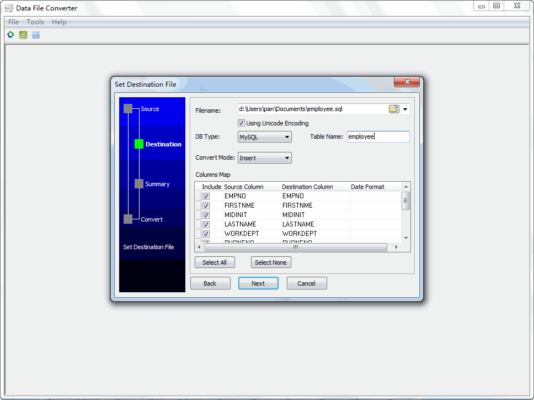
Before converting, you can preview your data and map columns to ensure accuracy. This feature is especially useful when converting between formats with different data structures.
4. Customizable Settings
Advanced users will appreciate the customizable options. You can adjust delimiters, encoding types, and field mappings to suit your specific needs. This level of control is crucial for developers working with international or structured datasets.
5. High-Speed Performance
Withdata has optimized the software for fast performance. Even large datasets with thousands of rows can be converted in seconds without sacrificing accuracy.
6. User-Friendly Interface
Despite its powerful features, the interface is clean and intuitive. Whether you’re a first-time user or a seasoned developer, you’ll find it easy to navigate.
Benefits of Using Withdata Data File Converter
Time-saving: Automate and batch-process multiple files without manual editing.
Accuracy: Minimize errors during conversion with real-time previews and validation.
Versatility: Supports various industries – finance, marketing, research, healthcare, and IT.
Cost-effective: A one-time purchase can replace multiple tools with similar functions.
Who Should Use It?
This tool is ideal for:
Data analysts who deal with large volumes of raw data from various sources.
Database administrators (DBAs) needing to import/export between systems.
Software developers working on APIs or system integration.
Researchers who need clean, structured data for analysis.
System Requirements
OS: Windows 7/8/10/11 (32-bit or 64-bit)
RAM: 2 GB minimum
Disk Space: 100 MB
Processor: Intel/AMD Dual-Core or higher
Conclusion
Withdata Data File Converter 5.3.4 is a reliable, efficient solution for handling complex data transformation tasks. Whether you’re cleaning data, migrating databases, or just converting files for import/export, this software has the features and flexibility to meet your needs.
Download it today and streamline your data conversion workflows!
https://www.youtube.com/watch?v=8VEuPnqQyq4&list=PLMjLUvnJ4y48PnpSOzzwFad-xikyvbTdr
✔ Tested: This software was tested on Windows 10 & Windows 11 and works smoothly without issues.
Frequently Asked Questions
- Is this software free?
Yes, it can be downloaded and used for free. - Does it support Windows 11?
Yes, it works perfectly on Windows 10 and 11. - Is it safe to use?
Yes, the software was scanned and tested before publishing.
Last updated: January 2026