
Send Anywhere 23.1.171058 is a powerful and user-friendly file transfer application that allows you to send files of any type and size — photos, videos, documents, APKs, and more — between devices without requiring account registration or cloud storage. Available on Android, iOS, Windows, macOS, and web, this latest version delivers faster speeds, improved stability, and enhanced security for seamless sharing across platforms.
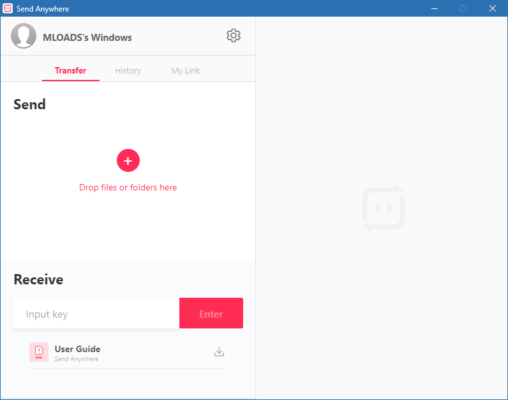
Whether you’re sending a 4K video to a friend, transferring apps between phones, or sharing work files across devices, SendAnywhere 23.1.171058 makes it simple, fast, and secure — all with a 6-digit key instead of email or sign-in.
Why Choose Send Anywhere?
Unlike traditional cloud services (Google Drive, Dropbox), Send Anywhere doesn’t upload your files to a server. Instead, it uses peer-to-peer (P2P) technology to transfer files directly between devices — either over the internet or via Wi-Fi Direct (offline mode).
This means:
- ✅ No file size limits (up to 10GB with premium)
- ✅ No account or login required
- ✅ End-to-end encryption for privacy
- ✅ Cross-platform (Android to iPhone, PC to mobile, etc.)
- ✅ Works offline via local Wi-Fi
Perfect for quick sharing in homes, offices, schools, or public spaces.
Key Features of Send Anywhere 23.1.171058
1. 6-Digit Key Transfer System
To send a file:
- Select the file on your device.
- The app generates a 6-digit one-time key (e.g., 123-456).
- Share the key with the recipient (via message, voice, or in person).
- Recipient enters the key and downloads the file instantly.
No contact syncing, no ads, no tracking.
2. Direct P2P & Cloud Relay
- If both devices are on the same network → Direct Wi-Fi transfer (fastest)
- If on different networks → Uses secure relay server (encrypted tunnel)
- Fallback to QR code or Bluetooth pairing for key sharing
3. Massive File Support
- Free users: Send files up to 10GB
- Pro users: Priority speed and unlimited history
Ideal for:
- Sharing high-resolution videos
- Transferring game data or OBB files
- Sending large work presentations or design files
4. Multi-Device Sync & History
With optional Google or Apple account login, you can:
- Sync transfer history across devices
- Resume interrupted downloads
- Access recent files from any device
Data is encrypted and never stored permanently.
5. Offline Mode via Wi-Fi Direct
No internet? No problem.
Enable offline mode to create a direct connection between two devices using:
- Wi-Fi Direct
- Hotspot
- Bluetooth (for key exchange)
Great for:
- Classrooms
- Airplane travel
- Remote locations
6. Cross-Platform Compatibility
Send files between:
- 📱 Android → iPhone
- 💻 Windows → Mac
- 📲 Mobile → PC (via web browser)
- 🌐 Web to App (use sendanywhere.com)
No compatibility issues.
7. Security & Privacy
- All transfers are AES-256 encrypted
- 6-digit keys expire after 10 minutes or once used
- No personal data collected
- Optional password protection for sensitive files
How to Use Send Anywhere 23.1.171058
Sending a File:
- Open the app and tap “Send”.
- Select files (single or multiple).
- Note the 6-digit key.
- Share the key with the recipient.
Receiving a File:
- Open the app and tap “Receive”.
- Enter the 6-digit key.
- Wait for connection and download.
💡 You can also scan a QR code or use Nearby Share integration (on Android).
Send Anywhere Pro vs Free Version
The MOD APK (Pro Unlocked) removes ads and unlocks premium features without subscription.
Who Should Use Send Anywhere?
✅ Students – Share notes, projects, and photos
✅ Professionals – Transfer work files quickly
✅ Gamers – Move APKs and OBB data between devices
✅ Families – Share videos and memories
✅ Travelers – Send files without internet
Send Anywhere vs Other File Transfer Apps
Send Anywhere stands out with security, simplicity, and no ads in Pro versions.
Final Thoughts
Send Anywhere 23.1.171058 is one of the most reliable, secure, and versatile file-sharing tools available today. Whether you’re transferring large files across platforms or sharing offline in a classroom, its key-based system, strong encryption, and zero-registration policy make it a top choice for users who value speed and privacy.
Fast, simple, and smart — Send Anywhere redefines how we share in the digital age.
📁 Download Send Anywhere 23.1.171058 today and experience hassle-free, secure file transfers — anytime, anywhere.
✔ Tested: This software was tested on Windows 10 & Windows 11 and works smoothly without issues.
Frequently Asked Questions
- Is this software free?
Yes, it can be downloaded and used for free. - Does it support Windows 11?
Yes, it works perfectly on Windows 10 and 11. - Is it safe to use?
Yes, the software was scanned and tested before publishing.
Last updated: January 2026