
Designing and organizing living or office spaces can be challenging without the right tools. Room Arranger 10.2.0.730 is an intuitive software solution that enables users to create floor plans, design interiors, and experiment with furniture placement in both 2D and 3D views. Whether you are an architect, interior designer, or homeowner planning a renovation, Room Arranger offers a practical way to bring ideas to life and buy.
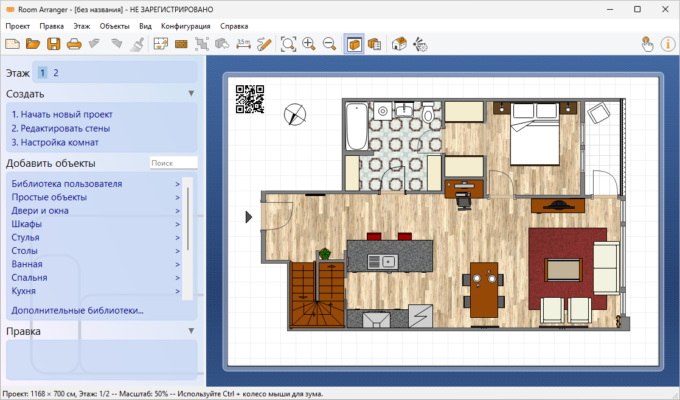
🚀 Why Use Room Arranger?
1. Easy-to-Use Interface
With a simple drag-and-drop system, users can quickly create floor plans and room layouts without technical expertise.
2. Realistic 3D Visualization
Switch between 2D drawings and immersive 3D models to better understand how your design looks in reality.
3. Wide Furniture Library
Choose from a built-in collection of furniture and household items or design your own custom objects.
4. Perfect for Professionals & Hobbyists
Architects and interior designers can use it for client presentations, while homeowners can use it to plan renovations.
🔑 Key Features of Room Arranger 10.2.0.730
🖼 Floor Plan Creator – design detailed 2D layouts with dimensions.
🛋️ Furniture Arrangement – drag-and-drop furniture into rooms.
🏡 3D Visualization – realistic rendering of room designs.
📏 Measurement Tools – ensure accuracy in dimensions and spacing.
🧩 Custom Objects – create or import your own furniture models.
📂 Export Options – save projects in multiple formats, including images and VRML.
👥 Multi-language Support – accessible to users worldwide.
📌 What’s New in Version 10.2.0.730?
Improved 3D rendering engine for smoother visualization.
Updated furniture and object library.
Enhanced measurement accuracy.
Bug fixes for better stability and performance.
💻 Software Information
Name: Room Arranger
Version: 10.2.0.730
Size: ~50 MB
Developer: Jan Adamec
System: Windows 7/8/10/11, macOS
License: Paid with trial version available
🛠 How to Use Room Arranger 10.2.0.730
Install the software and launch a new project.
Start by drawing the room’s floor plan with exact dimensions.
Drag and drop furniture items from the library into your plan.
Switch to 3D view for a realistic visualization of your design.
Save, export, or print your project for presentations or personal use.
👨💼 Who Can Benefit from It?
Interior Designers 🎨 – create and showcase design concepts to clients.
Architects 🏗️ – plan and visualize structures before construction.
Homeowners 🏠 – design renovations or rearrange furniture before moving.
Real Estate Agents 📊 – present virtual tours and furnished layouts.
✅ Final Verdict
Room Arranger 10.2.0.730 is a versatile and easy-to-use interior design and planning tool. With its combination of 2D planning and 3D visualization, it empowers users to design rooms, experiment with layouts, and bring creative ideas into reality.
If you are looking for an affordable yet powerful space design solution, this version of Room Arranger is an excellent choice.
✔ Tested: This software was tested on Windows 10 & Windows 11 and works smoothly without issues.
Frequently Asked Questions
- Is this software free?
Yes, it can be downloaded and used for free. - Does it support Windows 11?
Yes, it works perfectly on Windows 10 and 11. - Is it safe to use?
Yes, the software was scanned and tested before publishing.
Last updated: January 2026