In today’s digital world, video content has become a vital part of communication, entertainment, and education. From social media uploads to professional presentations, having the right tool to manage video formats is essential. Windows Video Converter 2025 v9.9.9.17 is a versatile solution that allows users to convert, compress, and even perform basic editing on their video files with ease and buy.
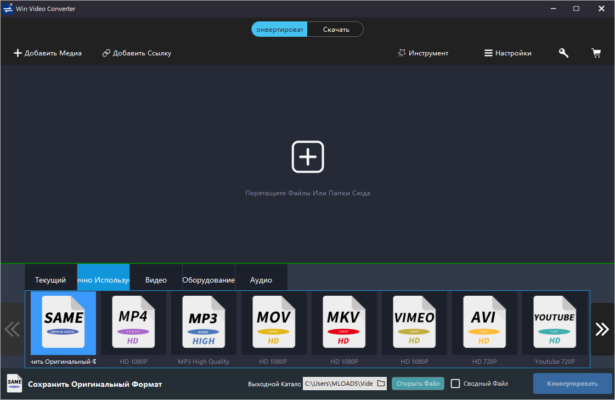
This software is designed for both beginners and professionals who need fast, reliable, and high-quality video conversion. In this article, we will discuss the features, benefits, and uses of Windows Video Converter 2025.
What is Windows Video Converter 2025?
Windows Video Converter 2025 is an advanced video conversion software that supports a wide range of video and audio formats. Whether you want to convert a video to play on your smartphone, compress a large file for email, or edit videos before sharing, this tool covers all your needs.
The program ensures fast conversion speeds, lossless quality, and a user-friendly interface that makes video handling simple and efficient.
Key Features of Windows Video Converter 2025 v9.9.9.17
Wide Format Support
Convert videos to and from popular formats like MP4, AVI, MOV, MKV, WMV, FLV, and many others. This guarantees compatibility with almost all media players and devices.High-Speed Conversion
With GPU acceleration and optimized processing, the software can convert videos up to 30x faster than traditional converters.Lossless Video Quality
Even after conversion, the software maintains the original resolution and quality, supporting up to 4K and 8K UHD videos.Video Compression
Large video files can be reduced in size without sacrificing too much quality, making it perfect for online sharing and cloud storage.Built-in Video Editor
Includes basic editing tools such as trimming, cropping, rotating, adding subtitles, and applying effects.Audio Extraction
Easily extract audio tracks from videos and save them in formats like MP3, AAC, or WAV.Batch Processing
Convert multiple videos at once, saving time for users who work with large media libraries.Device Presets
Ready-made presets optimized for devices like iPhone, iPad, Android smartphones, gaming consoles, and smart TVs.
Benefits of Using Windows Video Converter 2025
User-Friendly Interface: Simple navigation suitable for beginners.
Professional Output: Maintains video clarity and syncs audio perfectly.
Versatile Use: Works for personal, educational, and professional projects.
Time Saving: Batch conversion and GPU acceleration reduce waiting times.
All-in-One Tool: Combines video converter, compressor, and editor.
Why You Need Windows Video Converter 2025
Video formats often create compatibility issues across platforms and devices. For example, a video recorded on one device may not play on another without conversion. With Windows Video Converter 2025, you can easily resolve these problems, ensuring smooth playback anywhere.
Content creators, educators, businesses, and everyday users can all benefit from the efficiency and flexibility offered by this tool.
How to Use Windows Video Converter 2025
Install the software and launch it.
Import your video files into the program.
Choose the desired output format or device preset.
Customize settings if needed (resolution, bitrate, subtitles, etc.).
Click the Convert button to start processing.
Within minutes, your videos will be ready for playback, sharing, or storage.
Conclusion
Windows Video Converter 2025 v9.9.9.17 is a comprehensive solution for anyone who needs to manage video files effectively. With its fast conversion speed, wide format support, and built-in editing features, it stands out as one of the best video conversion tools available today.
Whether you are a professional content creator or just someone who wants to convert videos for personal use, this software provides everything you need in a single package.
✔ Tested: This software was tested on Windows 10 & Windows 11 and works smoothly without issues.
Frequently Asked Questions
- Is this software free?
Yes, it can be downloaded and used for free. - Does it support Windows 11?
Yes, it works perfectly on Windows 10 and 11. - Is it safe to use?
Yes, the software was scanned and tested before publishing.
Last updated: January 2026