Adobe Photoshop 2021: Key Features, Tools, and Why It Still Matters for Designers
While newer versions of Adobe Photoshop continue to roll out, Adobe Photoshop 2021 remains a powerful and widely used version—especially for freelancers, students, and small studios seeking a stable, feature-rich editor without the latest subscription demands. Released in late 2020 as part of the Creative Cloud 2021 suite, Photoshop 2021 introduced several groundbreaking tools that reshaped creative workflows and buy.
What Made Photoshop 2021 Stand Out?
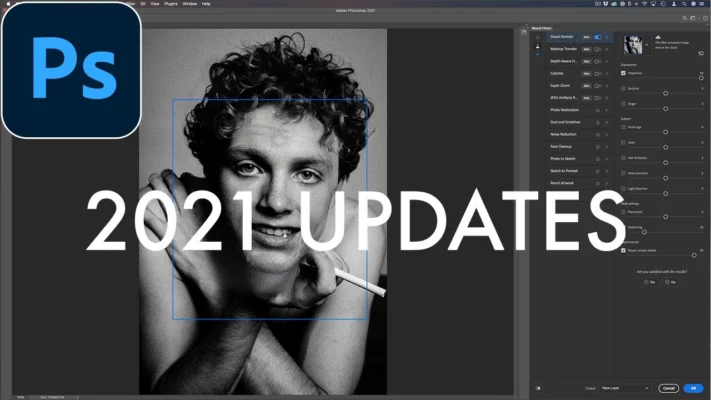
Introduction of Neural Filters
One of the most significant additions in Photoshop 2021 was Neural Filters—a suite of AI-powered filters accessible under the Filter menu. These smart tools enabled users to perform complex edits with a single click, such as:
- Skin Smoothing for portrait retouching
- Style Transfer to apply artistic effects
- Colorize for bringing black-and-white photos to life
- Depth Blur for realistic background bokeh
Unlike traditional filters, Neural Filters run in the cloud (with an internet connection), leveraging Adobe Sensei AI for intelligent, context-aware results.
Sky Replacement Tool
Photoshop 2021 debuted the Sky Replacement feature, revolutionizing landscape and architectural photography. With just one click, users could swap dull skies with dramatic clouds, sunsets, or starry nights. The tool automatically matched lighting, color temperature, and perspective—making compositing faster and more natural than ever.
Improved Brush Experience & Pattern Preview
Designers welcomed the enhanced brush engine, which offered smoother strokes and better pressure sensitivity—ideal for digital painters. Additionally, the new Pattern Preview mode allowed users to see real-time tiling of custom patterns as they designed them, streamlining textile, wallpaper, and surface design workflows.
Performance and Interface Enhancements
Photoshop 2021 featured a modernized user interface with better contrast and cleaner icons, improving readability and reducing eye strain. Behind the scenes, Adobe optimized performance for both Windows and macOS, resulting in:
- Faster startup times
- Quicker layer rendering
- Smoother zooming and panning on high-resolution images
The software also introduced cloud document support, enabling seamless saving and syncing of PSD files to Adobe Creative Cloud—ideal for switching between desktop and iPad workflows.
Why Photoshop 2021 Is Still Relevant in 2024
Stability and Compatibility
Many users prefer Photoshop 2021 for its proven stability and compatibility with older plugins and hardware. Unlike newer versions that require frequent updates or high-end specs, Photoshop 2021 runs efficiently on mid-range systems—making it a practical choice for educators and budget-conscious creatives.
Cost-Effective Licensing Options
Although Adobe has shifted to a subscription-only model, some users still access Photoshop 2021 through perpetual licenses (via older Creative Cloud plans) or educational bundles. This makes it an attractive entry point for learners who don’t need the latest AI features like Generative Fill.
Solid Foundation for Learning
For beginners, Photoshop 2021 offers a balanced mix of classic tools and modern innovations—without the complexity of advanced generative AI found in Photoshop 2024. Mastering layers, masks, selections, and Neural Filters in this version provides a strong foundation for future upgrades.
Tips for Maximizing Photoshop 2021
- Use Keyboard Shortcuts: Speed up your workflow with customizable shortcuts (Edit > Keyboard Shortcuts).
- Enable GPU Acceleration: Go to Preferences > Performance to ensure smooth rendering.
- Explore Adobe Tutorials: Adobe offers free in-app tutorials tailored to Photoshop 2021 features.
Final Thoughts
Though it’s no longer the newest version, Adobe Photoshop 2021 remains a robust, versatile, and accessible tool for a wide range of creative tasks. Its blend of AI innovation and traditional editing power ensures it continues to serve photographers, designers, and digital artists worldwide—even years after its release.
Whether you’re working on a legacy system or simply prefer a streamlined editing experience, Photoshop 2021 proves that great design doesn’t always require the latest software—just the right tools.
✔ Tested: This software was tested on Windows 10 & Windows 11 and works smoothly without issues.
Frequently Asked Questions
- Is this software free?
Yes, it can be downloaded and used for free. - Does it support Windows 11?
Yes, it works perfectly on Windows 10 and 11. - Is it safe to use?
Yes, the software was scanned and tested before publishing.
Last updated: January 2026