🌍 Adobe Substance 3D Sampler 5.1.1: The Ultimate Tool for Material Creation
Adobe Substance 3D Sampler 5.1.1 is a powerful software that lets artists, designers, and 3D creators transform real-world images into realistic digital materials. Whether you’re building a game environment, a visual effects scene, or an architectural model, Sampler gives you the tools to create high-quality, physically based (PBR) materials from simple photographs.
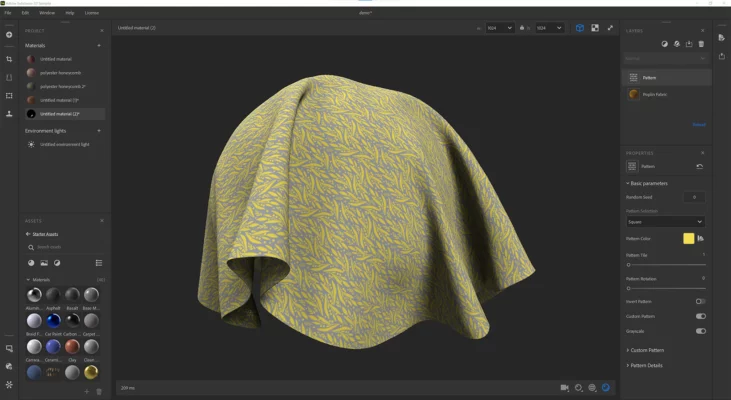
It’s part of the Adobe Substance 3D Collection, alongside Painter, Designer, and Stager — forming a complete ecosystem for professional 3D texturing and material creation.
🎯 Why Use Substance 3D Sampler?
✅ Photo-to-Material Conversion: Instantly convert real images into PBR textures.
✅ AI-Powered Enhancements: Remove shadows, lighting, and perspective distortions automatically.
✅ Seamless Integration: Sync projects with Substance Painter and Photoshop.
✅ Material Blending: Combine multiple surfaces for unique hybrid results.
✅ Fast Workflow: Real-time 3D viewport and instant updates.
✅ Adobe Cloud Integration: Save and share your assets securely across devices.
Perfect for game developers, 3D artists, interior designers, and texture specialists who want to save time while maintaining professional-level quality.
✨ Key Features in Version 5.1.1
🧩 1. Enhanced AI Material Generation
This version introduces upgraded AI algorithms that automatically detect surface types, remove lighting artifacts, and generate seamless normal, roughness, and height maps with stunning accuracy.
🖼️ 2. Realistic Surface Scanning
With just a few photos, users can capture real materials (like wood, fabric, or stone) and turn them into high-quality 3D textures ready for rendering or game engines such as Unreal Engine and Unity.
🧱 3. Parametric Editing & Layering
Easily modify material properties such as roughness, metallic values, and color balance. You can also stack layers of materials to produce complex textures without losing realism.
🌈 4. Integration with the Adobe 3D Ecosystem
Seamlessly send your materials to Substance Painter for texturing, Designer for node-based editing, or Stager for 3D scene rendering. Adobe’s ecosystem ensures consistency and a smooth pipeline for professionals.
⚙️ 5. New Export & Format Support
Sampler 5.1.1 adds better export options for GLTF, USD, and FBX formats — ensuring compatibility with leading 3D platforms and engines.
🧠 Ideal For:
🎮 Game Developers: Build custom materials for realistic environments.
🏠 Architects & Designers: Visualize interior and exterior surfaces accurately.
🎥 VFX Artists: Create photorealistic props and backgrounds for films.
🧑🎨 3D Artists: Generate new textures quickly for creative projects.
🪵 Material Libraries: Scan and digitize physical samples for consistent branding.
💡 Pro Tip: Capture your own materials with a smartphone, then refine them in Sampler to achieve a perfect photorealistic texture!
🧪 System Requirements
Operating System: Windows 10 / 11 (64-bit)
Processor: Intel Core i5 / AMD Ryzen 5 or higher
RAM: 8 GB (16 GB recommended)
GPU: NVIDIA GTX 1060 or equivalent
Storage: 2 GB available space
License: Requires Adobe Creative Cloud subscription
🆚 Substance Sampler vs. Other Material Tools
| Feature | Substance Sampler | Quixel Mixer | Materialize |
|---|---|---|---|
| AI Material Creation | ✅ Yes | ⚠️ Partial | ❌ No |
| Adobe Ecosystem | ✅ Full Integration | ❌ None | ❌ None |
| Layered Materials | ✅ Yes | ✅ Yes | ⚠️ Limited |
| Export Formats | ✅ PBR, GLTF, USD | ⚠️ Limited | ❌ Basic |
| Free Version | ⚠️ Trial Only | ✅ Free | ✅ Free |
⚠️ Important Notes
Always use high-resolution photos for best material quality.
Check licensing before using captured textures commercially.
Save your assets to Adobe Cloud for team collaboration and version control.
Learn more and download from Adobe’s official page: https://substance3d.adobe.com
✔ Tested: This software was tested on Windows 10 & Windows 11 and works smoothly without issues.
Frequently Asked Questions
- Is this software free?
Yes, it can be downloaded and used for free. - Does it support Windows 11?
Yes, it works perfectly on Windows 10 and 11. - Is it safe to use?
Yes, the software was scanned and tested before publishing.
Last updated: January 2026