
🔒 StopUpdates10 4.7.2025.424 – Complete Control Over Windows Updates
StopUpdates10 4.7.2025.424 is a powerful and user-friendly tool that allows you to disable automatic Windows updates on Windows 10 and Windows 11. Many users dislike Microsoft’s policy of forced updates, which can sometimes cause performance issues, unwanted restarts, or software incompatibilities. This utility solves that problem by giving you full control over updates.
🆕 What’s New in StopUpdates10 4.7.2025.424?
The latest release introduces:
Improved compatibility with the latest Windows 10 and Windows 11 builds.
Enhanced protection against Windows Update reactivation.
New features for advanced users to control update-related services.
Bug fixes and stability improvements.
⚙️ Key Features of StopUpdates10
✅ Disable Automatic Updates
Completely blocks Windows from downloading and installing updates without your permission.
Prevents forced reboots after updates.
✅ Re-Enable Updates Anytime
The tool allows you to re-enable updates easily whenever you want to install security patches.
✅ Block Upgrade to New Windows Versions
StopUpdates10 prevents automatic upgrade to newer versions, such as moving from Windows 10 to Windows 11 without consent.
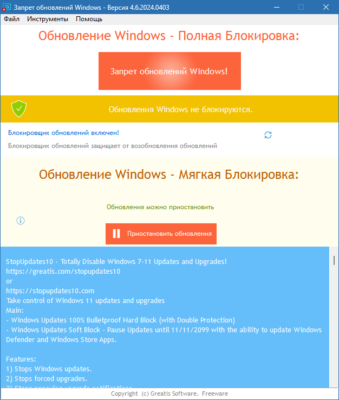
✅ Simple and Clean Interface
No complicated settings. One-click control to disable or enable updates.
Clear status indicators showing if updates are blocked or active.
🖥️ System Requirements
OS: Windows 10, Windows 11.
RAM: At least 512 MB.
Storage: Minimal space required (few MBs).
Permissions: Administrator rights for full functionality.
🧩 Why Use StopUpdates10?
Full Control: You decide when and what updates to install.
Avoid Update Bugs: Prevent problematic updates from crashing your system.
Improve Performance: Stop unnecessary background update processes.
Ideal for Gamers: Avoid sudden restarts during gaming sessions.
✅ Advantages
Free and lightweight.
Works on the latest Windows versions.
No background resource usage after setup.
Easy restore option for updates.
⚠️ Important Notes
Disabling updates for a long time may expose your system to security risks.
Use this tool responsibly and install critical patches manually when needed.
Best for users who require stability and cannot risk system crashes due to unexpected updates.
🏁 Final Thoughts
StopUpdates10 4.7.2025.424 is the perfect solution for anyone frustrated by Windows automatic updates and forced upgrades. With a simple interface, strong blocking features, and compatibility with modern Windows versions, this tool gives you complete control over your system.
If you need an easy, reliable, and safe way to manage updates on Windows 10 or 11, StopUpdates10 is an excellent choice.
✔ Tested: This software was tested on Windows 10 & Windows 11 and works smoothly without issues.
Frequently Asked Questions
- Is this software free?
Yes, it can be downloaded and used for free. - Does it support Windows 11?
Yes, it works perfectly on Windows 10 and 11. - Is it safe to use?
Yes, the software was scanned and tested before publishing.
Last updated: January 2026