
In the world of engineering and manufacturing, precision, efficiency, and compatibility are key. Whether you’re designing machine parts, creating technical drawings, or managing production workflows, having the right CAD software can make all the difference. ZWCAD MFG 2026 v26.00 Build 2025.03.28 is a specialized version of ZWCAD tailored specifically for manufacturing and mechanical design , offering advanced tools that streamline the entire design-to-production process and buy.
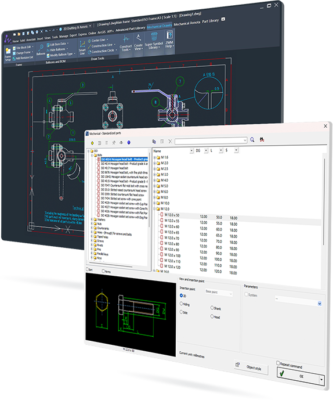
Developed by ZWSOFT, this release combines high-speed performance, full DWG compatibility, and industry-specific features — making it an ideal alternative to AutoCAD Mechanical for engineers, drafters, and manufacturers.
Let’s explore what makes ZWCAD MFG 2026 a top choice for modern industrial design.
📌 What Is ZWCAD MFG 2026 v26.00?
ZWCAD MFG 2026 v26.00 (Build 2025.03.28) is the Manufacturing Edition of ZWCAD — a professional-grade CAD platform built for mechanical engineers and production teams. Unlike the standard version, MFG includes dedicated toolsets for part design, dimensioning, sheet metal, tolerances, and BOM (Bill of Materials) management .
It supports both 2D drafting and 3D modeling , with seamless integration into existing workflows thanks to its native support for DWG files — ensuring no data loss when exchanging drawings with clients or partners using AutoCAD.
🛠️ Key Features of ZWCAD MFG 2026 v26.00
1. ⚙️ Specialized Manufacturing Toolset
Includes libraries and commands for:
- Shaft generators
- Gear design
- Bolted joints
- Bearings and springs
- Standard part catalogs (ISO, ANSI, DIN)
These tools reduce repetitive tasks and improve design accuracy.
2. 📐 Smart Dimensioning & Annotation
Automatically apply mechanical dimensions, surface finish symbols, welding symbols, and geometric tolerances (GD&T) according to international standards.
3. 🧩 Full DWG Compatibility
Open, edit, and save DWG files natively without conversion issues. Fully compatible with AutoCAD R2.5 through latest versions.
4. 🖌️ Enhanced Drafting Assistant
Intelligent cursor tracking, layer management, and constraint tools help maintain precision in complex assemblies.
5. 🧮 Parametric Design & Automation
Use constraints and formulas to create intelligent, editable designs that update automatically when parameters change — perfect for iterative product development.
6. 📦 Bill of Materials (BOM) & Table Creation
Generate structured BOMs directly from block attributes. Export tables to Excel or CSV for procurement and documentation.
7. 🌀 3D Solid Modeling
Create and modify 3D models with Boolean operations, extrusion, revolution, and lofting tools. Visualize assemblies before manufacturing.
8. 📁 Sheet Metal Design Tools
Design flat patterns, add bends, and calculate unfold lengths with dedicated sheet metal commands.
9. 🔄 API & LISP Support
Customize workflows using LISP, VBA, ZRX (C/C++) , and .NET APIs — ideal for integrating with PLM or ERP systems.
10. 💾 Lightweight & Fast Performance
Runs smoothly on mid-range hardware, with faster startup and file loading compared to heavier CAD suites.
👥 Who Should Use ZWCAD MFG 2026?
- Mechanical Engineers: For designing machine components and assemblies.
- Drafters & Technicians: To create detailed technical drawings and schematics.
- Manufacturing Companies: Streamline design-to-production pipelines.
- Tool & Die Makers: Design molds, jigs, and fixtures efficiently.
- Educational Institutions: Teach CAD with a cost-effective, industry-relevant tool.
🖥️ System Requirements
- Operating System: Windows 10 / 11 (64-bit)
- Processor: Intel Core i5 or equivalent
- RAM: 8 GB minimum (16 GB recommended)
- Graphics Card: DirectX 11-compatible GPU with 2GB VRAM
- Hard Disk Space: 4 GB free space
- Display: 1920×1080 resolution or higher
📈 Why Choose ZWCAD MFG 2026 v26.00?
- ✅ Tailored for Manufacturing – Industry-specific tools out of the box
- ✅ AutoCAD Alternative – Same DWG workflow at a lower cost
- ✅ Stable & Reliable – Proven performance across global industries
- ✅ Extensible & Customizable – Supports automation and integration
- ✅ Regular Updates – Active development with new features in 2025 builds
✅ Final Thoughts
ZWCAD MFG 2026 v26.00 Build 2025.03.28 is more than just a CAD program — it’s a complete mechanical design environment built for real-world manufacturing challenges. With its powerful toolset, excellent DWG compatibility, and focus on productivity, it stands as a strong competitor to high-cost alternatives like AutoCAD Mechanical.
If you’re in the engineering, fabrication, or industrial design field and need a reliable, affordable, and feature-rich CAD solution, ZWCAD MFG 2026 is definitely worth considering .
✔ Tested: This software was tested on Windows 10 & Windows 11 and works smoothly without issues.
Frequently Asked Questions
- Is this software free?
Yes, it can be downloaded and used for free. - Does it support Windows 11?
Yes, it works perfectly on Windows 10 and 11. - Is it safe to use?
Yes, the software was scanned and tested before publishing.
Last updated: January 2026