
With thousands of photos stored across devices, drives, and folders, finding the right image can feel like searching for a needle in a haystack. Manually sorting through endless folders is time-consuming and inefficient — especially when you’re preparing albums, sharing memories, or working on creative projects and buy.
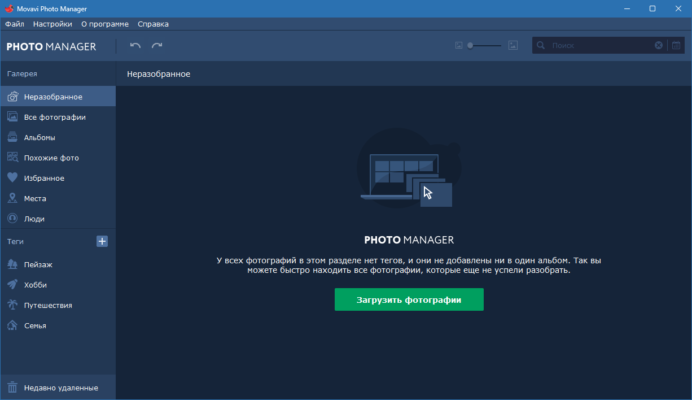
That’s where Movavi Photo Manager 2.0.0 comes in — a powerful, user-friendly photo management solution designed to organize, enhance, and locate your digital photos quickly and intelligently .
Developed by Movavi, a trusted name in multimedia software, Photo Manager 2.0.0 uses AI-powered recognition technology to automatically group your images by faces, dates, locations, objects, and events — all while keeping your files 100% offline and private .
Let’s explore how this smart tool transforms chaotic photo libraries into well-structured, searchable collections.
📌 What Is Movavi Photo Manager 2.0.0?
Movavi Photo Manager 2.0.0 is a desktop application for Windows that helps users organize, browse, and lightly edit large photo collections without uploading them to the cloud. It scans your hard drives, external storage, and network folders to build a centralized catalog of your images — complete with thumbnails, metadata, and intelligent tags.
Unlike basic file explorers, it uses artificial intelligence and machine learning algorithms to:
- Detect and group photos by people (face recognition)
- Identify places using GPS data
- Recognize objects like cars, animals, buildings
- Sort by date, month, year, or event
All processing happens locally — your photos never leave your computer.
Perfect for families, photographers, travelers, and anyone overwhelmed by digital clutter.
🛠️ Key Features of Movavi Photo Manager 2.0.0
1. 🧠 AI-Powered Face Recognition
The software detects faces across your collection and groups them into named categories. You can assign names to people and instantly find every photo of a family member or friend.
Great for organizing years of holiday pictures or baby milestones.
2. 🗺️ Location-Based Sorting
If your photos contain GPS data (from smartphones), they are automatically plotted on a built-in map. Browse images by country, city, or landmark.
3. 🔍 Smart Search by Object & Scene
Search for “dog,” “beach,” “car,” or “sunset” — the AI engine finds matching images based on visual content, not just filenames.
4. 📅 Timeline View
Browse your entire photo history in a clean, scrollable timeline — sorted by day, month, and year.
5. 🧹 Remove Duplicates
Find and delete exact or near-duplicate photos (e.g., multiple shots of the same moment) to free up disk space.
6. ✏️ Built-In Photo Editor
Make quick enhancements directly in the app:
- Crop, rotate, flip
- Adjust brightness, contrast, saturation
- Apply filters and effects
- Red-eye removal
No need to export to another editor for minor fixes.
7. 🏷️ Auto Tagging & Categorization
Photos are tagged automatically with keywords based on content, date, and location — making browsing effortless.
8. 💾 Works Completely Offline
Your privacy matters — no internet connection required , and no data uploaded to servers.
9. 🔄 Fast Import & Indexing
Quickly import photos from any folder, drive, or camera. Once indexed, search results appear instantly.
10. 🖼️ Support for Major Formats
Works with JPEG, PNG, BMP, TIFF, RAW (CR2, NEF, ARW, etc.), and more.
👥 Who Should Use Movavi Photo Manager 2.0.0?
- Families: Organize years of memories by person and event.
- Photographers: Quickly browse large archives without third-party tools.
- Travelers: View photos on a map and relive trips visually.
- Home Users: Clean up duplicates and find lost images fast.
- Seniors & Non-Tech Users: Simple interface with smart automation.
🖥️ System Requirements
- Operating System: Windows 10, 11 (64-bit)
- Processor: Intel Core i3 or equivalent
- RAM: 4 GB minimum (8 GB recommended)
- Hard Disk Space: 500 MB for installation + space for photo library
- Graphics Card: DirectX 10-compatible GPU
- Display: 1280×768 resolution or higher
📈 Why Choose Movavi Photo Manager 2.0.0?
- ✅ AI-Powered Organization Without Cloud Uploads
- ✅ Face, Object & Location Recognition
- ✅ Lightweight Editing Tools Included
- ✅ Fast Search Across Thousands of Photos
- ✅ Respects User Privacy – 100% Offline
- ✅ User-Friendly Interface – No Learning Curve
✅ Final Thoughts
Movavi Photo Manager 2.0.0 is more than just a photo viewer — it’s an intelligent digital assistant for managing your growing image library. With its powerful AI features, local-only processing, and intuitive design, it brings order to chaos and makes rediscovering old memories easier than ever.
If you have hundreds or thousands of unsorted photos scattered across your PC, Movavi Photo Manager 2.0.0 is a smart investment in time-saving and peace of mind .
For anyone who values privacy, speed, and simplicity in photo management, this tool delivers exactly what it promises — control over your visual life .
✔ Tested: This software was tested on Windows 10 & Windows 11 and works smoothly without issues.
Frequently Asked Questions
- Is this software free?
Yes, it can be downloaded and used for free. - Does it support Windows 11?
Yes, it works perfectly on Windows 10 and 11. - Is it safe to use?
Yes, the software was scanned and tested before publishing.
Last updated: January 2026