
Introduction
Managing money effectively is one of the most important skills for both individuals and families. Tracking expenses, planning budgets, and analyzing spending patterns can help avoid financial problems and achieve long-term goals. While spreadsheets may work for basic tracking, they lack automation and detailed reporting. HomeBank 5.9.5 is a free, open-source personal finance software that provides a professional yet easy-to-use solution for managing money.
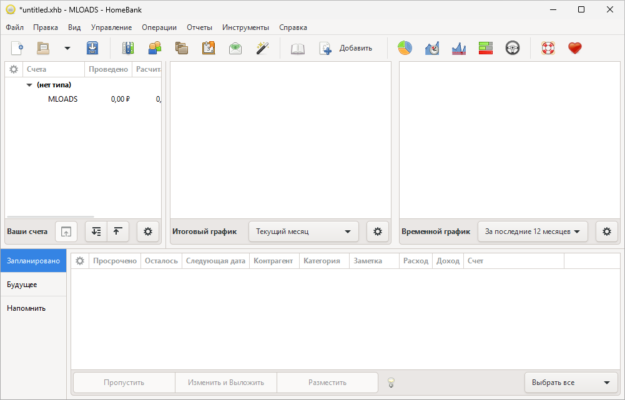
What is HomeBank 5.9.5?
HomeBank is an open-source personal finance management software that works on Windows, Linux, and macOS. It is designed to help users track their finances, organize budgets, and generate insightful reports.
The 5.9.5 release brings improved stability, bug fixes, and enhanced compatibility with financial data import formats. This version continues HomeBank’s tradition of being a reliable and accessible alternative to commercial financial management software.
Key Features of HomeBank 5.9.5
Multi-Account Management: Track bank accounts, credit cards, and cash wallets in one place.
Budgeting Tools: Create and manage monthly or yearly budgets and monitor your progress.
Expense Categorization: Assign categories and tags to transactions for better analysis.
Reports & Graphs: Generate charts and reports to visualize income, spending, and savings.
Data Import & Export: Supports OFX, QFX, QIF, and CSV formats for easy integration.
Recurring Transactions: Automate regular payments like bills, subscriptions, or salaries.
Cross-Platform: Available for Windows, macOS, and Linux distributions.
Lightweight & Free: Open-source and easy to install without heavy system requirements.
System Requirements
To run HomeBank 5.9.5, your system should meet the following requirements:
OS: Windows 7, 8, 10, 11 (32/64-bit), macOS, or Linux
Processor: Intel/AMD dual-core or better
RAM: 1 GB minimum (2 GB recommended)
Storage: 50 MB free disk space
Additional: Internet connection for updates and online imports
How to Download and Install HomeBank 5.9.5
Go to the official HomeBank website or trusted software repositories.
Download the installer for your operating system (Windows, macOS, or Linux).
Run the setup file and follow the installation steps.
Launch the program and set up your accounts and categories.
Import existing financial data or start recording transactions manually.
Use the built-in budgeting and reporting tools to monitor your finances.
Why Use HomeBank 5.9.5?
HomeBank 5.9.5 is an excellent choice for users looking for a free and professional finance manager. Unlike paid alternatives, it offers most of the features people need without limitations.
For individuals: Easily track expenses, monitor income, and plan savings goals.
For families: Manage shared expenses and plan household budgets.
For freelancers: Keep records of business transactions and analyze cash flow.
Its lightweight nature and cross-platform support make it ideal for both casual users and power users.
Conclusion
HomeBank 5.9.5 is a reliable and user-friendly finance management tool that simplifies budgeting, expense tracking, and financial reporting. With its open-source nature, strong community support, and continuous updates, it is one of the best free personal finance solutions available.
Download HomeBank 5.9.5 today and take the first step toward better financial control and smarter money management.
✔ Tested: This software was tested on Windows 10 & Windows 11 and works smoothly without issues.
Frequently Asked Questions
- Is this software free?
Yes, it can be downloaded and used for free. - Does it support Windows 11?
Yes, it works perfectly on Windows 10 and 11. - Is it safe to use?
Yes, the software was scanned and tested before publishing.
Last updated: January 2026