
OP Auto Clicker 3.1.1 is a lightweight and efficient automation tool that allows users to simulate mouse clicks automatically. It is widely used for productivity tasks, repetitive work, and gaming, where quick and precise clicking is required. With customizable settings and a simple interface, OP Auto Clicker makes automation accessible to both beginners and advanced users.
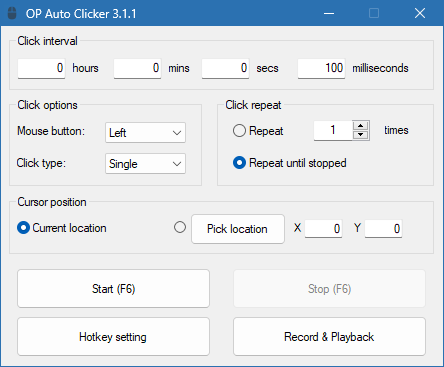
Simple and User-Friendly Interface
One of the main advantages of OP Auto Clicker is its straightforward interface. The software is designed to be easy to use, with clear options and simple controls. Users can quickly set up:
The number of clicks to perform.
The interval between each click.
The mouse button to use (left, right, or middle).
Single or double-click actions.
This makes it practical for anyone who wants quick automation without needing technical knowledge.
Customizable Automation Options
OP Auto Clicker 3.1.1 offers flexible customization so that users can adapt it to their needs. Key features include:
Adjustable click intervals (milliseconds, seconds, minutes, hours).
Unlimited number of clicks or a fixed count.
Hotkeys to start and stop the clicking process instantly.
Options to click at the current cursor location or a specific screen coordinate.
These features make it useful for tasks that require repetitive clicking or continuous input.
Applications in Gaming and Productivity
The software is popular among gamers who need rapid clicking in games such as idle clickers, Minecraft, or other action-based titles. It provides a competitive edge by automating actions that would otherwise be physically tiring.
Outside of gaming, OP Auto Clicker is valuable for:
Testing software and applications.
Automating repetitive tasks in data entry.
Speeding up workflow in productivity tools.
Reducing strain on the hands from constant clicking.
This makes it a versatile utility for multiple scenarios.
Lightweight and Safe to Use
OP Auto Clicker 3.1.1 is a lightweight program that runs smoothly without consuming significant system resources. It does not require installation, meaning users can run it as a portable tool. Additionally, it is safe and secure, without unnecessary ads or bundled software.
Why Choose OP Auto Clicker 3.1.1?
There are many auto-clickers available, but OP Auto Clicker stands out because of its simplicity and reliability. Its key strengths include:
Easy setup with no technical complexity.
Flexible settings for full customization.
Portable design with no installation required.
Compatibility with Windows operating systems.
It provides an effective solution for anyone looking to save time and effort.
Conclusion
OP Auto Clicker 3.1.1 is a reliable and efficient tool for automating mouse clicks. Whether you are a gamer seeking faster actions, a professional handling repetitive tasks, or a developer testing applications, this software provides an easy way to increase productivity. With its customizable features, lightweight design, and user-friendly interface, OP Auto Clicker remains one of the best auto-clicking tools available today.
✔ Tested: This software was tested on Windows 10 & Windows 11 and works smoothly without issues.
Frequently Asked Questions
- Is this software free?
Yes, it can be downloaded and used for free. - Does it support Windows 11?
Yes, it works perfectly on Windows 10 and 11. - Is it safe to use?
Yes, the software was scanned and tested before publishing.
Last updated: January 2026