
In the field of computational proteomics, accurate protein identification from mass spectrometry (MS) data is critical—and SearchGUI 4.3.17 stands out as a powerful, open-source platform that unifies multiple search engines into a single, user-friendly workflow. Developed by the CompOmics team at Ghent University, this tool streamlines the analysis of peptide-spectrum matches (PSMs), enabling researchers to achieve higher confidence in their results through consensus-based identification.
What Is SearchGUI?
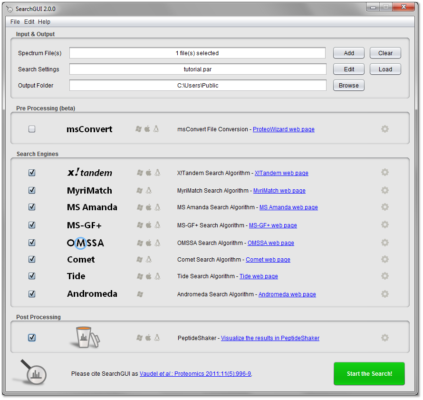
SearchGUI is not a search engine itself, but a meta-search platform that wraps and harmonizes leading proteomics search algorithms—including X! Tandem, MS-GF+, OMSSA, Comet, Tide, and MyriMatch—into one interface. Version 4.3.17 enhances compatibility, stability, and support for modern file formats, making it a staple in academic and industrial proteomics pipelines.
Key Features of SearchGUI 4.3.17
1. Multi-Engine Integration
Run multiple search engines simultaneously on the same raw MS data (e.g., .mgf, .mzML). By comparing results across algorithms, researchers reduce false positives and increase identification reliability—especially for low-abundance proteins.
2. Seamless Compatibility with PeptideShaker
SearchGUI is designed to work hand-in-hand with PeptideShaker, its companion tool for result visualization and validation. After processing, SearchGUI exports data directly to PeptideShaker for in-depth analysis, protein inference, and report generation.
3. Support for Modern File Formats
Version 4.3.17 fully supports:
- mzML and mzXML (open MS data standards)
- FASTA protein databases (with decoy generation for FDR control)
- Thermo .raw files (via ProteoWizard conversion)
4. Customizable Search Parameters
Fine-tune every aspect of your search:
- Enzyme specificity (trypsin, Lys-C, etc.)
- Fixed and variable modifications (e.g., carbamidomethylation, oxidation)
- Mass tolerances (precursor and fragment ions)
- Instrument type (Q-TOF, Orbitrap, ion trap)
5. Cross-Platform & Open Source
Built in Java, SearchGUI runs on Windows, macOS, and Linux. As part of the CompOmics suite, it’s free for academic and commercial use under the Apache 2.0 license—promoting transparency and reproducibility in science.
6. Command-Line Support for Automation
Ideal for high-throughput labs, SearchGUI 4.3.17 includes a robust CLI mode, enabling integration into automated pipelines (e.g., via Nextflow, Snakemake, or Galaxy).
Why Researchers Choose SearchGUI
- Increased identification confidence through consensus across engines
- Reduced setup time—no need to configure each search tool separately
- Reproducible workflows with saved parameter templates
- Active community and academic support from Ghent University’s bioinformatics group
Ideal For:
- Proteomics labs analyzing LC-MS/MS data
- PhD students and postdocs in systems biology
- Core facilities processing large-scale MS datasets
- Developers building custom bioinformatics pipelines
Limitations to Note
- Requires basic knowledge of proteomics (not designed for beginners)
- Raw file conversion (e.g., .raw → .mzML) must be done externally (via msconvert)
- Large datasets may require significant RAM and processing time
Final Thoughts
SearchGUI 4.3.17 exemplifies how open-source collaboration can advance scientific research. By unifying fragmented search tools into a coherent, extensible platform, it empowers proteomics researchers to extract more accurate, reliable insights from complex mass spectrometry data.
Whether you’re validating biomarkers, studying post-translational modifications, or mapping protein interactions, SearchGUI remains an indispensable tool in the modern bioinformatician’s arsenal.
✔ Tested: This software was tested on Windows 10 & Windows 11 and works smoothly without issues.
Frequently Asked Questions
- Is this software free?
Yes, it can be downloaded and used for free. - Does it support Windows 11?
Yes, it works perfectly on Windows 10 and 11. - Is it safe to use?
Yes, the software was scanned and tested before publishing.
Last updated: January 2026