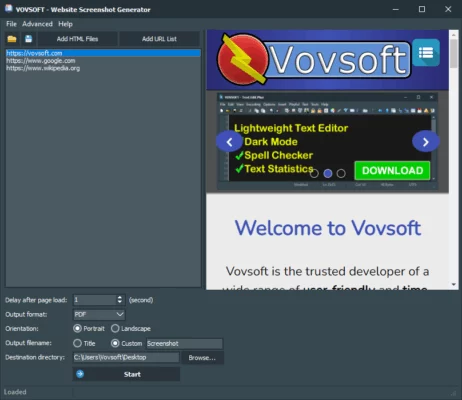
Need to save, share, or archive how a webpage looks—without manual scrolling or browser extensions? VovSoft Website Screenshot Generator 2.0 is a lightweight, portable, and incredibly fast desktop tool that captures full-page or visible-area screenshots of any website with a single click. Designed for marketers, developers, designers, and researchers, it eliminates the hassle of manual screen captures while offering precision and automation and buy.
Why Choose This Screenshot Tool?
Unlike browser-based screenshot extensions that rely on cloud services or limited viewport captures, VovSoft’s tool works 100% offline, requires no installation, and uses a built-in Chromium engine to render pages accurately—even those with JavaScript or dynamic content.
Key Features of Version 2.0
1. Full-Page or Visible-Area Capture
Choose between:
- Full-page screenshot: Captures the entire scrollable page, from header to footer, in one seamless image.
- Visible area only: Mimics what’s currently shown in a browser window—ideal for responsive testing or quick previews.
2. Batch URL Processing
Save time by capturing screenshots of multiple websites at once. Simply load a list of URLs from a text file, set your output folder and image format (PNG, JPG, or BMP), and let the tool run automatically—perfect for monitoring competitor sites or archiving project milestones.
3. Customizable Output Settings
- Set image quality and format
- Define output folder with auto-naming (e.g., by URL or timestamp)
- Adjust browser window size to simulate desktop, tablet, or mobile views (via custom width/height)
4. Portable & No Installation Required
The tool comes as a single EXE file—just download, run, and use. No registry changes, no background processes, and no internet permission needed after download. Ideal for USB drives or restricted work environments.
5. Fast and Lightweight
With a file size under 50 MB and minimal RAM usage, it runs smoothly even on older Windows systems (Windows 7 and up). Screenshots are generated in seconds, not minutes.
Practical Use Cases
- Web designers documenting design iterations
- SEO specialists tracking SERP changes or competitor layouts
- Developers verifying cross-browser rendering
- Teachers capturing online resources for classroom use
- Legal or compliance teams archiving web content for records
Privacy & Security Advantage
Since all rendering happens locally, your URLs and screenshots never leave your computer. This makes VovSoft’s tool far more secure than online screenshot services—especially when capturing internal dashboards, login pages, or sensitive client websites.
Limitations to Note
- Windows only (no macOS or Linux support)
- Cannot capture pages behind login walls (unless you manually log in via the built-in browser—currently not supported in v2.0)
- No built-in annotation or editing tools (but you can edit output images in any photo editor)
Final Thoughts
VovSoft Website Screenshot Generator 2.0 excels at doing one thing—and doing it extremely well: capturing accurate, high-quality website screenshots quickly and privately. It’s not bloated with unnecessary features, yet it offers enough control for professional workflows.
For anyone who regularly needs to document, compare, or share how websites appear, this free (with optional paid license for commercial use) tool is a reliable, efficient, and secure solution in 2024.
✔ Tested: This software was tested on Windows 10 & Windows 11 and works smoothly without issues.
Frequently Asked Questions
- Is this software free?
Yes, it can be downloaded and used for free. - Does it support Windows 11?
Yes, it works perfectly on Windows 10 and 11. - Is it safe to use?
Yes, the software was scanned and tested before publishing.
Last updated: January 2026