
USB flash drives and external storage devices are widely used for transferring files, backing up data, and carrying important documents. However, not all flash drives deliver the speed and reliability they promise. Some drives may even be faulty or contain fake storage capacities. This is where Bulldog Flash Tester 0.92-7 comes in. It is a lightweight and efficient tool designed to check the performance, stability, and authenticity of USB drives.
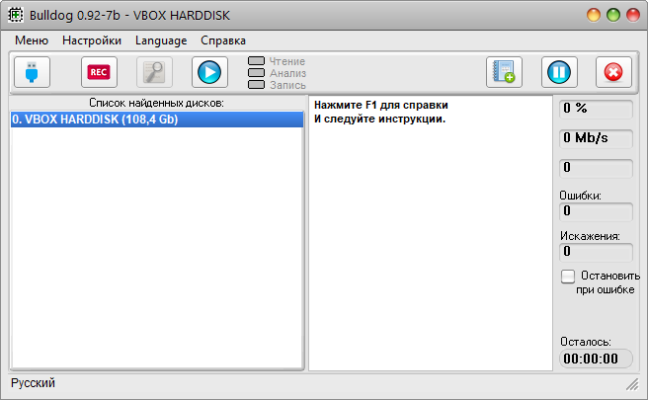
In this article, we will explore the key features of Bulldog Flash Tester, why it is useful, and how it can help users avoid unreliable storage devices.
What is Bulldog Flash Tester?
Bulldog Flash Tester is a flash drive testing utility that analyzes the performance of USB drives by writing and reading test data. The program checks if the flash memory is functioning correctly, whether it has hidden defects, and if it matches the advertised specifications.
Unlike general benchmarking tools, Bulldog Flash Tester is focused on stability and reliability, ensuring that your files are safe on the tested device.
Key Features of Bulldog Flash Tester 0.92-7
Authenticity Check: Detects fake flash drives that report higher capacity than they physically contain.
Speed Test: Measures real read and write speeds of USB drives.
Data Integrity Verification: Ensures files can be safely written and retrieved.
Lightweight Tool: No complex installation; runs quickly on Windows systems.
Error Detection: Identifies bad sectors or unstable memory blocks.
Simple Interface: Easy to use, even for beginners.
What’s New in Version 0.92-7
Improved compatibility with modern USB controllers.
Enhanced error detection for more accurate test results.
Minor bug fixes and performance optimizations.
Better reporting of storage inconsistencies.
Why Use Bulldog Flash Tester?
There are many reasons to use a flash testing tool like Bulldog Flash Tester:
Avoid Data Loss – By detecting bad memory blocks, you can prevent future file corruption.
Verify Drive Authenticity – Many counterfeit USB drives claim large storage sizes but provide far less usable space.
Measure Real Performance – Find out the actual speed of your USB drives, which is often different from what the manufacturer advertises.
Troubleshoot Issues – If your drive frequently disconnects or fails to copy large files, Bulldog Flash Tester can help pinpoint the cause.
System Requirements
Operating System: Windows XP, Vista, 7, 8, 10, 11
RAM: 512 MB minimum
Processor: 1 GHz or faster
Disk Space: 10 MB
How to Use Bulldog Flash Tester 0.92-7
Insert the USB flash drive you want to test.
Launch Bulldog Flash Tester.
Select the drive from the list of available storage devices.
Start the test to measure speed, stability, and integrity.
Review the report to see if the drive is reliable.
Final Verdict
Bulldog Flash Tester 0.92-7 is a must-have tool for anyone who relies on USB flash drives for important data. With its ability to check authenticity, measure speed, and verify stability, it protects users from fake or faulty drives.
If you want to ensure your storage devices are trustworthy, Bulldog Flash Tester is a simple but powerful solution.
✔ Tested: This software was tested on Windows 10 & Windows 11 and works smoothly without issues.
Frequently Asked Questions
- Is this software free?
Yes, it can be downloaded and used for free. - Does it support Windows 11?
Yes, it works perfectly on Windows 10 and 11. - Is it safe to use?
Yes, the software was scanned and tested before publishing.
Last updated: January 2026