
In today’s digital era, file synchronization is essential for both individuals and organizations. Cloud storage services like Google Drive and Dropbox are widely used, but they often raise concerns about privacy, speed limitations, and storage costs. Resilio Sync offers a different approach. Built on peer-to-peer (P2P) technology, it provides a direct and secure way to sync files across multiple devices without relying on third-party cloud servers and buy.
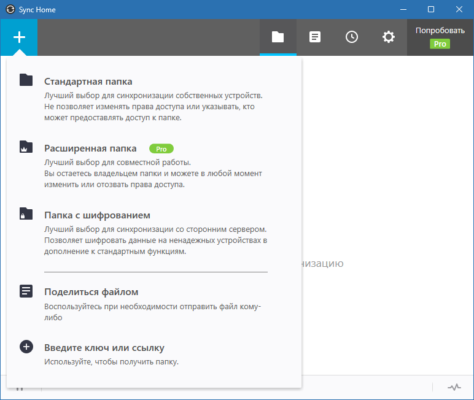
What is Resilio Sync?
Resilio Sync is a cross-platform file synchronization software based on the BitTorrent protocol. Instead of uploading files to a central server, Resilio Sync establishes a direct connection between devices. This allows for faster transfer speeds, stronger privacy, and unlimited storage since you are only limited by your own devices and network.
Whether you want to sync work documents, share media files, or keep backups across multiple devices, Resilio Sync provides a reliable and scalable solution.
Key Features of Resilio Sync
1. Peer-to-Peer Technology
Resilio Sync uses a decentralized architecture. Files are transferred directly between devices, ensuring that your data does not pass through third-party servers.
2. Cross-Platform Support
Available for Windows, macOS, Linux, Android, iOS, and even NAS devices, Resilio Sync works seamlessly across different operating systems.
3. Unlimited File Size and Storage
Unlike cloud services that restrict file sizes or storage capacity, Resilio Sync has no such limits. You can sync large media files, entire folders, or even terabytes of data.
4. End-to-End Encryption
Privacy is a key strength of Resilio Sync. Files are encrypted during transfer, preventing unauthorized access.
5. Selective Sync
Choose which files or folders to download on specific devices. This is especially useful for mobile devices with limited storage.
6. LAN and WAN Transfer
Resilio Sync works both on local networks (for ultra-fast transfers) and over the internet (for remote sync).
7. Team Collaboration Features
With Resilio Sync Business, multiple users can share and update files in real-time. Permissions can be controlled, ensuring proper access management.
Benefits of Using Resilio Sync
Privacy First: No third-party cloud provider has access to your files.
Speed: P2P transfers can be much faster than uploading and downloading from the cloud.
Scalability: Suitable for small personal use or enterprise-level file distribution.
Cost-Efficient: No subscription costs for cloud storage; you use your own devices.
Offline Availability: Files can be synced directly on a LAN without internet access.
Use Cases
Personal File Syncing – Keep your documents, photos, and videos synced across your laptop, phone, and desktop.
Team Collaboration – Share project files with colleagues in real-time without relying on external cloud platforms.
Media Sharing – Sync music, movies, or creative projects with friends or collaborators.
Backup and Disaster Recovery – Maintain multiple copies of critical files across devices for extra safety.
Enterprise File Distribution – Companies can distribute large datasets or software packages to employees and partners.
Comparison with Cloud Services
While Dropbox, Google Drive, and OneDrive are convenient, they rely on centralized storage, which can introduce security risks and additional costs. Resilio Sync, by contrast, eliminates the cloud, giving users direct control over their data. The tradeoff is that your devices must be online to sync, but the advantages in speed and privacy often outweigh this limitation.
Conclusion
Resilio Sync is an innovative solution for those who value speed, privacy, and control over their data. By leveraging peer-to-peer technology, it provides secure file synchronization without the limitations of cloud storage. Whether you’re an individual looking to sync personal files or a business needing reliable file distribution, Resilio Sync delivers a flexible and powerful platform for data synchronization.
✔ Tested: This software was tested on Windows 10 & Windows 11 and works smoothly without issues.
Frequently Asked Questions
- Is this software free?
Yes, it can be downloaded and used for free. - Does it support Windows 11?
Yes, it works perfectly on Windows 10 and 11. - Is it safe to use?
Yes, the software was scanned and tested before publishing.
Last updated: January 2026