
TweakNow RegCleaner 2.5.1 is a compact, user-friendly registry cleaning tool designed to help Windows users identify and repair invalid or obsolete entries in the Windows Registry — the central database that stores system and application settings. Over time, the registry can become cluttered with broken references from uninstalled programs, outdated drivers, or corrupted software, potentially leading to slow performance, errors, and system instability.
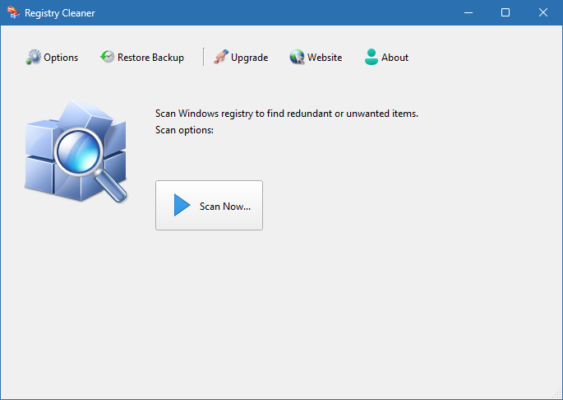
With TweakNow RegCleaner 2.5.1, you can safely scan, review, and clean these entries to improve system responsiveness, reduce boot time, and enhance overall stability — all with a simple interface suitable for both beginners and advanced users.
✅ Free to use
✅ Lightweight and fast
✅ Automatic backup before cleaning
✅ No installation required (portable version available)
Why Use a Registry Cleaner?
The Windows Registry grows with every program you install, update, or remove. When software is uninstalled improperly, it often leaves behind:
- Invalid file paths
- Missing DLL references
- Orphaned startup entries
- Broken uninstallers
These “junk” entries don’t directly harm your PC but can:
- Slow down system operations
- Cause application errors
- Increase boot time
- Contribute to system crashes
TweakNow RegCleaner helps clean up this digital clutter — safely and efficiently.
Key Features of TweakNow RegCleaner 2.5.1
1. Deep Registry Scanning
Automatically detects invalid entries in key areas:
- Shared DLLs – References to missing dynamic link libraries
- Startup Programs – Invalid or broken auto-run entries
- File Associations – Broken links for file types (e.g., .txt, .jpg)
- COM/ActiveX – Unused or missing components
- Uninstall Entries – Leftover entries from deleted software
Each is clearly categorized for easy review.
2. Safe & Selective Cleaning
- Review all detected issues before deletion
- Manually select which entries to remove
- Avoid deleting critical system entries
Prevents accidental damage to your OS.
3. Automatic Registry Backup
Before any cleanup:
- The tool creates a full registry backup
- Saves it as a
.REGfile - Can be restored via System Restore or double-clicking the backup
Peace of mind with every clean.
4. Portable Mode Available
Run RegCleaner without installation:
- From a USB drive
- On multiple PCs
- Ideal for IT technicians and repair tools
Just download and run RegCleaner.exe.
5. Lightweight & Fast
- File size: Under 2 MB
- No background processes
- Scans complete in seconds
- Works on older PCs (Windows XP to Windows 11)
No performance overhead.
6. Simple, Clean Interface
Designed for clarity:
- One-click scan
- Color-coded results
- Clear “Fix” button
- No confusing menus or ads
Perfect for non-technical users.
How to Use TweakNow RegCleaner 2.5.1
Step 1: Download & Run
- Visit the official site: https://www.tweaknow.com
- Download RegCleaner 2.5.1
- Extract and run the executable (no installation needed)
Step 2: Scan the Registry
- Click “Scan”
- Wait as the tool checks all registry sections
- View results by category
Step 3: Review & Fix
- Browse detected issues
- Uncheck any entry you’re unsure about
- Click “Fix” to repair selected items
🔐 The tool automatically backs up the registry first.
Step 4: Restart (Optional)
While not always required, restart your PC to apply changes and clear memory.
Who Should Use TweakNow RegCleaner?
✅ Home Users – Keep your PC running smoothly
✅ IT Technicians – Clean up client machines quickly
✅ Gamers – Optimize system performance
✅ Old PC Owners – Revive sluggish Windows XP/Vista/7 systems
✅ Anyone uninstalling many programs – Remove leftover registry junk
Is Registry Cleaning Safe?
When done with trusted tools like TweakNow RegCleaner, yes — it’s safe. However:
- ❌ Never use unknown or “cracked” registry cleaners
- ✅ Always backup before cleaning
- ✅ Use tools that let you review entries
- ❌ Avoid aggressive cleaners that delete without warning
⚠️ Modern Windows systems (10/11) are more stable, so registry issues are less common — but still possible after heavy software use.
TweakNow RegCleaner vs. Alternatives
TweakNow wins on simplicity, safety, and zero bloat.
Final Thoughts
TweakNow RegCleaner 2.5.1 is one of the most reliable and straightforward registry cleaning tools available for Windows. While the need for registry cleaners has decreased with modern OS stability, it remains a valuable utility for cleaning up legacy clutter, improving performance on older machines, and preparing systems for maintenance.
With its small footprint, automatic backup, and transparent interface, it’s a trusted choice for users who want to keep their Windows registry lean and error-free — without risking system integrity.
💾 Download TweakNow RegCleaner 2.5.1 today from the official website:
👉 https://www.tweaknow.com/system-tuning/regcleaner/
✔ Tested: This software was tested on Windows 10 & Windows 11 and works smoothly without issues.
Frequently Asked Questions
- Is this software free?
Yes, it can be downloaded and used for free. - Does it support Windows 11?
Yes, it works perfectly on Windows 10 and 11. - Is it safe to use?
Yes, the software was scanned and tested before publishing.
Last updated: January 2026