
When it comes to viewing images on Windows, many users are not satisfied with the default Photos app due to its slowness and lack of features. That’s where ImageGlass comes in. The new version, 9.3.1.518, offers a free, open-source, and lightweight alternative that provides speed, flexibility, and wide format support.
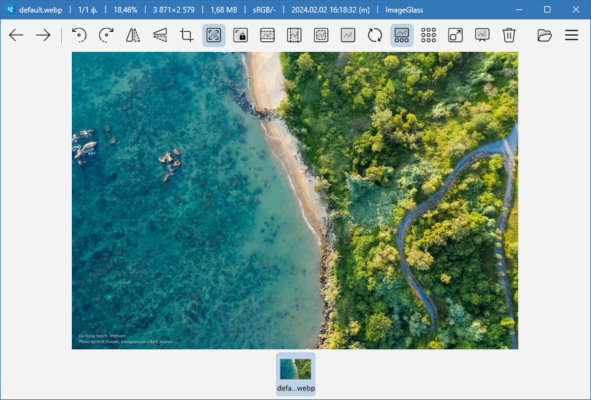
This article explores the main features of ImageGlass 9.3.1.518, what’s new in this release, and why it has become one of the most popular image viewers for Windows.
Why Use ImageGlass 9.3.1.518?
Unlike bulky photo management software, ImageGlass focuses on fast image viewing and simplicity. It launches quickly, loads images instantly, and supports more than 80 file formats, including common ones like JPG, PNG, and GIF, as well as advanced types like PSD and RAW.
It is designed for users who want a minimalist yet powerful image viewer without unnecessary extras that slow down the workflow.
Key Features
1. Wide Format Support
ImageGlass supports over 80 formats, making it one of the most versatile image viewers. This includes JPG, PNG, GIF, BMP, TIFF, WEBP, PSD, and RAW camera files.
2. Speed and Lightweight Performance
The software is optimized for speed, with instant image loading and navigation, even with high-resolution photos.
3. Customizable Interface
Users can apply themes, toolbar layouts, and language packs, giving them full control over the look and feel of the program.
4. Image Conversion
It allows quick conversion between popular formats, helping users save time when working with multiple image types.
5. Clipboard and Drag-and-Drop Support
With drag-and-drop functionality and easy copy-paste tools, managing images is simple and efficient.
6. Slideshow Mode
ImageGlass includes a built-in slideshow feature, perfect for quickly previewing folders of photos.
What’s New in Version 9.3.1.518?
This latest release introduces several improvements and fixes:
Enhanced performance and stability when loading large files.
Improved thumbnail caching for smoother browsing.
Better RAW format support for photographers.
Bug fixes related to memory usage and UI scaling.
These updates make the software more reliable and user-friendly.
Benefits of Using ImageGlass
Free and Open-Source – 100% free with an active developer community.
Fast and Lightweight – Uses minimal system resources.
User-Friendly Interface – Clean design with customization options.
Portable Version Available – Can be used without installation.
Frequent Updates – Actively maintained with regular improvements.
System Requirements
OS: Windows 7, 8, 10, or 11
RAM: 1 GB minimum
CPU: Any modern Intel/AMD processor
Storage: Less than 50 MB of disk space
Conclusion
ImageGlass 9.3.1.518 is one of the best free alternatives to the Windows Photos app. It is fast, lightweight, customizable, and supports an impressive range of image formats. Whether you are a casual user looking for a simple viewer or a professional photographer needing RAW support, ImageGlass delivers a reliable solution.
By upgrading to this version, users benefit from enhanced performance, stability, and extended format compatibility. For anyone seeking a modern, efficient, and open-source image viewer for Windows, ImageGlass 9.3.1.518 is an excellent choice.
✔ Tested: This software was tested on Windows 10 & Windows 11 and works smoothly without issues.
Frequently Asked Questions
- Is this software free?
Yes, it can be downloaded and used for free. - Does it support Windows 11?
Yes, it works perfectly on Windows 10 and 11. - Is it safe to use?
Yes, the software was scanned and tested before publishing.
Last updated: January 2026