
For .NET developers, reverse engineers, and security researchers, having a reliable tool to decompile, debug, and edit assemblies is crucial. dnSpy 6.1.8 is one of the most popular open-source tools in this space, offering an all-in-one solution for exploring .NET applications. Whether you want to understand how an app works, fix a bug, or learn from compiled code, dnSpy makes the process seamless.
What is dnSpy?
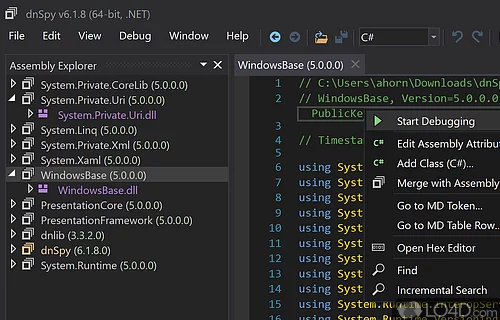
dnSpy is a free, open-source debugger and .NET assembly editor. It allows developers to decompile .NET applications, explore their source code, and even make live edits directly in the binaries.
Unlike traditional debuggers, dnSpy combines a powerful C# decompiler with an integrated code editor, making it a unique tool for both development and reverse engineering.
Key Features of dnSpy 6.1.8
1. .NET Decompilation
Converts compiled .NET assemblies into human-readable C# or Visual Basic code.
Makes it possible to study third-party applications or lost source projects.
2. Integrated Debugger
Step through code execution in real time.
Supports breakpoints, call stacks, and variable inspection.
3. Assembly Editing
Modify .NET assemblies directly without needing the original source code.
Add or remove methods, classes, and resources.
4. Source Code Editing
Built-in editor with syntax highlighting and IntelliSense-like features.
Edit decompiled code and save changes instantly.
5. Plugin Support
Extend dnSpy with community-made plugins.
Customize the tool for specialized workflows.
What’s New in Version 6.1.8?
Improved compatibility with .NET Core and .NET 5+ assemblies.
Better stability when debugging multi-threaded applications.
Optimized decompilation speed for large projects.
Bug fixes related to assembly editing and plugin handling.
Benefits of Using dnSpy 6.1.8
For Developers
Debug third-party libraries when source code is unavailable.
Recover lost source code from compiled assemblies.
Patch applications quickly without rebuilding from scratch.
For Security Researchers
Analyze suspicious .NET applications for vulnerabilities or malware behavior.
Inspect obfuscated assemblies for better threat analysis.
For Learners
Study real-world applications to understand programming practices.
Experiment with decompiled projects to improve coding skills.
How to Use dnSpy 6.1.8
Step 1: Open an Assembly
Load a .dll or .exe file into dnSpy.
Step 2: Explore Decompiled Code
Navigate through namespaces, classes, and methods with the tree view.
Step 3: Debug the Application
Set breakpoints and run the application to watch the execution flow.
Step 4: Edit Assemblies
Right-click on code elements to edit or replace methods directly.
Step 5: Save and Test
Compile and save the modified assembly, then test it in your environment.
Why Choose dnSpy Over Other Tools?
All-in-one solution – debugger, decompiler, and editor in one.
Open-source and free – no licensing costs.
User-friendly interface – simple yet powerful navigation.
Community support – active GitHub community for fixes and plugins.
Conclusion
dnSpy 6.1.8 is an indispensable tool for .NET developers, reverse engineers, and researchers. Its unique combination of decompilation, debugging, and assembly editing makes it one of the most versatile tools available in the .NET ecosystem.
Whether you’re recovering lost code, analyzing third-party libraries, or studying software behavior, dnSpy provides the transparency and control you need. With version 6.1.8, the tool is faster, more stable, and more compatible than ever.
✔ Tested: This software was tested on Windows 10 & Windows 11 and works smoothly without issues.
Frequently Asked Questions
- Is this software free?
Yes, it can be downloaded and used for free. - Does it support Windows 11?
Yes, it works perfectly on Windows 10 and 11. - Is it safe to use?
Yes, the software was scanned and tested before publishing.
Last updated: January 2026