
Renaming large numbers of files can be a time-consuming and error-prone task. Whether you’re organizing photos, preparing datasets, or managing documents, doing it manually is inefficient. Better File Rename 6.28 solves this problem by offering a powerful, flexible, and easy-to-use batch renaming solution for Windows and buy.
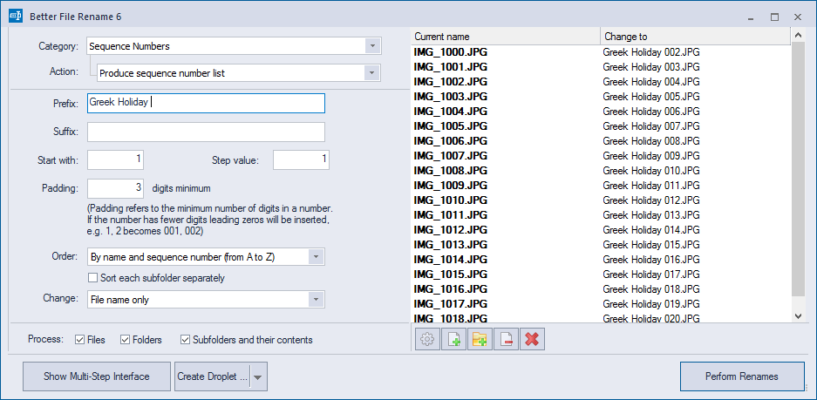
What is Better File Rename?
Better File Rename is a professional-grade file renaming utility designed to handle bulk operations with precision. Instead of renaming files one by one, users can apply advanced rules and instantly rename hundreds or even thousands of files.
It’s widely used by photographers, content creators, researchers, and IT professionals who regularly work with large collections of files.
Key Features of Better File Rename 6.28
1. Batch File Renaming
Rename multiple files and folders simultaneously.
Save hours compared to manual renaming.
2. Flexible Renaming Rules
Add, remove, or replace text in filenames.
Insert timestamps, sequential numbers, or custom words.
Change capitalization (UPPERCASE, lowercase, Title Case).
3. Advanced Options
Rename file extensions in bulk.
Work with EXIF metadata from images.
Support for regular expressions for complex renaming tasks.
4. Instant Preview
See real-time previews of new filenames before applying changes.
Avoid mistakes and ensure accuracy.
5. Automation Support
Combine multiple renaming rules into presets.
Reuse renaming workflows for repetitive tasks.
What’s New in Version 6.28?
Improved performance for handling large file batches.
Enhanced support for image metadata (EXIF, IPTC).
Bug fixes and refinements to the renaming preview engine.
More stability for Windows 10 and Windows 11 users.
Benefits of Using Better File Rename 6.28
For Photographers
Organize photo collections using EXIF date/time data.
Rename by event, location, or project.
For Businesses
Standardize file naming conventions across teams.
Ensure consistency in documents and reports.
For IT Professionals
Manage large numbers of system logs, backups, or datasets.
Use regular expressions for advanced renaming.
For Everyday Users
Easily organize music, movies, or downloaded files.
Clean up cluttered filenames with a few clicks.
How to Use Better File Rename 6.28
Step 1: Select Files
Drag and drop the files or folders you want to rename into the application.
Step 2: Choose Renaming Rules
Pick from a wide range of rules such as text replacement, numbering, or timestamps.
Step 3: Preview Changes
Instantly see how filenames will look after the rename.
Step 4: Apply Changes
Once satisfied, apply the rules and rename all files in seconds.
Why Choose Better File Rename?
Compared to free renaming tools, Better File Rename provides:
Professional-level features including metadata support and regex.
High performance for handling thousands of files at once.
User-friendly interface that balances power with simplicity.
Reliability as a trusted tool used by professionals worldwide.
Conclusion
Better File Rename 6.28 is an essential utility for anyone who works with large file collections. With its combination of batch renaming, advanced rules, and automation capabilities, it offers speed, precision, and convenience. Whether you’re a photographer managing images, an IT admin working with logs, or simply someone who wants organized files, Better File Rename delivers the right solution.
Upgrading to version 6.28 ensures enhanced performance and stability, making it one of the best file renaming tools available for Windows.
✔ Tested: This software was tested on Windows 10 & Windows 11 and works smoothly without issues.
Frequently Asked Questions
- Is this software free?
Yes, it can be downloaded and used for free. - Does it support Windows 11?
Yes, it works perfectly on Windows 10 and 11. - Is it safe to use?
Yes, the software was scanned and tested before publishing.
Last updated: January 2026