
Deploying and maintaining operating systems across multiple computers can be a complex task for IT administrators and technicians. Traditional methods often require creating separate bootable USB drives or CDs for each operating system, which is both time-consuming and inefficient.
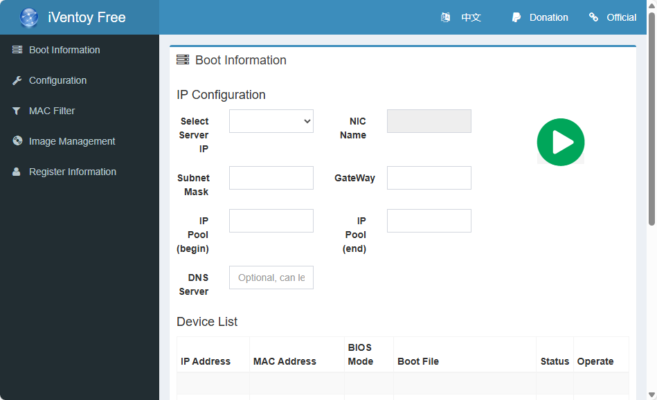
iVentoy 1.0.19 provides a modern solution by enabling PXE boot and ISO management through a single, centralized platform. With iVentoy, you can boot multiple operating systems directly over the network or via USB, saving time and simplifying deployment and see SARDU MultiBoot Creator .
What is iVentoy?
iVentoy is an advanced PXE (Preboot Execution Environment) and ISO management tool designed for IT professionals, system administrators, and tech enthusiasts. It builds on the foundation of Ventoy, a popular multi-boot USB tool, and extends it with network boot capabilities.
This means you can set up one server with iVentoy, connect multiple client machines to the same network, and boot them into different operating systems without ever touching a USB stick.
Key Features of iVentoy 1.0.19
1. PXE Boot Support
Boot multiple client machines over LAN without USB drives.
2. Multi-ISO Booting
Store multiple ISO files in one place and boot them directly.
3. Cross-Platform Compatibility
Supports Windows, Linux, WinPE, and other bootable ISOs.
4. Centralized Management
Manage ISO files and boot menus from a single interface.
5. UEFI & Legacy BIOS Support
Works seamlessly with both modern and older hardware.
6. Fast Deployment
Deploy operating systems to multiple computers simultaneously.
7. Easy Setup
Minimal configuration required – iVentoy simplifies PXE boot setup compared to traditional TFTP/HTTP servers.
What’s New in iVentoy 1.0.19?
Improved stability for PXE boot across large networks.
Optimized performance when handling multiple simultaneous clients.
Enhanced support for newer Linux distributions.
Minor bug fixes and usability improvements.
Benefits of Using iVentoy
For IT Administrators
Manage OS deployments for an entire office or lab with one central server.
For Educational Institutions
Set up classrooms and computer labs quickly without preparing dozens of USB drives.
For Tech Enthusiasts
Experiment with multiple operating systems without reformatting drives.
For Businesses
Reduce downtime during system recovery and maintenance.
How to Use iVentoy 1.0.19
Step 1: Install iVentoy
Download and install iVentoy on a Windows or Linux machine that will act as the PXE server.
Step 2: Add ISO Files
Place your desired ISO images into the iVentoy directory.
Step 3: Configure Network Settings
Enable PXE boot on your client machines and ensure they are connected to the same network.
Step 4: Boot Clients
Clients will automatically detect the iVentoy server and present a boot menu with all available ISOs.
Why Choose iVentoy Over Alternatives?
Compared to traditional PXE servers, iVentoy offers:
Simpler setup – no need for complex DHCP/TFTP configuration.
Greater flexibility – supports both USB and PXE booting.
Multi-ISO support – boot hundreds of ISOs from one location.
Cross-platform compatibility – works with Windows, Linux, and more.
This makes it a faster and more user-friendly alternative to older network boot solutions.
Conclusion
iVentoy 1.0.19 is a powerful, flexible, and efficient tool for managing operating system deployments. By combining multi-ISO booting with PXE support, it eliminates the need for multiple USB drives and makes OS installation much more efficient.
Whether you are an IT administrator deploying Windows across dozens of PCs, a teacher managing a computer lab, or an enthusiast experimenting with Linux distributions, iVentoy provides the speed, reliability, and convenience you need.
✔ Tested: This software was tested on Windows 10 & Windows 11 and works smoothly without issues.
Frequently Asked Questions
- Is this software free?
Yes, it can be downloaded and used for free. - Does it support Windows 11?
Yes, it works perfectly on Windows 10 and 11. - Is it safe to use?
Yes, the software was scanned and tested before publishing.
Last updated: January 2026