
If you use Google services daily—like Gmail, Drive, Maps, or Translate—you probably waste time navigating to each one individually. The Shortcuts for Google extension solves this problem by giving you instant one-click access to over 1,000 Google services, right from your browser.
Whether you’re a student, professional, or just someone who wants a faster workflow, this extension can save you a significant amount of time every day and see Google Apps Manager .
What is Shortcuts for Google?
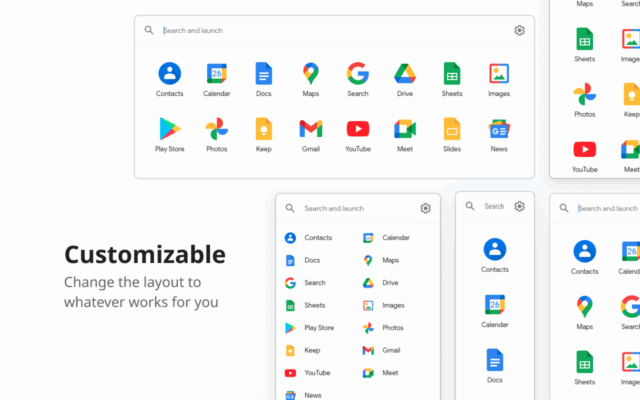
Shortcuts for Google is a free Chrome extension that adds a customizable panel of Google service icons to your browser. With a single click, you can open services like:
Gmail
Google Drive
YouTube
Google Translate
Google News
Google Calendar
Google Maps
Google Photos
Google Keep
Blogger
And many more
Instead of typing URLs or searching bookmarks, you get everything in one clean, drop-down menu.
Key Features
📌 Over 1,000 Services Supported
From popular tools like Gmail and Maps to lesser-known services like Google Earth Studio and Google Finance, everything is just one click away.
🧩 Full Customization
You can add, remove, or reorder the shortcuts. This means only your favorite services are shown.
🎯 Search Bar Included
Can’t find a shortcut? Just use the built-in search to quickly access the right Google service.
🌓 Dark Mode Support
The extension includes dark mode for better comfort during nighttime browsing.
🖥️ Lightweight and Fast
It doesn’t slow down your browser or consume memory in the background.
Benefits of Using Shortcuts for Google
🔄 Save Time: Skip multiple tabs and go directly to the service you want.
🧠 Stay Focused: Reduces distractions by keeping everything organized in one place.
🔒 Safe and Private: No data tracking or login needed.
📈 Boost Productivity: Spend less time clicking and more time doing.
How to Install
Open Google Chrome.
Visit the Chrome Web Store Page.
Click Add to Chrome.
Click on the puzzle icon in your browser bar and pin Shortcuts for Google for quick access.
Use Cases
📚 Students use it for Classroom, Docs, and Translate
🧑💼 Professionals open Gmail, Meet, and Calendar in one click
🧑🎨 Creatives access Google Photos, Blogger, and YouTube Studio
👩💻 Developers link directly to Google Cloud Console or Firebase
YouTube Video Tutorial
🎥 Watch: How to Use Shortcuts for Google Chrome Extension (2024)
✔ Tested: This software was tested on Windows 10 & Windows 11 and works smoothly without issues.
Frequently Asked Questions
- Is this software free?
Yes, it can be downloaded and used for free. - Does it support Windows 11?
Yes, it works perfectly on Windows 10 and 11. - Is it safe to use?
Yes, the software was scanned and tested before publishing.
Last updated: January 2026