
What is RAMMap 1.61?
For system administrators, developers, and power users who need to understand how Windows handles memory, RAMMap 1.61 is a must-have utility.
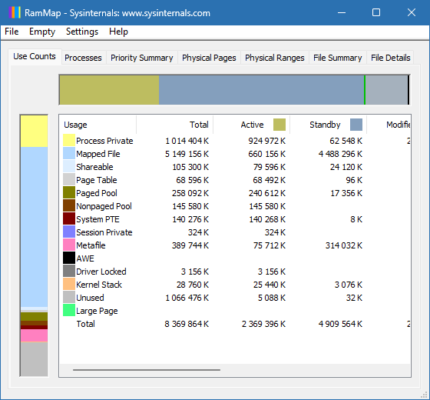
Developed by Microsoft Sysinternals, RAMMap is a free, lightweight, and advanced tool that provides detailed insights into the way your system uses physical memory (RAM) . Unlike standard tools like Task Manager or Resource Monitor, RAMMap offers granular data that allows you to analyze memory usage by category, process, and even driver .
Whether you’re troubleshooting high memory usage, optimizing system performance, or debugging applications, RAMMap 1.61 gives you full visibility into what’s happening under the hood and see uRAM .
⚙️ Key Features of RAMMap 1.61
📊 Detailed Physical Memory View
RAMMap breaks down your system’s memory usage into categories such as Paged Pool , Non-paged Pool , System PTEs , and more — giving you a comprehensive understanding of where every megabyte is being used.
💻 Real-Time Memory Analysis
Monitor live changes in memory allocation across running processes and system components. This feature is especially useful when diagnosing memory leaks or inefficient memory use in applications.
🗂 Exportable Reports
RAMMap allows you to export memory reports in various formats including CSV and TXT, making it easy to share findings with colleagues or save logs for future analysis.
🛠 Advanced System Tools Integration
As part of the Sysinternals suite , RAMMap integrates seamlessly with other tools like Process Explorer and VMMap, enabling deep system diagnostics and optimization.
🖥 Lightweight & No Installation Required
RAMMap 1.61 runs as a portable application — no installation needed. You can launch it directly from any folder or USB drive, making it ideal for quick troubleshooting sessions.
💡 Why Use RAMMap 1.61?
While most users rely on basic tools like Task Manager, these often fall short when dealing with complex memory-related issues. RAMMap steps in with advanced capabilities tailored for:
- Developers : Debugging memory-intensive applications.
- IT Professionals : Investigating system crashes or slow performance.
- System Administrators : Optimizing server memory configurations.
With RAMMap, you’re not just viewing memory usage — you’re analyzing it at a deep technical level , helping you make informed decisions about system health and performance.
▶️ Watch How It Works
✔ Tested: This software was tested on Windows 10 & Windows 11 and works smoothly without issues.
Frequently Asked Questions
- Is this software free?
Yes, it can be downloaded and used for free. - Does it support Windows 11?
Yes, it works perfectly on Windows 10 and 11. - Is it safe to use?
Yes, the software was scanned and tested before publishing.
Last updated: January 2026
