
Cool Reader 3.3.61 is a lightweight, open-source e‑reader application compatible with Windows, Linux, and Android. Designed for users who want a fast and customizable reading experience, it supports many common e-book formats and offers flexible interface options without unnecessary complexity and see Foxit Reader 2025.
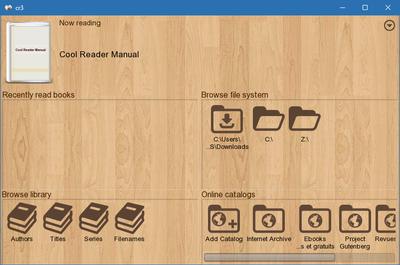
🔑 Key Features
Multi‑Format Support: Read FB2, EPUB, MOBI, TXT, HTML, and RTF files effortlessly.
Customizable Layouts: Adjust fonts, margins, line spacing, colors, and themes (day/night).
Text-to-Speech (TTS): Listen to books using built-in TTS support via speech engines.
Table of Contents & Bookmarks: Navigate easily with automatic TOC handling and bookmarking.
Page Flip Effects: Enjoy sliding or page-turn animations for a realistic reading feel.
Annotations & Highlights: Add notes, highlight passages, and export annotations.
Library View: Organize books by author, title, or date in an intuitive library interface.
Dictionary Integration: Quickly look up words using built-in or external dictionaries.
Plugin Support: Extend with features like font presets, auto-scroll, and embedded audio support.
🆕 What’s New in Version 3.3.61
Optimized performance for large files and smoother scrolling.
Improved EPUB parsing and rendering, especially with complex layouts.
Enhanced TTS voice synchronization and settings.
Fixed UI glitches and improved stability across all platforms.
👥 Ideal For
Avid readers who want a fast, lightweight e‑reader.
Users working with multiple formats on desktop or mobile.
Readers who prefer customizable themes and layouts.
Users needing TTS for hands-free reading.
Anyone wanting open-source alternatives to mainstream apps.
✅ Why Choose Cool Reader?
Exceptionally light on system resources.
Supports a wide variety of e-book formats.
Highly customizable interface and reading mode options.
Built-in TTS and annotation tools enhance accessibility.
Cross-platform availability keeps your library in sync.
✔ Tested: This software was tested on Windows 10 & Windows 11 and works smoothly without issues.
Frequently Asked Questions
- Is this software free?
Yes, it can be downloaded and used for free. - Does it support Windows 11?
Yes, it works perfectly on Windows 10 and 11. - Is it safe to use?
Yes, the software was scanned and tested before publishing.
Last updated: January 2026