
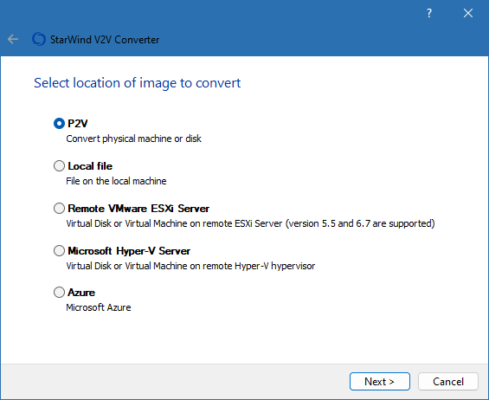
StarWind V2V Converter 9.0.117 is a robust Windows tool that allows safe, agentless conversion of virtual machine disk images between major formats like VMDK, VHD, QCOW2, RAW, and VDI. It’s ideal for IT professionals, data center managers, and virtualization engineers who need to migrate, backup, or optimize virtual environments see site.
What Is StarWind V2V Converter?
StarWind V2V Converter is a free utility designed to perform direct, offline or online VM disk conversions without requiring OS-level agents. It supports multiple disk formats and provides optional disk resizing, enabling seamless migrations across virtualization platforms such as VMware, Hyper‑V, KVM, and Xen.
Key Features
🔄 Agentless Conversion
Convert virtual disks directly from VMDK to VHD, QCOW2, RAW, or VDI formats without installing any agents inside the virtual machine.
💾 Disk Resizing
Adjust disk size during conversion to optimize storage usage or meet destination requirements.
🧩 Broad Format Support
Supports all major VM disk formats: VMDK (VMware), VHD/VHDX (Microsoft Hyper‑V), QCOW2 (KVM), RAW, and VDI (VirtualBox).
🖥 Offline and Live Conversion
Works with powered-off machines or performs hot conversion of running VMs without downtime.
📋 Command-Line Interface
Fully scriptable with CLI support, enabling automation across migration workflows and batch tasks.
🔐 Checkpoint & Integrity
Verifies disk checksums and integrity after conversion; includes options to create snapshot backups.
🛠 Flexible Source Options
Convert local files or disks, or convert disks directly from file paths, storage arrays, or SAN LUNs.
What’s New in Version 9.0.117?
Updated support for latest VHDX and QCOW2 enhancements
Improved performance during large-disk conversions
Enhanced logging with more detailed progress reporting
Bug fixes for handling special disk types and metadata
Better compatibility with new versions of VMware ESXi and Hyper-V
Why Use StarWind V2V Converter?
Migrate virtual machines across platforms seamlessly
Resize disks at conversion time to optimize storage usage
Automate conversions using command-line scripts
Ensure data integrity with built-in verification
Eliminate the need for in-VM agents, simplifying security and permissions
System Requirements
| Requirement | Details |
|---|---|
| OS | Windows 7 SP1, 8.1, 10, 11 (64-bit) |
| CPU | Intel or AMD 64-bit |
| RAM | 2 GB minimum |
| Disk | At least space for both source and destination virtual disks |
| Virtualization Tools | VMware Workstation/ESXi, Hyper-V, KVM, VirtualBox compatible |
✔ Tested: This software was tested on Windows 10 & Windows 11 and works smoothly without issues.
Frequently Asked Questions
- Is this software free?
Yes, it can be downloaded and used for free. - Does it support Windows 11?
Yes, it works perfectly on Windows 10 and 11. - Is it safe to use?
Yes, the software was scanned and tested before publishing.
Last updated: January 2026