Scanning documents and photos has become an essential task for both professionals and home users. However, the software bundled with scanners often lacks advanced features and compatibility with older devices and buy.
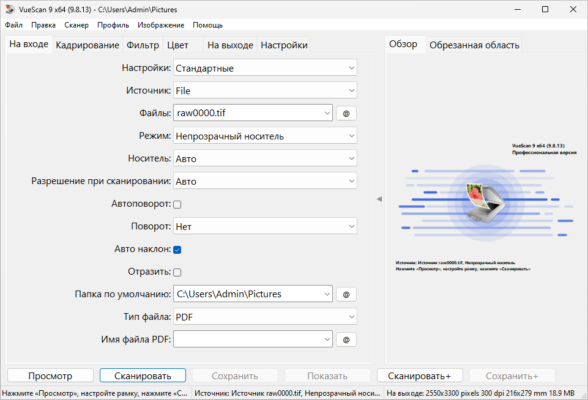
VueScan Pro 9.8.46 is a professional scanning solution that supports over 7,000 scanners from leading manufacturers like Canon, Epson, HP, and Brother. Known for its reliability and advanced features, it is the preferred choice for photographers, archivists, and office users worldwide.
What is VueScan Pro?
VueScan Pro is a cross-platform scanning application designed to deliver high-quality scans while extending the life of older scanners. Unlike default drivers, VueScan works with outdated hardware and provides professional-grade features for both documents and images.
It is compatible with Windows, macOS, and Linux, making it a versatile choice for different environments.
Key Features of VueScan Pro 9.8.46
1. Wide Scanner Compatibility
Supports 7,000+ scanners from 42 manufacturers.
Works with older hardware no longer supported by official drivers.
2. Professional Scanning Quality
High-resolution scans with accurate color reproduction.
Options for film and slide scanning with supported devices.
3. OCR (Optical Character Recognition)
Convert scanned documents into editable text.
Supports multiple languages.
4. Advanced Output Formats
Save scans as PDF, JPEG, or TIFF.
Multi-page PDF creation with automatic document feeder support.
5. Batch Scanning
Scan multiple photos or documents in one session.
Automatic cropping and alignment.
6. Cross-Platform Support
Works on Windows, macOS, and Linux.
Frequent updates ensure compatibility with new systems.
What’s New in Version 9.8.46?
Improved scanner driver support for new devices.
Enhanced OCR accuracy for faster text recognition.
Bug fixes for smoother workflow and reliability.
Optimized performance for high-resolution scanning.
Benefits of Using VueScan Pro
For Home Users
Digitize family photos, receipts, and personal documents with ease.
For Businesses
Create searchable PDFs for archiving and document management.
For Photographers & Archivists
Preserve slides, negatives, and film with professional-grade accuracy.
How to Use VueScan Pro 9.8.46
Step 1: Install the Software
Download and install VueScan Pro on your operating system.
Step 2: Connect Your Scanner
Plug in your scanner, even if official drivers are outdated.
Step 3: Choose Scan Mode
Select from options like flatbed, document feeder, or film/slide scanning.
Step 4: Adjust Settings
Customize resolution, color depth, and output format.
Step 5: Save or Export
Export scans to PDF, TIFF, or JPEG—or use OCR to save as text.
Why Choose VueScan Pro Over Default Scanner Software?
Compared to manufacturer drivers or free alternatives, VueScan Pro 9.8.46 offers:
Broader compatibility with thousands of scanners.
OCR capabilities for searchable documents.
Support for film and slide scanning.
Frequent updates and long-term device support.
Conclusion
VueScan Pro 9.8.46 is more than just a scanner driver—it is a complete scanning solution. With support for thousands of scanners, OCR functionality, batch scanning, and professional-grade output, it is the ultimate tool for both home and professional use.
Whether you want to digitize old family photos, archive important documents, or scan high-quality film, VueScan Pro provides the reliability and performance you need.
✔ Tested: This software was tested on Windows 10 & Windows 11 and works smoothly without issues.
Frequently Asked Questions
- Is this software free?
Yes, it can be downloaded and used for free. - Does it support Windows 11?
Yes, it works perfectly on Windows 10 and 11. - Is it safe to use?
Yes, the software was scanned and tested before publishing.
Last updated: January 2026